


Key takeaways
- Branch out to a new workspace, selective branching and compare and commit are generally available since September 2026. You can build a team process on them.
- Give each change its own small branch workspace and merge back by pull request. Stop editing the shared dev workspace by hand.
- Branch out starts from the last commit, not from what is on screen. Commit the shared workspace first or your uncommitted work stays behind.
- Accept incoming changes keeps the merged version and drops the local edit. That is correct, but the warning is generic and does not show which edit you lose.
- File level commit is still Preview and does not cover semantic models or reports.
- After every update, check Git status again. In my run one item that was not in conflict still showed a change.
For years the default Fabric team setup was one Git-connected dev workspace that everybody edited. It works until two people touch the same semantic model in the same week. Then the "who changed this" question lands in Git as one big commit with someone else's work folded in.
Branch workspaces were meant to fix that, and the parts that matter went GA in September 2026. I ran the full loop on a trial capacity with synthetic data: branch out with only some items, edit, compare, commit, merge, and update the shared workspace with a real conflict waiting. This post is the answer to one question: is it ready to be the team default?
Named model: slice, diff, merge, settle
- Slice: branch out from the last commit of the shared workspace and pick only the items the change needs, plus their dependencies.
- Diff: read the compare view before every commit. Commit whole items unless file level commit is supported and safe.
- Merge: the pull request in your Git provider is the only way back.
- Settle: update the shared workspace, resolve conflicts on purpose, then check Git status again.
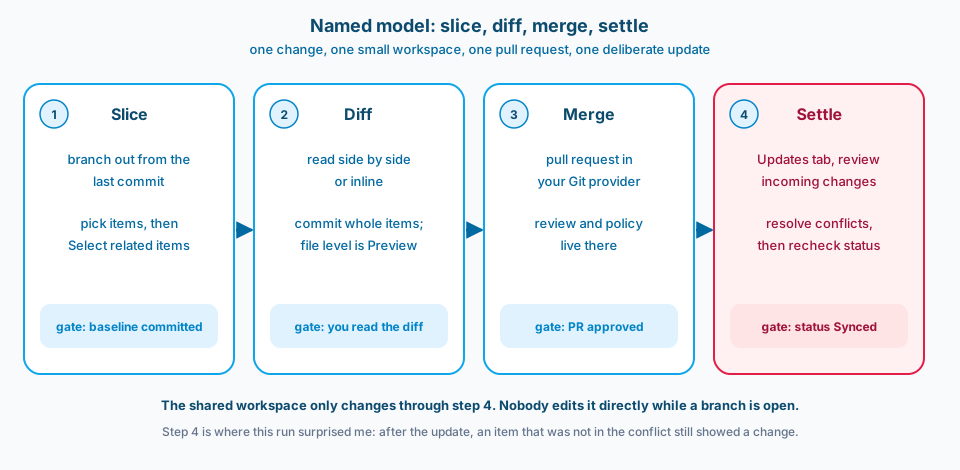
Figure 1. The shared workspace only changes in step 4. Each step has one gate you can check.
What changed
The old choice was bad either way. A shared dev workspace meant shared mess. A full branch out copied every item into a new workspace, which is slow and expensive once a workspace has dozens of items.
Three things are different now:
- Selective branching. In the branch out dialog you can choose "Select items individually", and "Select related items" adds what your picks depend on. Later you can use "Add more items" if the change grows.
- Compare and commit. Before you commit or update, you get a side by side or inline diff of the item files, and the conflict view lets you compare three ways.
- A firm permission date. Learn now says that from 28 Feb 2027 users without read-write permission on workspace items can't use Git integration. Learn ties this to items with sensitivity labels and protection policies. Until 26 Oct 2026 Learn said 1 Dec 2026. If your team has people with read-only access to some items in a dev workspace, plan for that now.
There is real demand for the selective part. A Fabric Community thread asks exactly how to branch out with only some items.
What shipped: the loop I tested
The test workspace had five items: an empty lakehouse, an empty notebook, a small semantic model in TMDL with five synthetic rows and one measure, a report in PBIR with one card, and a variable library. Everything was committed to a dev branch first. That baseline matters, as you will see.
Slice. I picked only the report and pressed Select related items. The semantic model was added for me, because the report binds to it.
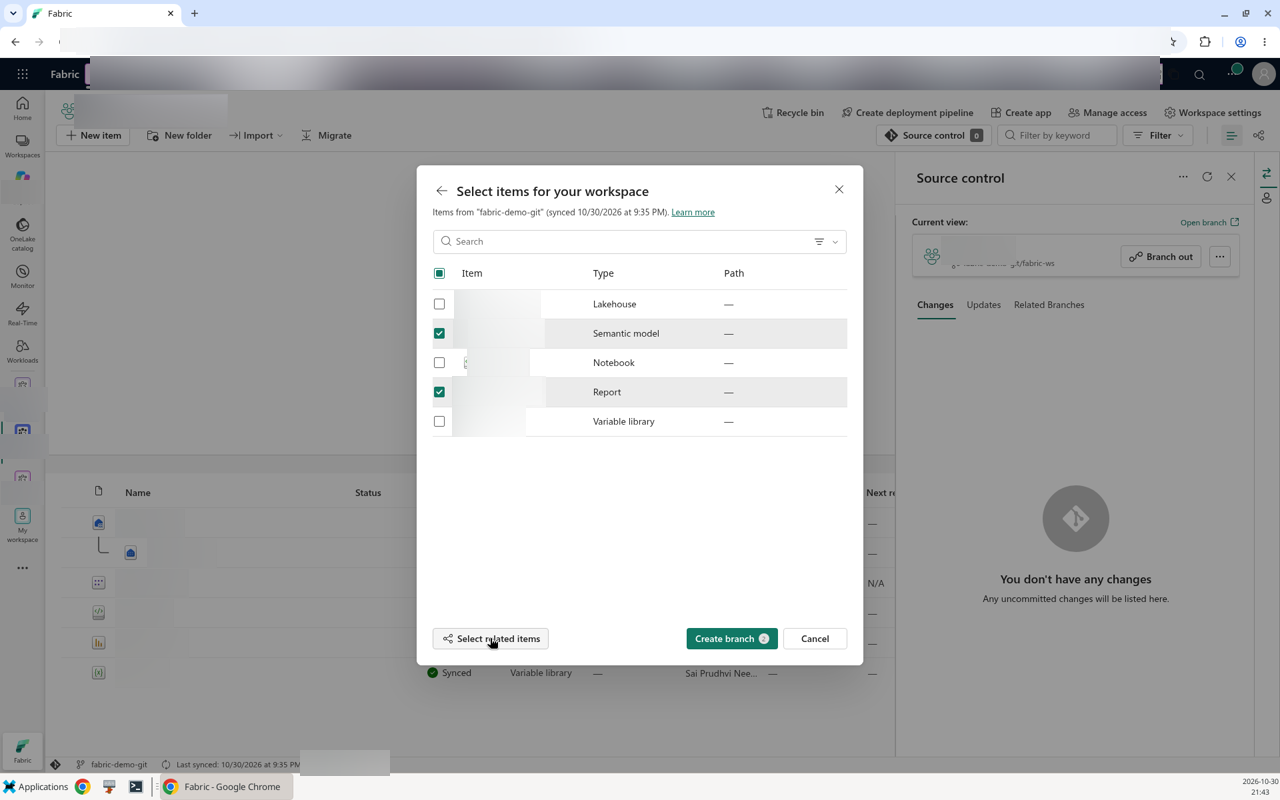
Figure 2. Pick the item you are changing, then let Select related items add its dependencies. Names are blurred.
The new workspace held two items. When the change grew to the variable library, Add more items and an update brought it in, for three items in total.
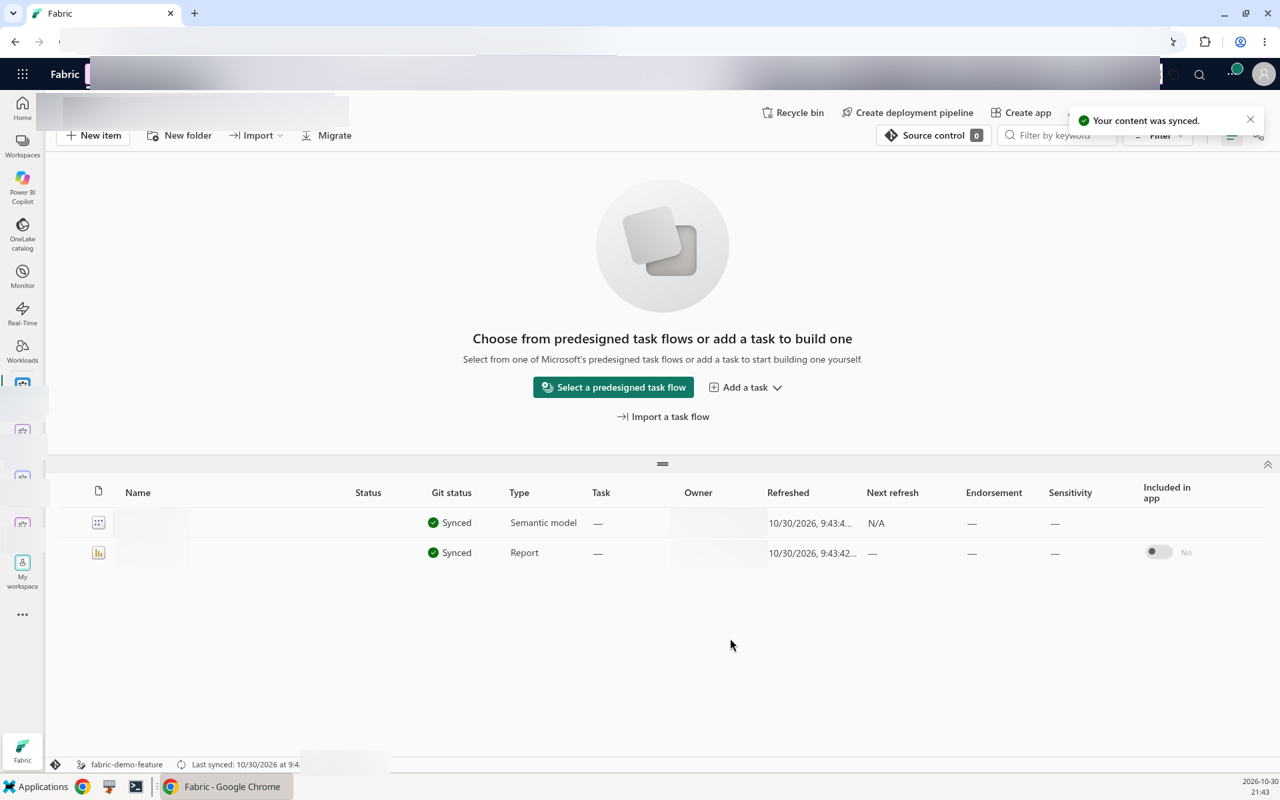
Figure 3. Two items instead of five. The icon next to the branch name in the status bar marks a selective branch.
One detail about reports is worth knowing. The committed definition.pbir pointed to the model by path. When I read the same report's definition through the Get Item Definition API, it pointed by connection, with the model ID inside. That ID never reached Git, which is what you want, so the branch workspace report binds to the model copy in its own workspace. Learn's PBIR report folder page says Git integration always exports a byPath reference when the report and model share a workspace.
Diff. I changed a measure format string, added a second measure, changed the card title, and edited two values in the variable library. The side by side view showed the TMDL change line by line. It is the best part of the release. You see exactly what you are about to put in Git.
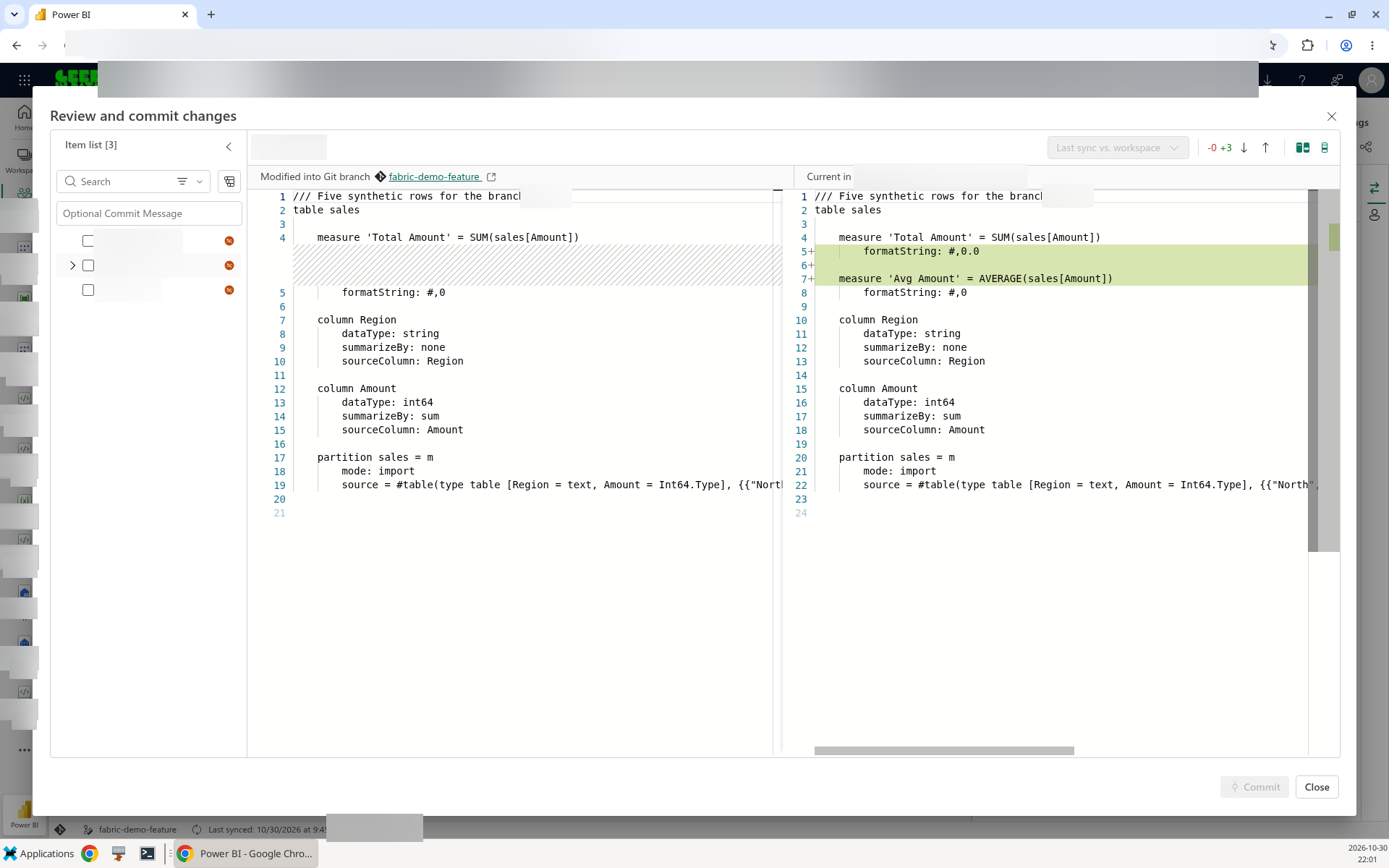
Figure 4. Read this before every commit. The diff is per file, so you see which part of the item changed.
One catch: the commit for the measure change also carried the card title change, because the report had changes too and was ticked. Read the whole item list before you commit, not just the item you came for.
Merge. The pull request went through the Git provider as usual. Nothing in Fabric is involved, which is the point: review, branch policies and approvals live where they already live.
Settle. This is where the interesting part happened. More on it below.
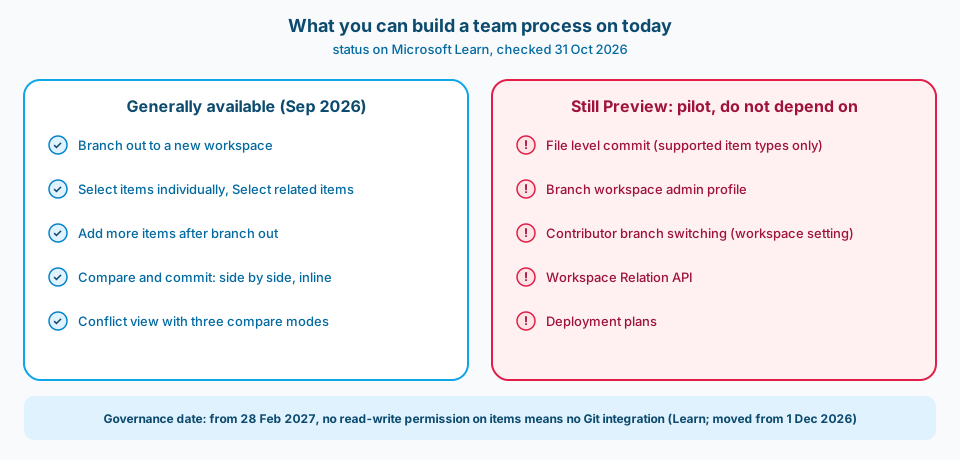
Figure 5. Build the process on the left column. Pilot the right column, but do not make it a step people depend on.
What is still not ready
File level commit is Preview, and narrow. It lets you commit some files of an item and leave the rest. It only works for some item types: Warehouse, SQL database, notebooks, Environment, Spark job definitions, pipelines, Dataflow Gen2 and Variable Library. Semantic models and reports are not on the list, and those are the items teams fight over most.
I tried it on the variable library: I committed the variables file and left one value set file uncommitted. It worked, and the value set stayed as Modified in the workspace. The warning is honest:
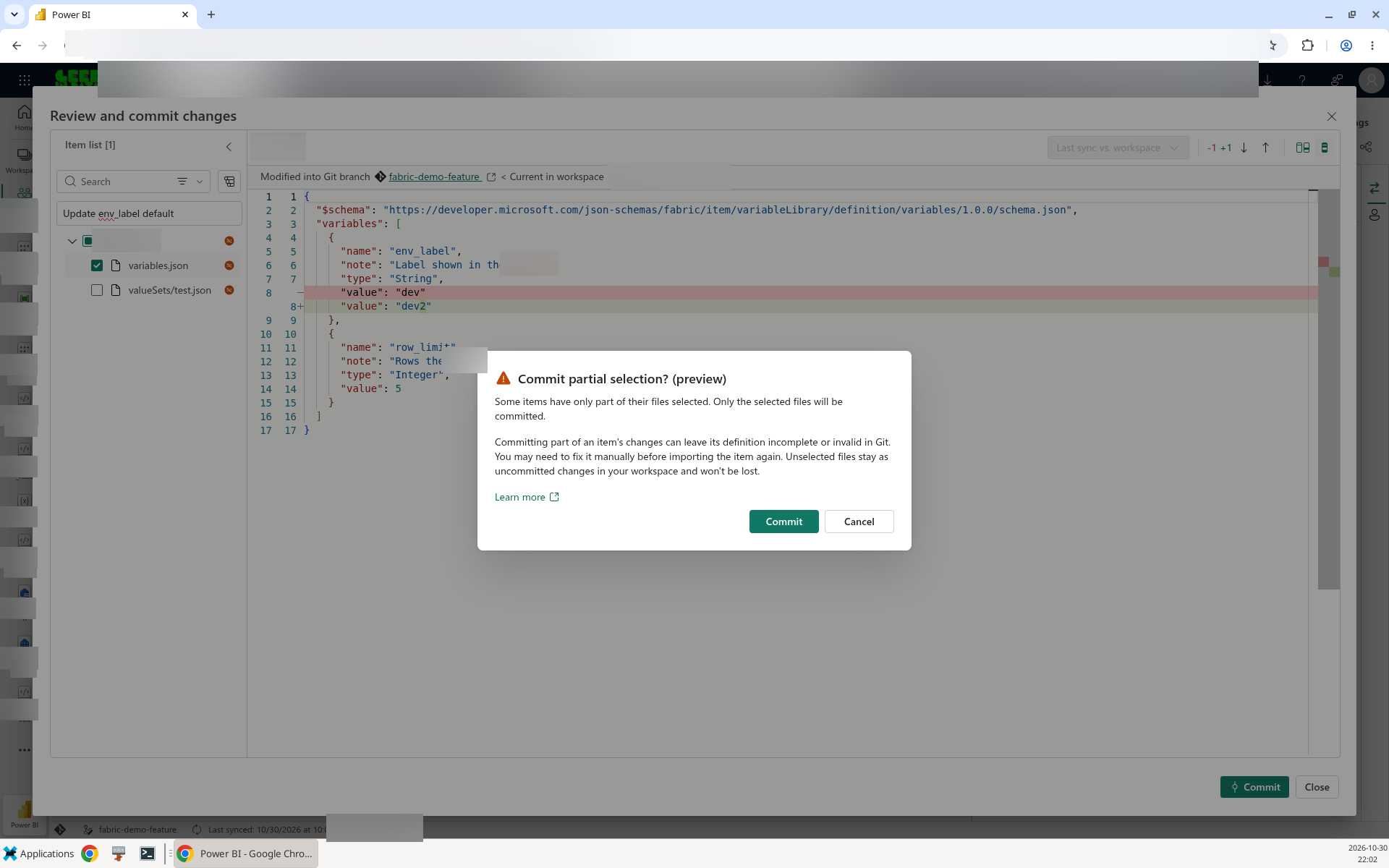
Figure 6. Fabric tells you a partial commit can leave an invalid definition in Git. Believe it.
The dialog, titled "Commit partial selection? (preview)", says: "Committing part of an item's changes can leave its definition incomplete or invalid in Git. You may need to fix it manually before importing the item again." Keep this for cases where you know the file split is safe.
Some admin pieces are Preview. Branch workspace admin profiles, the workspace setting that lets Contributors change the Git branch, the Workspace Relation API and deployment plans are all Preview. The Workspace Relation API did return the right relation types in my test (Branch on the source, Base on the branch workspace), so automation is possible, just not something to put in a production pipeline yet.
Read the Preview labels carefully. Learn's branched workspace page shows "Select items individually (Preview)" only in its deployment plan section, and deployment plans are Preview. Selective branching itself is GA per What's new. The page also says the status bar "says selective branch"; in my run it was an icon next to the branch name.
When the update meets a local edit
The conflict test was simple. The pull request changed the measure format from one decimal place pattern to another. Meanwhile someone had edited the same format string in the shared workspace and not committed it. Three versions of one line.
The Updates tab flagged the conflict. The compare view has three modes: "Last sync vs. remote", "Workspace vs Remote" and "Last sync vs. workspace". The dialog where you choose is titled "Merge and update content to resolve conflicts". The modes are useful. Last sync vs. workspace shows what someone did locally, and that is the edit you are about to lose.
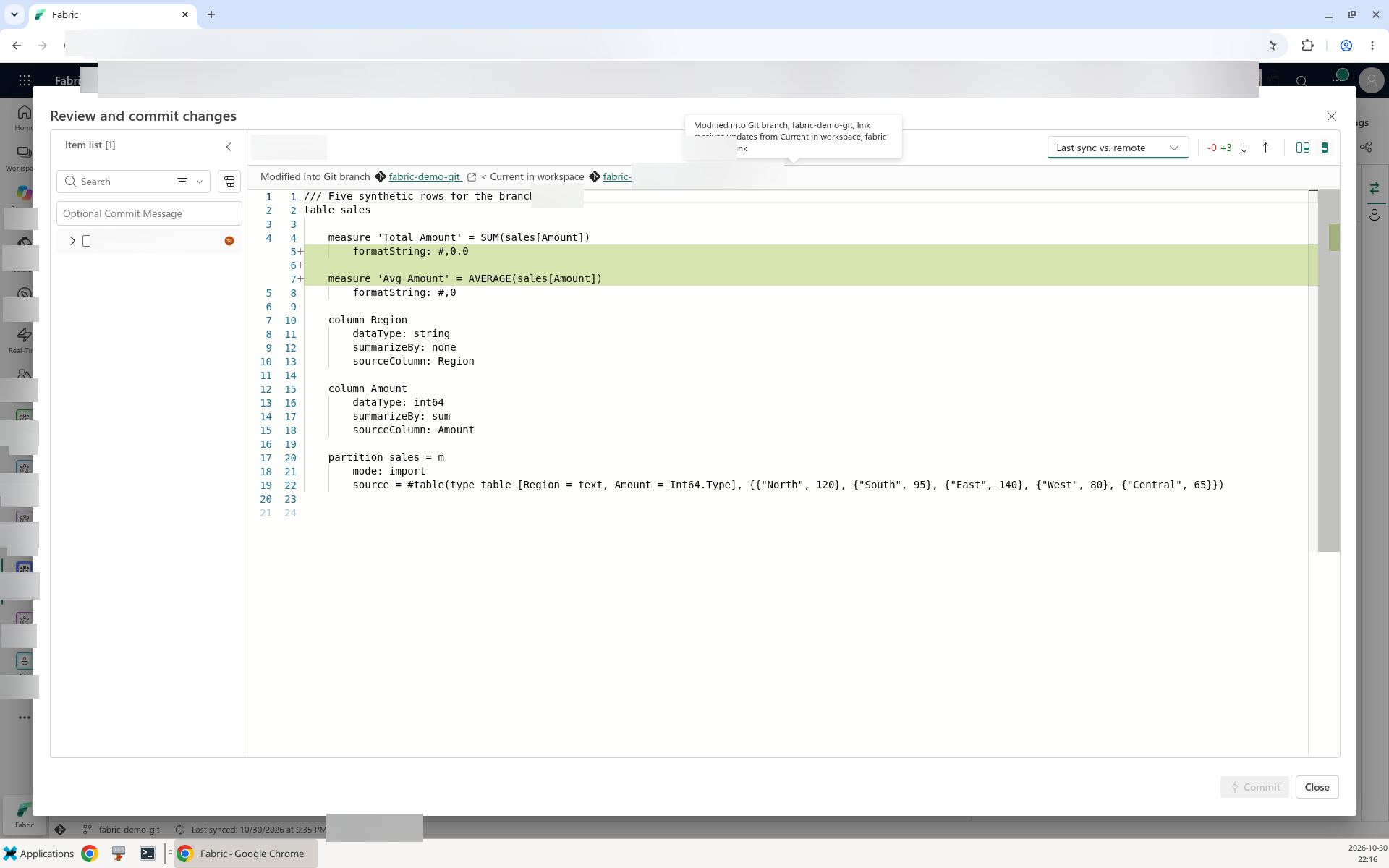
Figure 7. Shown: Last sync vs. remote. Switch to Last sync vs. workspace before you choose; it shows the local edit you are about to lose.
I chose Accept incoming changes, then Merge And Update. The workspace ended on the merged format. The local edit was gone. Learn says exactly this: the workspace changes are lost. That is the right behaviour for a team that treats the pull request as the truth. It is also a quiet way to lose someone's afternoon if they edited the shared workspace and did not tell anyone.
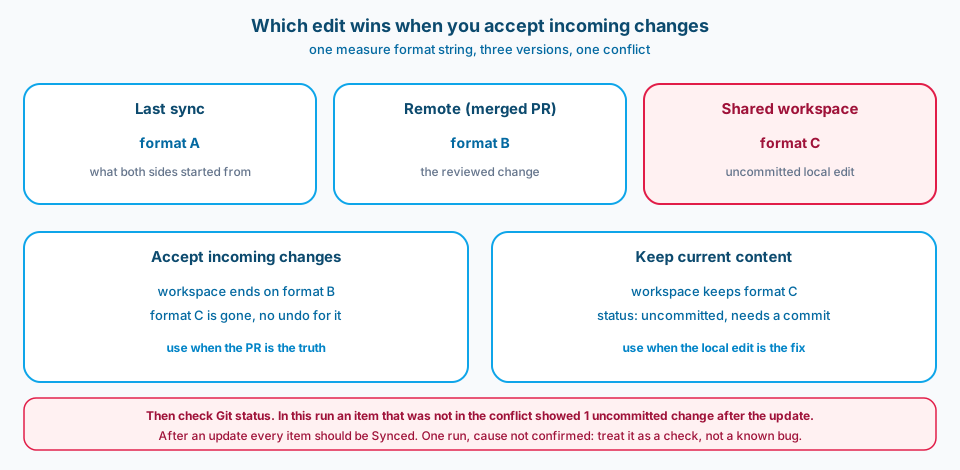
Figure 8. Accept incoming means the PR wins and the local edit is gone. Keep current content means you still owe a commit.
Then the surprise. After the update, the report, which was not in the conflict, showed as uncommitted with one change. After an update the workspace should match the branch, so every item should be Synced. The change appears to be the item description: it was empty in the shared workspace while the copy in Git still had it, and Learn notes that metadata changes take part in Git sync. I saw this once, I could not find it documented (checked 30 Oct 2026), and I am not calling it a bug. I am calling it a reason to add one step: look at Git status after every update, and do not walk away from a workspace that still shows changes.
When to say yes
Make branch workspaces the default when:
- More than one person changes the same dev workspace in the same sprint.
- Your Git provider already does the review, so the pull request can be the only way changes get back.
- Your items are on the supported list for Git integration, and reports use PBIR so the diffs are readable.
- You can commit the shared workspace before people branch out. If the shared workspace often has uncommitted work, fix that first.
Wait, or keep it small, when:
- Your process depends on partial commits of semantic models or reports. That is not supported.
- You need admin profiles or the workspace setting for branch switching by Contributors as a control. Those are Preview.
- People in the dev workspace lack write access to some items, for example because of sensitivity label protection. After 28 Feb 2027 they can't use Git integration, so sort out access first.
My answer to the title: yes for the core loop, with two rules written down. Nobody edits the shared workspace directly while a branch is open, and every update ends with a status check.
Common mistakes
- Branching out from uncommitted work. Branch out uses the last commit of the source workspace. Anything not committed is not in your branch.
- Branching out into an existing workspace. That can delete uncommitted items already there. Use a new workspace.
- Switching branch in a selective workspace. The selection resets, so you get every item. Create a new branch workspace instead.
- Expecting settings to follow. Settings from the original workspace are not copied. Disconnecting it removes the relation.
- Expecting Update to respect the selection. Update in the shared workspace takes the whole branch.
- Clicking Accept incoming without looking. Check Last sync vs. workspace first. The local edit has no other way back.
- Partial commits on items that need all their files. Fabric warns you that the definition can end up invalid.
- Trusting the compare for every file. Compare does not display the contents of binary files or files over 1 MB.
Use as-is or adapt
Use as-is if your team already uses pull requests:
- Commit the shared dev workspace. Status should be Synced before anyone branches out.
- Branch out to a new workspace per change. Pick the items, press Select related items.
- Read the compare view before each commit. Commit whole items.
- Merge by pull request only.
- In the shared workspace, review the Updates tab, resolve conflicts with Last sync vs. workspace open, then check Git status. Do not finish until it is Synced.
- Delete the branch workspace when the pull request is merged.
Adapt if:
- You have a lot of notebooks or pipelines and want file level commit. Pilot it on one item type, and add a check that the item still imports from Git.
- You want to automate branch workspace creation. The Workspace Relation API works, but it is Preview, so keep a manual fallback.
- Your capacity is shared and small. A branch workspace uses capacity too, so keep the selection tight.
Try it yourself
The full demo, with the steps, the observations and the evidence, is in tech-demos/fabric-branch-workspaces. It runs on a trial capacity with synthetic data, and the timings in it are single runs, not benchmarks.
Related
- Fabric CI/CD: How Do You Limit Blast Radius Across Dev Workspaces? (what a deployment touches compared with what Git changed)
- Fabric CI/CD: Merge the whole ladder, or cherry-pick what is ready? (moving one change forward when the branch holds several)
- Variable Library: How Do You Switch Active Value Sets from Dev to Prod? (how value sets behave across stages, which matters once branch workspaces edit them)
- Workspace Naming: Is a One-Time Rename Cheaper Than Translating Prefixes Forever? (branch workspaces multiply fast, so name them on purpose)