
Key takeaways
- In this test, a change committed in a Fabric SQL database left the source in 9.7 seconds median, 15.1 seconds at most (change feed sample, last 3 runs). It became visible on the SQL analytics endpoint after a median of 100 to 158 seconds, and 296 seconds in the worst case.
- Mirroring itself was quick: it committed to Delta about every 15 seconds, and a change reached Delta in a median of 18.5 seconds (max 28.9 seconds).
- In this setup (a Fabric SQL database on a 64-CU trial, at the rates tested), the bottleneck was the SQL analytics endpoint picking up new Delta commits, in 15 batches 151 to 329 seconds apart. Delta to endpoint was most of the lag: a median 86% of each marker's lag (in medians, 116 s of about 134 s).
- Promise "about 2 minutes typical, within 5 minutes" for queries through the SQL analytics endpoint, and only after you have measured your own setup with a heartbeat row.
- Do not tune the source to fix this. Capture and the Delta commit were never the slow part.
- If someone needs seconds, or needs to act on each change, mirroring plus the endpoint is the wrong path. Put the event on a stream where it is produced.
- All numbers were measured on a 64-CU Fabric trial, not a statement about paid F64 or production SLAs.
Every Fabric SQL database mirrors itself into OneLake automatically, with no settings to configure, and you get a SQL analytics endpoint over that copy (SQL database mirroring overview). The first question a stakeholder asks is simple: if I change a row in the app, how soon can I see it in a report? Microsoft's FAQ answers "near real-time latency" and publishes no interval (mirroring FAQ). That is not a number you can put in a requirement.
So I measured it: a Fabric SQL database's automatic mirroring to OneLake, read through its SQL analytics endpoint. This is the first post in a series of experiments I am running on a Fabric trial capacity, each with its method and numbers. The short answer: capture and the Delta commit take seconds, and the minutes are the endpoint catching up.
Named model: capture is fast, the wait is the endpoint
- Commit: your transaction ends in the Fabric SQL database.
- Capture: the change feed scans the log and publishes the change to a landing zone in OneLake. Seconds.
- Delta commit: the change is converted to Delta in OneLake. Mirroring committed about every 15 seconds; a change was in Delta 7.4 to 28.9 seconds after commit.
- Endpoint sync: the SQL analytics endpoint picks up the new Delta commits in batches. Minutes.
- Query: a T-SQL query on the endpoint can see the row.
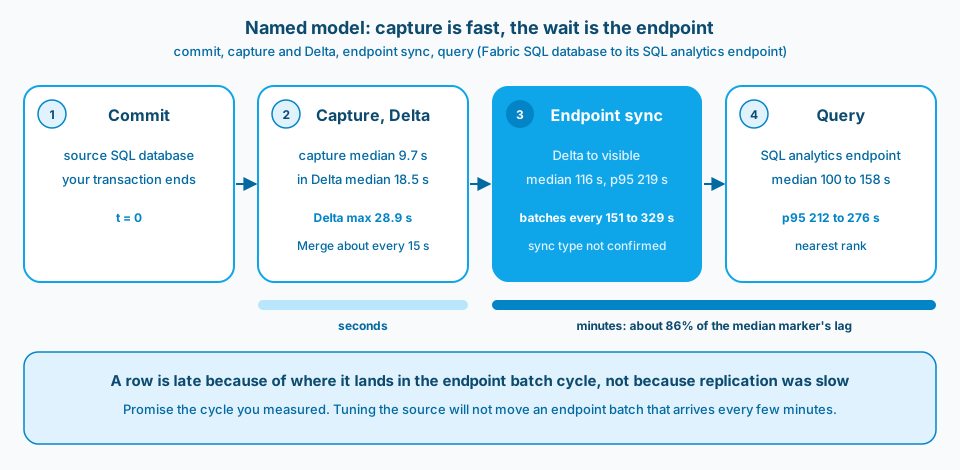
Figure 1. The change is in Delta within seconds. The minutes a user feels are the SQL analytics endpoint picking it up.
What I measured, and how
The question: how long does a committed change in a Fabric SQL database take to become queryable on its own SQL analytics endpoint, at about 10, 100 and 1,000 changed rows per second? I measured at the SQL analytics endpoint, not at the files in OneLake.
- Setup: one Fabric SQL database with one neutral table, seeded with 1,000,000 deterministic rows, on a 64-CU Fabric trial capacity in one region, on one evening.
- Workload: 9 runs of 150 seconds each, in 3 rounds of 10, 100 and 1,000 rows per second, always in that order. One transaction per second, with 40% inserts, 40% updates and 20% deletes, and 60 seconds idle between runs. Achieved rates were 10.1, 100.6 to 100.7 and 1,006.4 to 1,006.5 rows per second, with no late ticks.
- Heartbeat markers: every 10 seconds, plus once at the end of each burst, a marker row went in with its commit time from the source clock. That is 17 markers per run, 51 per rate, 153 in total.
- Polling: a second thread queried the endpoint every 2 seconds for new markers, with a unique predicate on every poll so no result could come from a cache.
- Lag: the first poll that sees a marker, minus its commit time, corrected for the clock offset between the two servers (under 4 ms). Resolution is about 2 seconds.
- Capture: I saved the last 30 sessions of sys.dm_change_feed_log_scan_sessions and the contents of sys.dm_change_feed_errors after the runs. That sample covers runs 7 to 9 only. Its latency column is per scan session: the time between the session's end and the commit it was processing (sys.dm_change_feed_log_scan_sessions). To time each marker, I matched it to the first scan session that processed past its commit.
- Delta commits: after the runs I read the mirrored table's Delta log in OneLake, read only: 102 commits over the night. The replicator writes no commitInfo timestamp, so a commit's time is the lastModified time of its log file in OneLake, a close proxy with 1 second resolution. Each marker was matched to the first commit whose newest source change reaches the marker's commit time.
All SQL ran from Fabric Python notebooks. No number below is typed by hand; they come from the run logs.
Results
All 153 markers were seen. Over the 51 markers per rate:
| Changed rows per second | Median lag | p95 lag (nearest rank) | Min | Max |
|---|---|---|---|---|
| 10 | 158 s | 276 s | 32 s | 296 s |
| 100 | 130 s | 244 s | 18 s | 264 s |
| 1,000 | 100 s | 212 s | 20 s | 214 s |
p95 is nearest rank: the 49th of 51 sorted values, rank ceil(0.95 × n). Across all 153 markers, 16% were visible within 60 seconds, 44% within 2 minutes, 75% within 3 minutes, 94% within 4 minutes and all of them within 5 minutes.
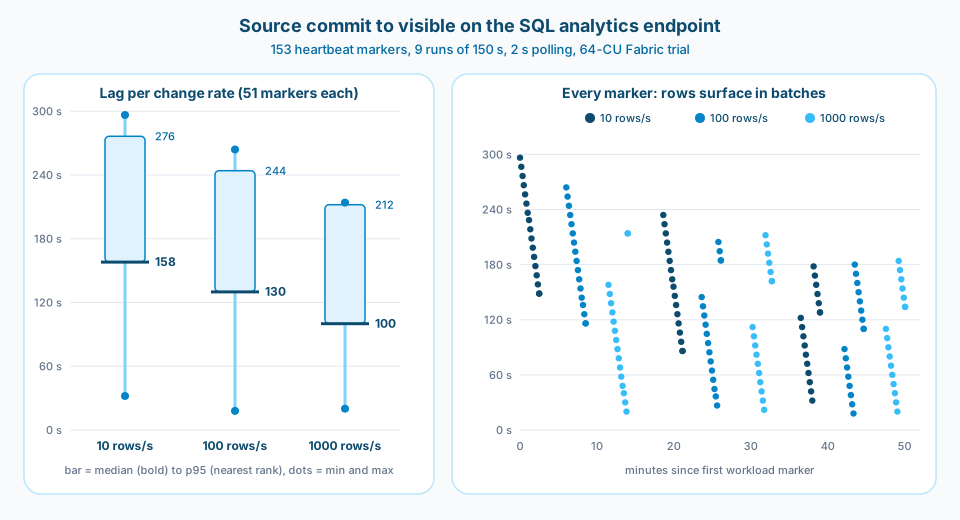
Figure 2. The sawtooth on the right is the finding. Markers committed early in a cycle wait longest; markers committed just before a batch wait only seconds.
More numbers from the same night:
- Capture: for the 41 markers in the DMV sample (runs 7 to 9), the change left the source 9.7 seconds after commit at the median, and 15.1 seconds at most. The time from there to visible on the endpoint was 110 seconds at the median (12 to 171 seconds), about 92% of each marker's lag. Every scan session in the sample finished with zero errors and nothing left to publish, and the errors DMV was empty.
- Delta commit: across all 153 markers, a change was in Delta 7.4 to 28.9 seconds after commit (median 18.5 seconds, p95 27.3 seconds). From that Delta commit to visible on the endpoint took 2.8 to 278.6 seconds (median 116.3 seconds, p95 218.6 seconds).
- Initial snapshot: the 1,000,000-row seed took 5.5 seconds to insert, reached Delta about 46 seconds after the commit, and the full count was visible on the endpoint 125 seconds after the commit. Until then, the endpoint returned "Invalid object name" for the new table, so that time includes the endpoint discovering a brand new table.
- Count convergence: after each burst, source and endpoint row counts matched after 88 to 216 seconds.
- Run to run: run medians for the same setup ranged from 98 to 218 seconds.
Where the lag actually comes from
Capture took seconds, and so did the Delta commit. During every burst, mirroring committed a Delta Merge every 14 to 16 seconds (median 15.0 seconds). So the batching is not in replication. It sits between the Delta table and the SQL analytics endpoint.
Figure 2 shows how: rows did not trickle in. Across the night there were 15 batches of newly visible markers, 151 to 329 seconds apart (median 188 seconds). Each batch picked up between 1 and 11 Delta commits at once, and every marker waiting at that moment appeared together.
That one fact explains the spread in the table:
- A marker committed just before a batch shows up in about 18 to 32 seconds. That is the min column.
- A marker committed just after a batch waits for the next one, up to almost 5 minutes. That is the max column.
- The median sits around the middle of the cycle.
For context, Learn says that under normal operating conditions the lag between a lakehouse and its SQL analytics endpoint is less than one minute, varying "from a few seconds to minutes" (SQL analytics endpoint performance). Here, Delta to endpoint took a median of 116 seconds, well above that. That is one evening on one trial, so I read it as what this endpoint did that night, not as a general figure.
Which metadata sync was running is not confirmed. On 30 Oct 2026 the endpoint had the objects Learn lists for the new metadata sync (preview), sys.dm_db_external_tables_log_status and sys.sp_dw_refresh_ext_table, but that DMV returned no rows, and the portal showed no metadata sync (preview) setting. That is consistent with the legacy metadata sync, but it is not proof. Learn says the new metadata sync keeps data queryable "within seconds" of landing and applies only to endpoints created after it is enabled (metadata sync).
On the change rate: the median was lower at higher rates in every round. I am not claiming the rate caused that. Inside every round the order was always 10, then 100, then 1,000 rows per second, and the first round came right after the initial snapshot, so rate and position in the round cannot be separated. Each run's 17 markers also fell into only 1 to 3 batches, so the real sample is the number of batches, not 51 markers per rate. Batching explains the spread; it does not explain a trend by rate.
What to promise stakeholders
Write the promise as a number, about the query path people will actually use:
- For reports and ad hoc T-SQL on the SQL analytics endpoint: "about 2 minutes typical, within 5 minutes". That covered every marker in this test, with a little margin over the 296-second worst case.
- Do not promise "near real-time". That is Microsoft's wording, and people hear seconds. Learn's own endpoint page says minutes are possible.
- Do not promise anything for a quiet system yet. Learn says the endpoint's background sync process "stops after 15 minutes without query activity" (SQL analytics endpoint performance). That is written for lakehouses; the SQL database's endpoint is the same lakehouse-style endpoint (mirroring limitations), and a Fabric SQL database can pause when idle, which also pauses pending mirroring (SQL database mirroring overview). My 2-second polling kept the endpoint busy, and I built a probe for the first change after an idle spell but did not run it. The cold case is not measured here.
- Re-measure on your own capacity. This is one table, one region, one evening on a trial, with a heavy TPC-H-derived build on the same capacity at the time. Your cycle may be shorter or longer.
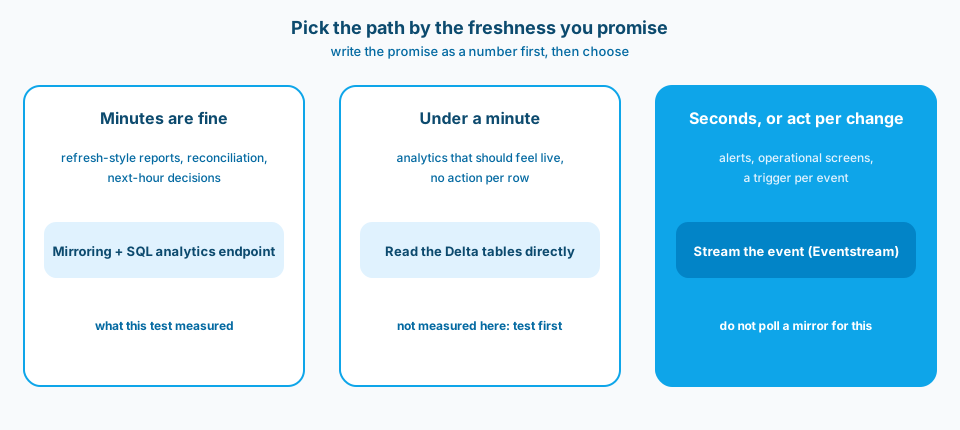
Figure 3. Agree on the freshness number first. The number picks the path, not the other way round.
When mirroring is fine, and when you need a stream
Mirroring plus the SQL analytics endpoint is a good default when minutes are acceptable: reporting over operational data, reconciliation, and analysis that does not trigger an action per row. There is no pipeline to build, and Microsoft's FAQ states there is no compute cost for mirroring from a Fabric SQL database to OneLake, and mirroring storage is free up to a limit based on capacity (mirroring FAQ). Your queries on the endpoint are billed as normal. Capacity use for this test is not measured yet; when it lands, it will be the cost of the test harness (endpoint queries and notebooks), not replication.
It is the wrong tool when someone needs to react within seconds: an alert, an operational screen, a workflow that fires per change. Polling a mirror every few seconds cannot beat a cycle measured in minutes. Put the event on a stream where it is produced, with Eventstream into an Eventhouse or Activator (Eventstream overview), and keep mirroring for the analytical copy.
In between sits "should feel live, but nobody acts per row". Engines that read the Delta tables in OneLake directly, such as Spark or a Direct Lake model, skip the SQL analytics endpoint sync. Since every change here was in Delta within about 30 seconds, they may see changes much sooner than the endpoint (Direct Lake once it reframes, for example with automatic updates on). I did not test that path, so test it before you promise it.
How to watch it
These are the monitoring routes that apply to a Fabric SQL database's mirror:
- Portal: on the SQL database, the Replication tab, then Monitor replication, shows the current status, rows replicated and last refresh (monitor mirroring).
- Source DMVs: sys.dm_change_feed_log_scan_sessions for capture timing, and sys.dm_change_feed_errors for failures (mirroring FAQ).
- Endpoint side: the Refresh SQL endpoint metadata REST call returns a lastSuccessfulSyncDateTime per table (Refresh SQL endpoint metadata). It also triggers a sync, so treat it as an action, not a passive read.
- A heartbeat row: the only one that measures what a user feels. See below.
The getMirroringStatus REST call does not apply here. It belongs to mirrored database items (Get Mirroring Status), while the SQL database API only offers Start and Stop for mirroring (SQL database mirroring API). A 404 for a SQL database is expected.
Common mistakes
- Treating "near real-time" as a number. Microsoft publishes no interval for this. Measure your own.
- Tuning the source. Faster capture does not help when the delay is the endpoint picking up Delta commits.
- Measuring with row counts only. Counts converge eventually and hide the per-row spread. A timestamped heartbeat row shows the sawtooth.
- Letting a cache answer the probe. If every poll is the same query, a cached result can make freshness look worse or better than it is. Vary the predicate.
- Reporting the best run, or the p95 as the worst case. Run medians in this test ranged from 98 to 218 seconds for the same setup. Report all runs, the p95 with its method, and the max as the worst case.
- Reading a trend from a fixed order. If the rates always run in the same order, any trend by rate is also a trend by position. Shuffle the order per round.
Use as-is or adapt
A heartbeat table is the cheapest way to know your real lag, and to alert when it drifts. On the Fabric SQL database:
-- datetime2(6): mirrored Delta and the SQL analytics endpoint keep six fractional digits; (7) would be trimmed
CREATE TABLE dbo.heartbeat (
    id            bigint       NOT NULL PRIMARY KEY,
    committed_utc datetime2(6) NOT NULL
);

-- run on a schedule, for example every minute
INSERT INTO dbo.heartbeat (id, committed_utc)
SELECT ISNULL(MAX(id), 0) + 1, SYSUTCDATETIME() FROM dbo.heartbeat;
On the SQL analytics endpoint:
SELECT MAX(committed_utc) AS last_seen_commit_utc,
       DATEDIFF(second, MAX(committed_utc), SYSUTCDATETIME()) AS staleness_s
FROM dbo.heartbeat;
If staleness_s goes above the number you promised plus the heartbeat interval (60 s here), you know before the stakeholder does. The six-digit note comes from the Delta precision limit in the mirroring limitations and the data types page. Two clocks are involved, source and endpoint; in my runs the offset was under 4 ms, but check yours before you trust single-digit seconds.
Method notes and caveats
- Measured on a 64-CU Fabric trial, not a statement about paid F64 or production: 153 markers, 9 runs, one evening, one region, one database, one table.
- A TPC-H-derived build ran on the same trial capacity during the runs, so noisy neighbour effects cannot be ruled out.
- The capture numbers come from the DMV sample for runs 7 to 9 (41 markers), not the whole night. The Delta numbers cover all 153 markers.
- Delta commit times are the log files' lastModified time in OneLake (1 second resolution), because the replicator writes no commitInfo timestamp.
- Each run's p95 equals its max at 17 markers, so only the pooled p95 per rate is reported.
- Sync type: not confirmed.
- 3 runs per rate, always in the same order, so no claim about rate.
- p95 is nearest rank, ceil(0.95 × n). The max is the worst case.
- Capacity use (CU): not measured yet. A later figure will cover the test harness (endpoint queries and notebooks), not replication.
- The idle (cold) case was not run.
- Lag is end to end through the SQL analytics endpoint. Readers of the Delta table directly may see changes much sooner, untested here.
Try it yourself
The mirroring lag demo in my public tech-demos repo seeds a Fabric SQL database, runs the 10, 100 and 1,000 rows per second workload with heartbeat markers, and polls the SQL analytics endpoint, so you can measure the lag on your own capacity.
Related
- Semantic refresh and Direct Lake for the other side of "when does a report see new data".
- Fabric monitor runbooks for turning a heartbeat into an alert someone owns.