

Key takeaways
- Fabric IQ answers in Microsoft 365 Copilot Chat are generally available, and the admin setting behind them is on by default. Your published models can already be asked questions.
- Fix the model before you write prompts. A reviewed measure beats any instruction.
- The AI data schema focuses Copilot. It is not security, and some skills ignore it.
- Verified answers are not returned when Fabric IQ is on. Do not build Copilot Chat correctness on them.
- Gate approval on a question set with validated expected results.
- Prep data for AI is in preview, needs Q&A turned on, and needs a service refresh after a Git or pipeline deploy.
A hypothetical, but a likely one. Someone asks Copilot Chat how the business did last quarter. Copilot finds a model nobody prepared for it, picks the gross figure instead of the net one, uses calendar quarters where the business reports fiscal ones, and answers with full confidence. No refresh failed. No report broke. The answer is still wrong.
Models were built for report authors who already know the business. Copilot does not. Shape the model, scope what Copilot sees, steer it with as little text as possible, and prove it before you approve it.
Named model: shape → scope → steer → prove
- Shape: explicit measures, real relationships, a marked date table, plain names, descriptions.
- Scope: an AI data schema for focus; row-level and object-level security (RLS, OLS) for access.
- Steer: short AI instructions; verified answers only where they actually fire.
- Prove: a question set with expected results, then Approved for Copilot.
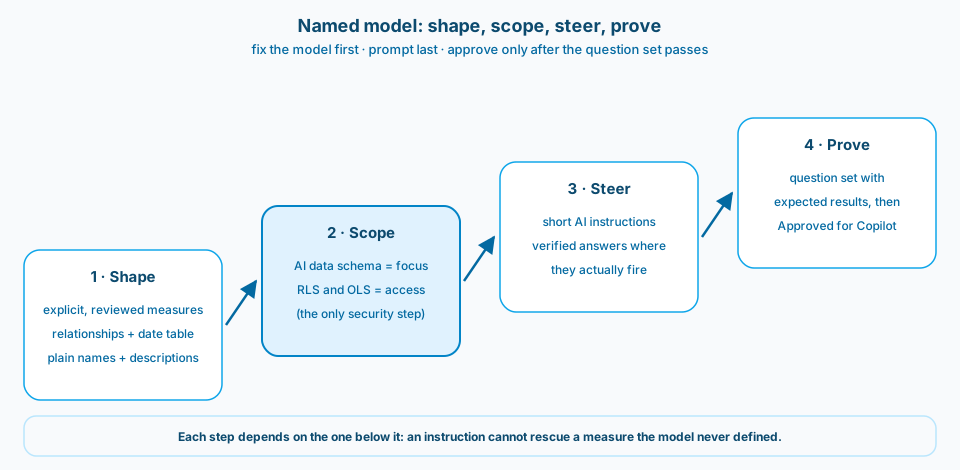
Figure 1. Only the scope step carries security. Only the prove step earns the approval flag.
Context and constraint
In Copilot Chat, Copilot searches for a relevant report and answers from the semantic model underneath, with the user's own permissions, RLS and OLS included. Answers reflect the last successful refresh. Models on Embedded (A or EM) capacities are not supported, and questions must be in a language Microsoft 365 Copilot supports (Fabric IQ in Microsoft 365 Copilot Chat).
When I open a model with Copilot in mind, I typically find the same things: numbers that exist only as implicit column sums, almost no descriptions, auto-generated synonyms nobody curated, and nothing set up for AI. None of that blocks a report. All of it confuses a chat. This is how I would prepare such a model and gate it. Post 13 covers the modeling fundamentals; this note covers the Power BI tooling and its sharp edges.
Design
1. Shape the model before you prompt it
If people ask for a number, it should exist as a reviewed measure with a plain name and a description. When measure A is net and measure B is gross and neither is described, Copilot will pick one, and it will not tell you it guessed. Learn lists cryptic names, missing descriptions, same-named fields across tables, and disconnected tables such as field parameters as common causes of bad answers (Copilot with semantic models).
One expectation to set: descriptions currently feed only DAX query and search capabilities (Prep data for AI FAQ). Write them anyway, but do not expect them alone to fix answers.
2. Scope for focus, secure with RLS and OLS
Prep data for AI is in preview (Prep data for AI), and Microsoft's recommended order is AI data schema, then verified answers, then AI instructions (FAQ above). The schema narrows which fields Copilot prioritizes. Learn's own example removes a competing measure so that "sales" resolves to the one the team actually uses.
The sharp edge: creating a report page or writing a DAX query still uses the whole model, not the schema (AI data schemas). A field you leave out of the schema is not hidden from anyone. If a user must not see it, that is RLS or OLS.
3. Steer with short instructions that point at real objects
AI instructions are limited to 10,000 characters, and Learn says outright that there is no guarantee Copilot follows them exactly (AI instructions). So I keep them to defaults and disambiguation, grouped by theme:
Metrics
- "Sales" without a qualifier means [Measure A] (net, after returns).
- Use [Measure B] only when the user asks for gross.

Dates
- Use the fiscal calendar on the Date table unless the user asks otherwise.

Ambiguity
- If "performance" could mean volume, value, or margin, ask which measure.
Every line names something the model already defines. An instruction that describes a calculation the model lacks is a measure you still owe.
4. Use verified answers where they fire
Verified answers map trigger phrases to a reviewed visual. The limit that matters most is on the same Learn page as the setup steps: Copilot does not return verified answers when Fabric IQ is enabled (verified answers). They also stop matching if a field they use is hidden, do not work with report measures, are not carried by Git integration or deployment pipelines, and are not a security feature for RLS or OLS data.
So I treat them as a report Copilot pane tool for a handful of high-traffic questions. Correctness in Copilot Chat lives in measures and instructions.
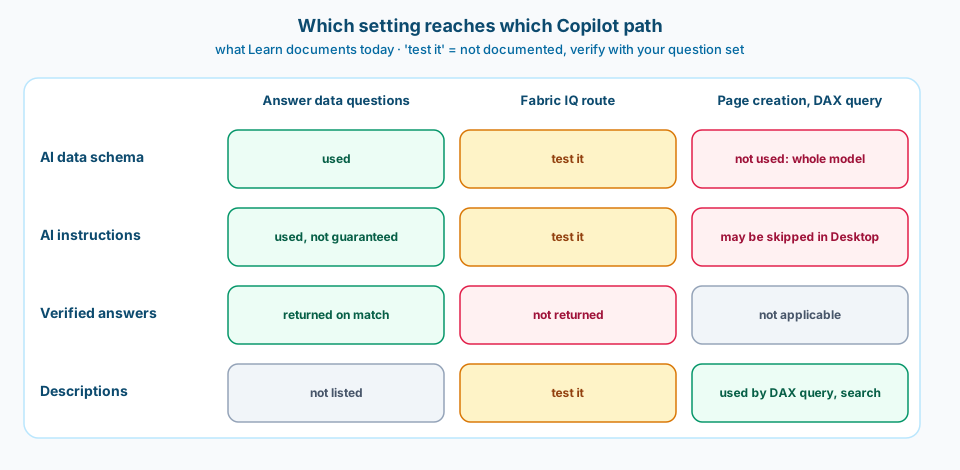
Figure 2. What Learn documents today. "Test it" marks the gaps your question set has to cover, and verified answers never reach the Fabric IQ route.
5. Prove it, then approve it
Before anyone marks the model approved, write the questions down with the answer you expect, as Learn recommends (Ask data questions with Copilot and Fabric IQ). Include at least one deliberately ambiguous question, because the right answer to it is a clarifying question.
question                       | measure   | grouping | date basis     | expected
Sales last quarter             | Measure A | none     | fiscal quarter | validated value
Top three categories by sales  | Measure A | category | fiscal year    | validated list
How is performance?            | (ask)     | none     | none           | clarifying question
Run it on the surfaces people use, read "How Copilot arrived at this" on each answer, and only then mark the model Approved for Copilot. Approval removes the caution that standalone Copilot adds to answers from unapproved items, for the model and every report on it. That is a promise to users, not a formality. Allow up to an hour for it to apply, or up to a day for models with many reports (Prep data for AI). It is the same gate as post 48, pointed at a model.
6. Ship it like a model change
AI instructions and the AI data schema live in the model's linguistic metadata. After a change through Git or a deployment pipeline, Learn says you must refresh the model in the service to sync it, and for DirectQuery and Direct Lake models it adds "but only once a day". Power BI Desktop authors Prep data for AI only on Import, DirectQuery, and local composite models, so Direct Lake models are prepared in the service (same page). A Git deploy is not the end of the release: plan the refresh, then run the question set.
Two checklist lines. Prep data for AI requires Q&A on the model, while Q&A experiences retire in February 2027 (Q&A best practices): remove Q&A visuals, keep the setting. And if model names or synonyms are not in English, test in the language people will actually ask in. Learn says Copilot works best with human-readable English names, and synonyms live in each model culture's linguistic metadata, so check the culture people will actually use.
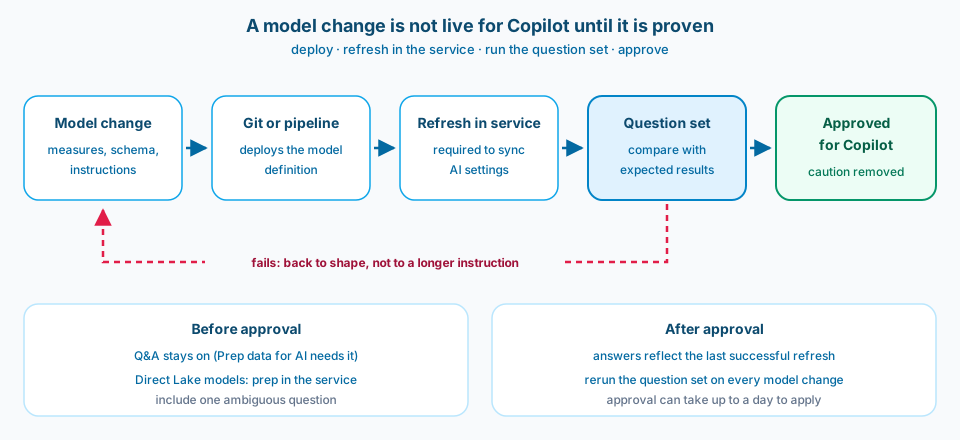
Figure 3. A model change is not live for Copilot until the service has synced it and the question set has passed.
Common mistakes
Prompting around a missing measure. An instruction cannot fix a number the model never defined.
Gross and net side by side, undescribed. Copilot picks one, confidently.
Schema as security. It focuses answers. RLS and OLS restrict data.
Verified answers as the Copilot Chat plan. With Fabric IQ on, they are not returned.
Hiding a field a verified answer uses. The answer silently stops matching.
Approving before testing. The approval flag removes the caution users would otherwise see.
Switching Q&A off during cleanup. The Prep data for AI tabs go dark.
Testing before the service refresh. Copilot still reads the old instructions.
Use as-is or adapt
Use as-is
- The shape, scope, steer, prove order.
- A reviewed, described measure for every number people ask about.
- RLS and OLS as the only security boundary.
- A question set with expected results, including an ambiguous one, before approval.
Adapt before you use
- How many verified answers to build, depending on whether people ask in Copilot Chat or in the report pane.
- How long the instruction set gets: start with defaults and add only what testing shows you need.
- Your Direct Lake and DirectQuery release rhythm, given the once-a-day refresh note.
- When to stop stretching a model and publish a Fabric data agent instead, for example when questions need lakehouse or warehouse data (semantic model best practices for data agent).
Related
- Data Agent Readiness: Is Genie (and Fabric Agents) Really a Modeling Problem? (the modeling fundamentals underneath this note)
- Gold Semantic Contract: Can You Choose Which Columns Reach the Direct Lake Model? (what reaches the model in the first place)
- Direct Lake: Do You Still Need to Refresh a Semantic Model? (why the sync step matters)
- Agent Evals: Can a Score Block a Release? (the same gate for agents)
Copilot will read your model whether you prepared it or not. Prepare it, then prove it.