

Key takeaways
- Code never changes between targets. Only bindings do: catalog, host, schedules, identity and permissions.
- Development and production modes are bundles of presets, not a ladder. A test target with no mode gets none of their safety defaults.
- A setting on the resource beats a preset, which beats the mode. Hardcode a schedule as unpaused and it runs everywhere.
- Bundle variables resolve at deploy time. Pass the catalog to code as a job parameter.
- Deploy as one service principal, run as another. When they differ, only jobs and pipelines are supported.
A bundle will happily deploy the same jobs to three environments. It does not decide what should differ between them, and its defaults are lopsided: development mode is careful, production mode checks a few things, and a test target in the middle gets nothing unless you ask.
The rule I work from: one commit, the same code everywhere, and a small, explicit set of bindings per target.
Named model: fixed code, bound targets, split identities
- Fixed code: notebooks, SQL and job definitions are identical in every target. No hosts, catalogs or IDs in code.
- Bound targets: each target sets its catalog, schedules, run identity and permissions; the host comes from the pipeline.
- Split identities: a CI identity deploys; a separate service principal runs; people get permissions, not credentials.
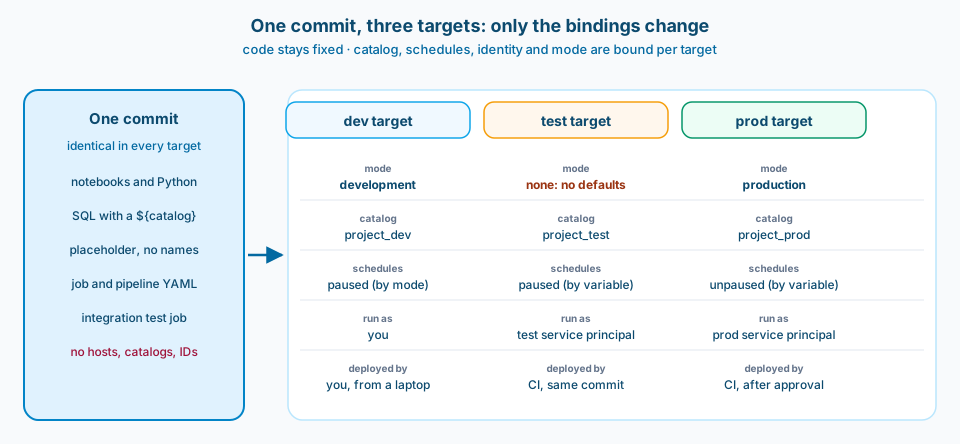
Figure 1. The code column never changes. If something differs between environments, it belongs in the target block.
Context and constraint
Declarative Automation Bundles describe jobs, pipelines and other resources in YAML next to the code, and the Databricks CLI deploys them per target. They were called Databricks Asset Bundles until March 2026; the rename is non-breaking (bundle FAQs).
The bundle template I maintain is small: one catalog per environment, serverless jobs, an integration test job deployed with the bundle, and an Azure DevOps pipeline using workload identity federation. It ships two targets, dev and prod. What follows comes from deciding what goes in those target blocks, and what changes when you add a third.
It is the Databricks counterpart to post 11 (parameterize environment bindings) and post 46 (promote by commit).
Design
1. Treat modes as presets, not as a ladder
mode: development prefixes resource names with your user name, tags jobs and pipelines, pauses all schedules and triggers, allows concurrent runs, and disables the deployment lock. mode: production validates that pipelines are not in development, optionally checks that you are deploying from the expected Git branch, and expects either a service principal as run_as or explicit run_as and permissions (deployment modes).
Modes are optional, and there is no test mode. A test target without one gets no prefix, no schedule pausing and no production checks unless you add presets.
Then the precedence rule from the same page: resource settings override presets, and presets override the mode. Learn's own example is the one that bites: a schedule set to UNPAUSED on the job stays unpaused even when the target's trigger_pause_status preset says PAUSED. Write pause_status: UNPAUSED into the job YAML because prod needs it, and every target that deploys the job runs it on schedule.
So I make the schedule state a variable, paused by default, and unpause it only in the prod target:
variables:
  catalog:
    description: One Unity Catalog catalog per environment.
  schedule_pause_status:
    default: PAUSED
  test_sp_app_id:
    description: Application ID of the test run principal.
  prod_sp_app_id:
    description: Application ID of the prod run principal.

targets:
  dev:
    mode: development
    default: true
    variables:
      catalog: project_dev
  test:
    variables:
      catalog: project_test
    run_as:
      service_principal_name: ${var.test_sp_app_id}
  prod:
    mode: production
    git:
      branch: main
    variables:
      catalog: project_prod
      schedule_pause_status: UNPAUSED
    run_as:
      service_principal_name: ${var.prod_sp_app_id}
The job reads pause_status: ${var.schedule_pause_status}. Forget to set it and the job stays paused, which is the failure you want.
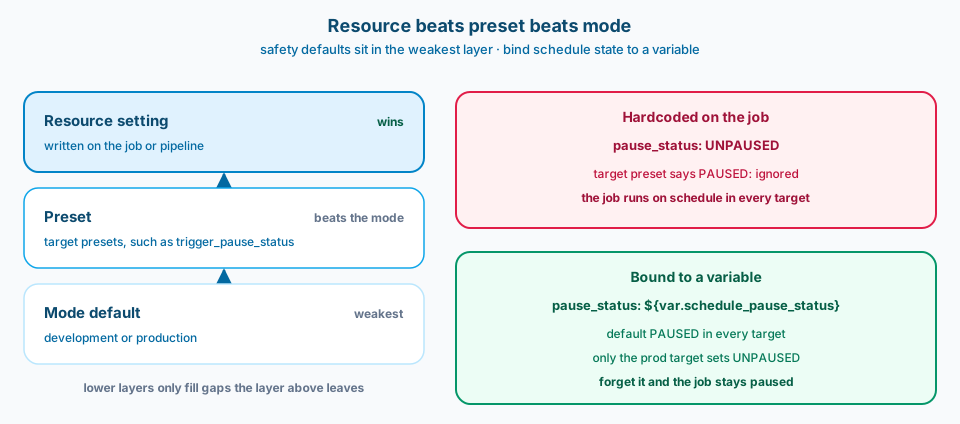
Figure 2. Safety defaults live at the weakest layer. Anything you write on the resource wins.
2. Bind the catalog at deploy time, read it at run time
One catalog per environment is the simplest Unity Catalog layout I know that keeps environments apart by construction. The catch is how the catalog reaches code. Bundle variables are deployment-time values: running a job uses the values from its last deployment, and passing a different variable at run time does not apply. Learn says to use job parameters for run values instead (substitutions and variables).
So the job declares a catalog parameter whose default is ${var.catalog}. SQL uses a ${catalog} placeholder, Python reads the parameter, and no file under the source folder names a catalog. A small lint in CI fails the build if it finds a workspace host, a token, a catalog name or a cluster ID in code.
One more edge: variable precedence runs from --var, to BUNDLE_VAR_ environment variables, to the per-target override file, to target values, to the default. A stray environment variable on a build agent quietly beats your YAML.
3. Split the deploy identity from the run identity
CI deploys as a service principal through workload identity federation, so there is no secret to rotate. On Azure DevOps that is a federated service connection with the Azure CLI task and DATABRICKS_AUTH_TYPE=azure-cli (authenticate with Azure DevOps); on GitHub Actions it is github-oidc with id-token: write (GitHub Actions). The workspace host stays out of the repo and comes from pipeline variables.
Workloads then run as a different service principal per environment through run_as. Learn calls this the most secure way to run production: the run identity can have fewer permissions than the deployer, and only that principal or someone allowed to use it can deploy with it (run identity).
The sharp edges are on that page too. When the deploying identity differs from run_as, only jobs and pipelines are supported. Top-level and target run_as take a user or a service principal, not a group, and non-admins can only set it to themselves. Model serving endpoints error if run_as is set in the same bundle. If the bundle will grow beyond jobs and pipelines, decide early where those resources live.
4. Permissions on jobs are not grants on data
Top-level permissions give users, groups and service principals CAN_VIEW, CAN_RUN or CAN_MANAGE on everything the bundle deploys, and Databricks recommends that approach. The same principal cannot appear in both the top-level mapping and a resource's own permissions (bundle permissions).
Those control who can see, run or edit the job. They do not decide what the job can read and write. That is Unity Catalog grants for the run identity on its own catalog, so the test principal cannot touch the prod catalog even if someone points a job at it.
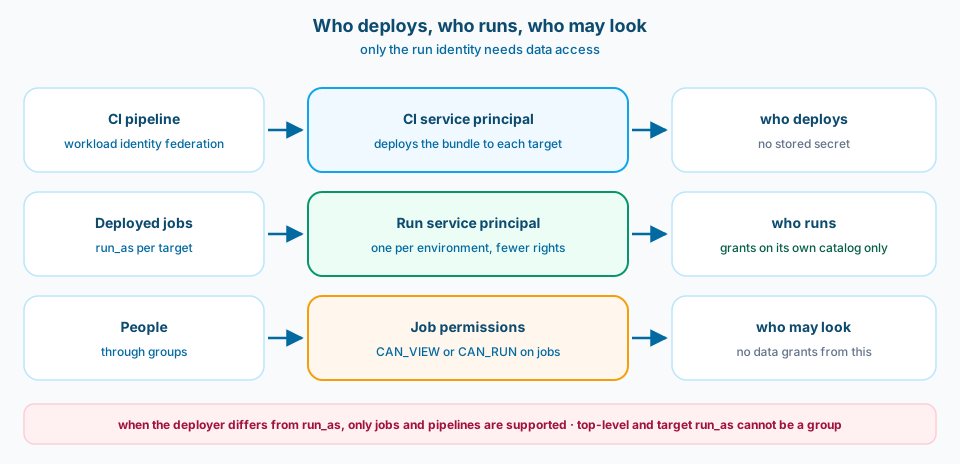
Figure 3. Three different questions: who deploys, who runs, and who may look. Only the run identity needs data access.
5. Promote the commit, and test where it will run
Every target deploys the same commit. My template's pipeline runs unit tests on the agent without Spark, deploys to dev, runs the bundle's integration test job on serverless with databricks bundle run, and only then deploys prod behind an environment approval. The git.branch check in production mode is a second lock: a prod deploy from any other branch fails unless someone passes --force.
Same idea as post 46: what reaches prod is a commit you can name, not whatever the branch tip happens to be.
6. Add a test target only when it buys something
Two targets is a real option. A third costs a catalog, a run principal, grants, a pipeline stage and test data. It pays when other teams consume the output before prod, when you need prod-shaped data that dev must not hold, or when a release needs sign-off on a stable shared environment. If integration tests run fine against dev, a test target mostly adds a place for drift.
When I add one, it copies prod's shape, not dev's: no development mode, a service principal as run_as, paused schedules, its own catalog.
Common mistakes
Hardcoding UNPAUSED on the job. Resource settings beat presets, so test runs on prod's schedule.
A test target with no mode and no presets. It gets none of the development defaults and none of the production checks.
Passing the catalog as a bundle variable at run time. Variables resolve at deploy; use a job parameter.
Catalog names in notebooks. One copied notebook writes to the wrong environment.
One service principal for deploy and run. It works, but the run identity now needs deploy rights.
Job permissions as data access. They govern the job, not the tables.
Use as-is or adapt
Use as-is
- Identical code in every target; environment only in target blocks.
- Schedules paused by variable, unpaused only in prod.
- The catalog as a job parameter defaulting to a bundle variable.
- Workload identity federation for CI, and a service principal
run_asfor test and prod.
Adapt before you use
- Whether you need a test target at all, using the costs in section 6.
- One workspace with a catalog per environment, or a workspace per environment as well, depending on your isolation and network requirements.
- Whether jobs and pipelines share a bundle with resources that cannot use a separate
run_as. - Read-only deployment folders: the immutable folder setting is in Private Preview and requires the direct deployment engine (configuration reference).
Related
- Fabric CI/CD: How Do You Limit Blast Radius Across Dev Workspaces? (parameterizing environment bindings in Fabric)
- Fabric CI/CD: Merge the whole ladder, or cherry-pick what is ready? (promoting by commit)
- Data Agent Readiness: Is Genie (and Fabric Agents) Really a Modeling Problem? (what the prod catalog should look like when someone asks it questions)
The bundle will deploy anything to anywhere. Decide what differs per target, write it down once, and let the code stay the same.