


Key takeaways
- Split app-owned backend state from Foundry platform stores before you argue Cosmos versus Azure SQL.
- Sample RAG and chat diagrams often default history to Cosmos; treat that as tutorial gravity, not a product mandate.
- Prefer Cosmos when the payload is a flexible document bag with little relational joining.
- Prefer Azure SQL + EF Core when app-owned records must join cleanly behind a stable HTTP API.
- Freeze routes and JSON across any cutover (API stays; store moves), then migrate once, flip repositories, and delete the Cosmos app-data path.
- Prove SQL firewall and EF migrations before treating "API is listening" as green; never migrate Foundry platform stores with the shell database.
Community threads keep asking why Microsoft RAG chatbot samples push Cosmos for chat history when a small Azure SQL database would also store messages. Fair question. Document stores map cleanly to message bags, Learn walkthroughs ship fast, and Cosmos shows up in the diagrams people copy.
That question is context, not the whole thesis for a Microsoft Foundry agent webapp. Published agent shells often leave durable product history with your backend. The records your backend writes for the product are your tables. Agents, threads, files, knowledge/Search, and platform memory stay on Foundry. The real decision is which engine backs the app-owned plane behind one product API.
Named model: API stays; store moves
- API stays: HTTP routes and JSON shapes for every app-owned collection stay frozen so the shell and callers do not relearn the contract.
- Store moves: the app-owned collections (A to D) leave Cosmos for Azure SQL + EF Core in a one-time migrate when relational ops win; then the Cosmos app-data path is deleted.
- Platform stays: Foundry agents, threads, files, knowledge/Search, and platform memory are not on that migration checklist.
- When Cosmos wins: flexible document chat or RAG bags, partition-by-conversation access, little join pressure, sample velocity.
- When SQL wins: joins, constraints, migrations as code, support queries that look like SQL, and one repository wiring path across environments.
- Contract: sample defaults explain Cosmos in the diagram; your webapp still owns product state behind a stable API.
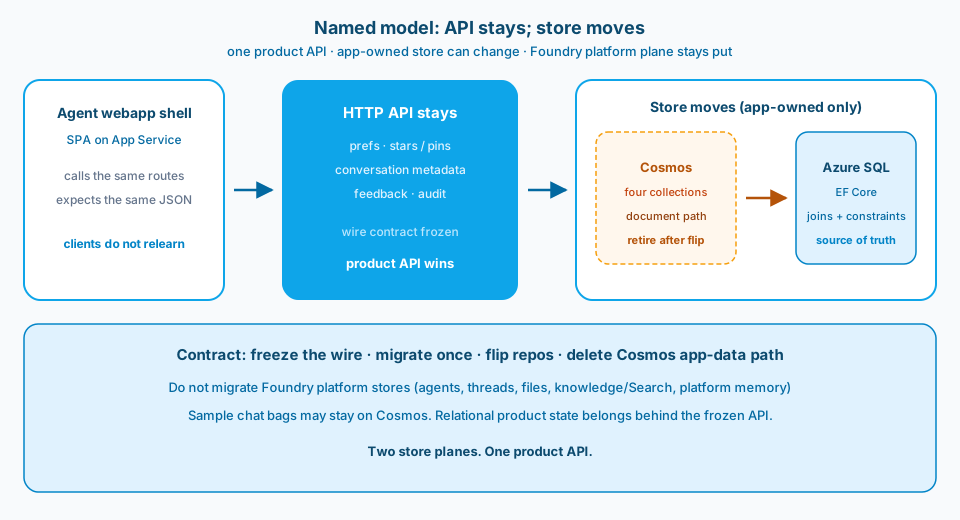
Figure 1. Named model: API stays; store moves. Freeze the wire contract. Move only app-owned collections. Leave Foundry platform stores alone.
Two planes before one engine
Most Cosmos-versus-SQL arguments fail because they mix two planes.
App-owned backend state is what your agent webapp API persists for the product: collections A to D (records keyed by id, an index, and an append-only log). That plane is yours to put on Cosmos, Azure SQL, or something else. Callers care about routes and JSON, not which Azure SKU sits under the repository.
Foundry platform stores are what the service owns: agent definitions and tools, threads and runs, files and knowledge (including Search grounding), and platform memory. Those stay on Foundry. Shipping a Cosmos-to-SQL cutover for the shell's app-owned collections does not mean you re-home platform threads into your App Service database.
Figure 2 draws the boundary. The engine debate applies to the left column only.
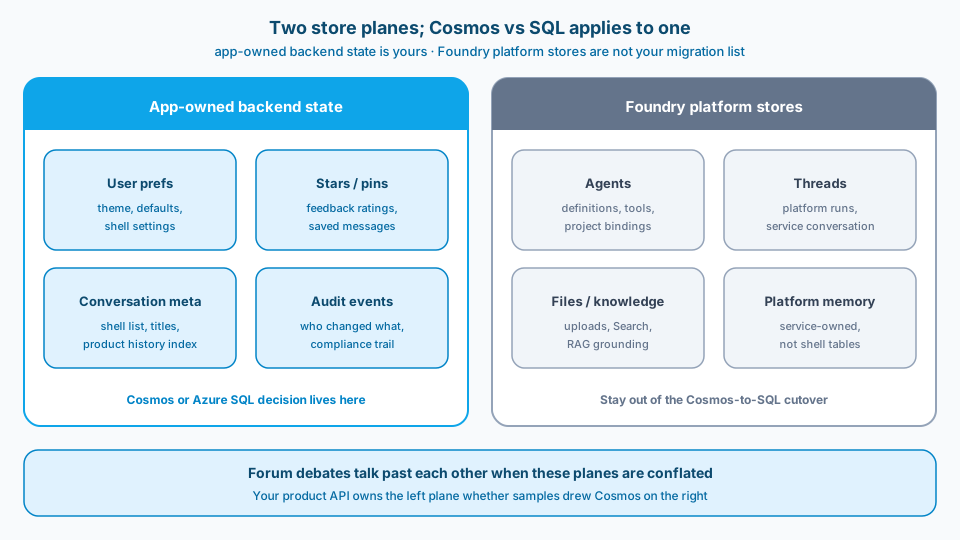
Figure 2. Two store planes. Cosmos versus Azure SQL is a decision about app-owned backend state. Conflating the planes is how forum debates talk past each other.
Why samples default Cosmos (and why that is incomplete)
Ask the Reddit question out loud, then narrow it.
- Where do sample RAG demos put message documents?
- Where does your Foundry-backed agent webapp put product state the SPA and support tools must query?
Cosmos answers (1) often. Message documents are natural, partitioning tutorials are ready, and the architecture diagram looks like the Learn walkthrough. Teams then treat that default as a platform law.
Microsoft Foundry changes the second half. When a published agent experience leaves multi-turn product history with your backend, the shell API becomes the product history plane whether you like Cosmos or not. Community deploy notes already describe persisting threads and messages in Cosmos or Postgres/SQL behind the webapp API. Ownership is not optional. The engine still is.
So keep the sample default as context. Use it to explain why Cosmos appears in diagrams. Do not use it as the ADR for every app-owned table.
When Cosmos, when Azure SQL
Figure 3 is the decision card for the app-owned plane.
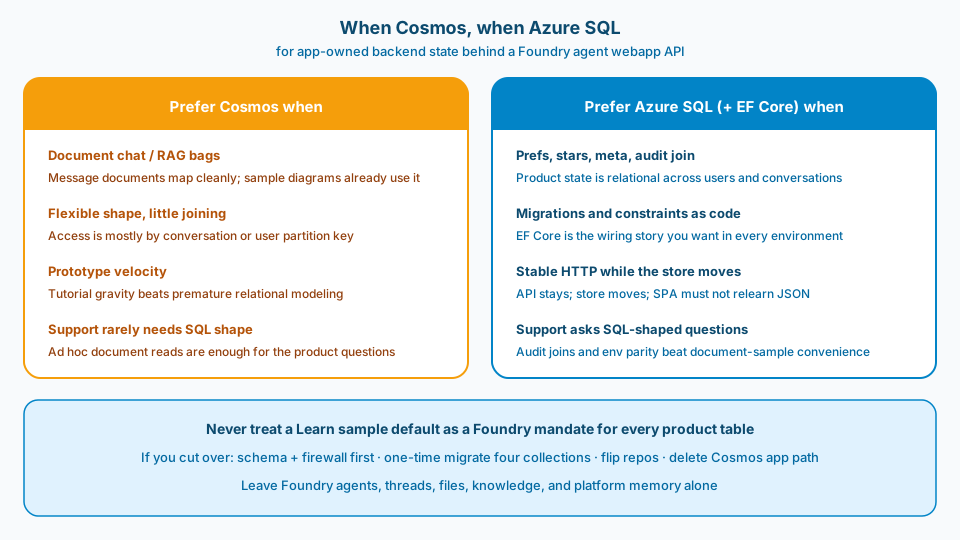
Figure 3. When Cosmos, when Azure SQL. Document bags and sample velocity favor Cosmos. Relational product state and a frozen HTTP cutover favor Azure SQL + EF Core.
Prefer Cosmos when
- The payload is a flexible chat or RAG message bag and the shape still changes week to week.
- Access is mostly by conversation or user partition with little joining across collections.
- You are following a sample and support rarely asks SQL-shaped questions.
- Prototype velocity matters more than migrations-as-code for this slice of state.
Prefer Azure SQL (+ EF Core) when
- App-owned collections must join cleanly with each other.
- You want constraints, EF migrations, and one repository wiring path across local, staging, and prod.
- The SPA contract must stay stable while the store engine changes (API stays; store moves).
- Support and audit teams ask relational questions (who changed what, across which records, for which users).
Never
- Treat a Learn sample default as a Foundry mandate for every product table.
- Migrate Foundry platform stores (agents, threads, files, knowledge, platform memory) into the shell database.
- Leave Cosmos and SQL both live for the same app-data path after cutover.
Defaults are not destiny. Requirements are.
Typical cutover (generic): freeze, migrate, flip, delete
A cutover like this can start when app-owned state sits on Cosmos and a team wants relational ops and one wiring path. The decision is not "Cosmos is wrong for every chat bag." It is "these collections want relational ops and one wiring path."
Ship the cutover as API stays; store moves:
- Freeze the wire. Keep the same routes and JSON for every app-owned collection. Callers should not notice the engine change.
- Schema and firewall first. Introduce Azure SQL tables and EF Core migrations. Prove the firewall path (or a local SQL) so migrations succeed before you debug SPA timeouts.
- One-time migrate. Move collections A to D with parity checks (counts plus sampled payloads).
- Flip repositories. SQL becomes the source of truth behind the same HTTP surface.
- Delete the Cosmos app-data path. Remove credentials and code paths so environments cannot drift back to a second store.
A temporary bridge can help during migrate. A permanent two-store product is how wiring drifts return. Leave Foundry platform stores alone the entire time.
Common mistakes
Treating sample Cosmos as a Foundry mandate. Learn diagrams are teaching aids. Your product state contract is an ADR.
Moving Foundry platform stores with the shell database. Agents, threads, files, knowledge, and platform memory are not more collections on your migration checklist.
Changing JSON shapes during the engine swap. Then every caller bug looks like a database bug. Freeze the wire format first.
Env drift: Cosmos in one environment, SQL in another. Environment-only failures follow. One repository wiring path after cutover.
SQL firewall blocking EF before listen. Local startup never reaches "API is up" if migrations cannot connect. Open the firewall path before you chase SPA timeouts.
Dual-writing forever. A temporary bridge is fine. A permanent two-store product reopens the drift you just closed.
Use as-is or adapt
Use as-is
- Explicit split: app-owned backend state versus Foundry platform stores.
- Decision rule: Cosmos for document bags; Azure SQL when relational product state is the job.
- Stable HTTP + JSON across a Cosmos-to-SQL cutover.
- One-time migrate, flip, delete the old app-data path.
- Firewall and EF migration health before treating the API as ready.
Adapt before you use
Do not rip Cosmos out of a pure message-bag prototype that has no relational pressure just to match this note. Do not "fix chat history" by migrating Foundry threads into your SQL database. Do not leave Cosmos credentials in prod config after the app-data path is gone.
Related
- Microsoft Foundry: How Do You Persist Agent Sessions Outside the Chat Shell? (three clocks: auth, UI, conversation)
- Microsoft Foundry: Is Deploy as Web App Enough, or Do You Need a Backend Proxy? (identity and egress first)
- Agent Shells: How Do You Feature-Toggle Agent Capabilities Across Environments? (default-open with overlays)
- Microsoft Foundry: Private Search MCP Says Name or Service Not Known. DNS or RBAC First? (DNS before RBAC on the private plane)
Sources (community grounding): Why does MS recommend Cosmos for RAG chat history vs Azure SQL?, Foundry published app / store behavior and backend-owned multi-turn state, Deploy Foundry agents: persist threads in Cosmos or Postgres/SQL behind your API, Anyone here using Cosmos DB?.
Sample defaults explain Cosmos in the diagram. Your agent webapp still decides where product state lives. Keep two planes honest. Keep one product API stable. Move only what you own.