


Key takeaways
- Relationship endpoint types must match; mismatches are release blockers.
- Gold and TMDL (or model metadata) for key types change together with a refresh contract.
- Date key and degenerate dim type standards are written and mandatory for new facts.
- CI validates relationship endpoint types in model definitions.
- Role-playing dims are inventoried with FK type rows in repo docs.
- Fixture queries prove non-blank filtering for critical relationships after publish.
Blank visuals are often type mismatches, not proof that "DAX is hard." An int64 fact key next to a string dimension key fails quietly. Role-playing dims multiply the blast radius: one bad FK type breaks several relationships that all looked fine in the diagram.
Align gold SQL and TMDL together. Date keys and degenerate dims deserve explicit type standards. Add a CI check for relationship endpoint types. Matching types is cheaper than another afternoon of staring at empty cards.
Named model: matching endpoints
- Fact FK type: the key on the fact as gold writes it (int64, date key, or string by contract).
- Dim PK type: the matching key on the dimension, same type end to end, including role-plays.
- Role-play inventory: every role (role A, B, C, D) lists dim, fact FK, and type in the repo.
- Gate: gold and TMDL change as one set with a refresh or republish contract; CI asserts left/right types; fixtures prove filters.
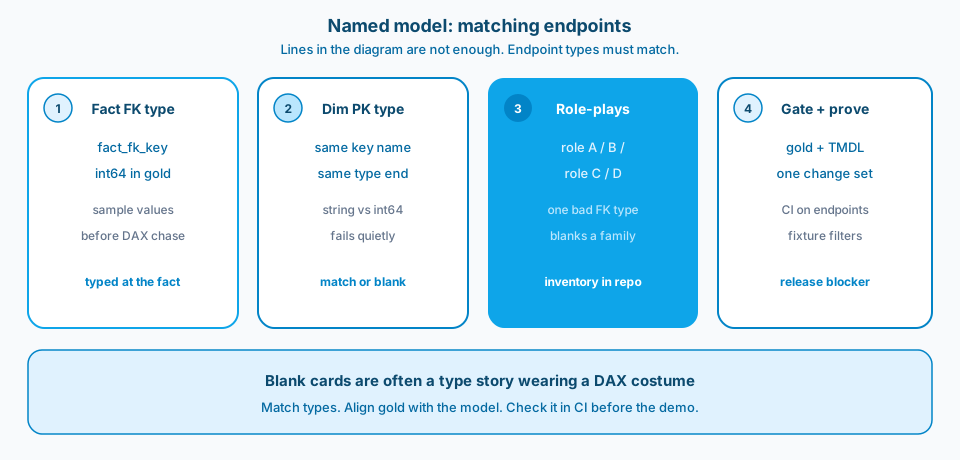
Figure 1. Matching endpoints. Relationship lines in the diagram are not enough. Fact and dim key types must match, including across role-plays, or cards stay blank.
Context and constraint
A common failure: every relationship line is drawn and several still do nothing useful at query time. The fix is not a clever measure. It is making the fact's key and the role-played dim share a type end to end. The visuals populate like they had been waiting politely.
Fix the gold column types and the TMDL (or model metadata) in one change set. File-only TMDL edits without a refresh contract still leave old types in the effective model until you follow through. Standards for date keys and degenerate dims prevent local inventiveness. CI should fail mismatched endpoints the same way it fails broken tests.
Figure 2 is the Learn framing for relationships. Lines can appear while endpoint types disagree.
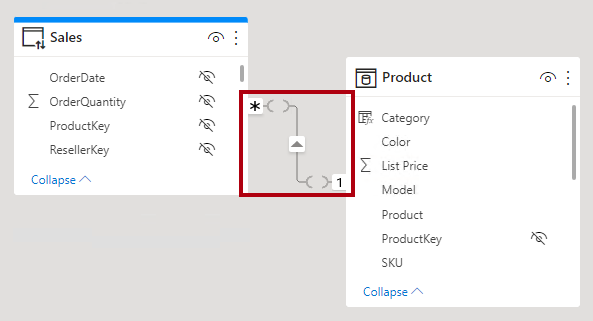
Figure 2. Blank visuals are often int64-versus-string relationship endpoints, not proof that DAX is hard. Source: Microsoft Learn: understand relationships.
Figure 3 is why lake tables and model columns must be typed together when or gold feeds the model.
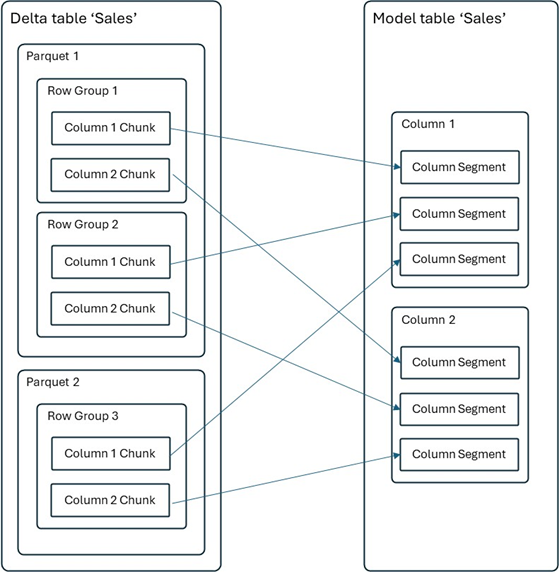
Figure 3. Align gold SQL types and TMDL together, then gate relationship endpoint types in CI. Source: Microsoft Learn: Direct Lake storage.
Design
1. Treat blank visuals as a type mystery first
Before rewriting DAX, inspect relationship endpoint types and sample keys. Confirm whether values would match if types were aligned. Many "filter context" rabbit holes start as int-versus-string. Save DAX archaeology for after types are boring.
2. Inventory role-playing dims as multipliers
Each role-play duplicates risk. List them. Check every FK that points at them. A single stringly typed date role can blank a family of pages. Role-plays are powerful and unforgiving. Figure 4 is the checklist shape worth keeping next to TMDL.
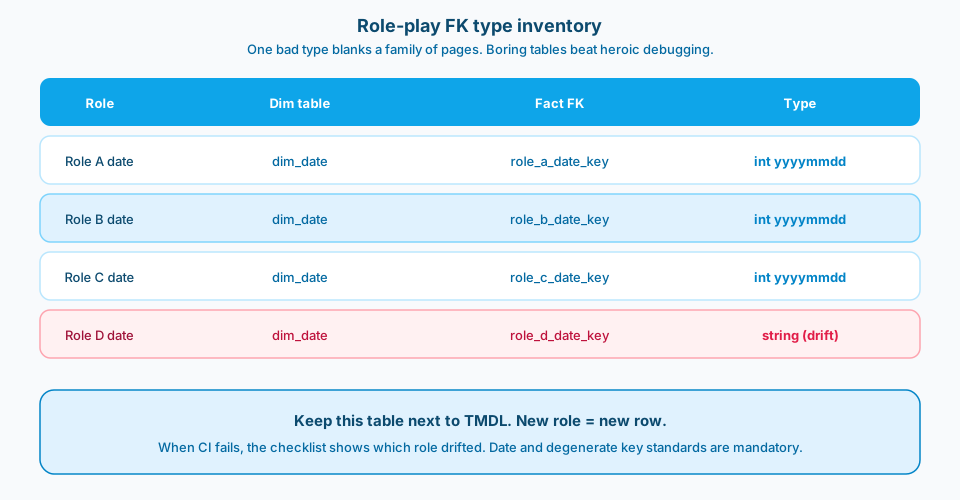
Figure 4. Role-play FK type inventory. New role means a new row. When CI fails, the checklist shows which role drifted.
3. Change gold and TMDL together
If gold casts a key to int64, the model column must be int64 too, and the dimension must match. Ship SQL and model metadata as one PR when you can. Document the refresh or republish steps when the environment requires them. Half-updated metadata is a time bomb. Figure 5 is the safe path versus the half update.
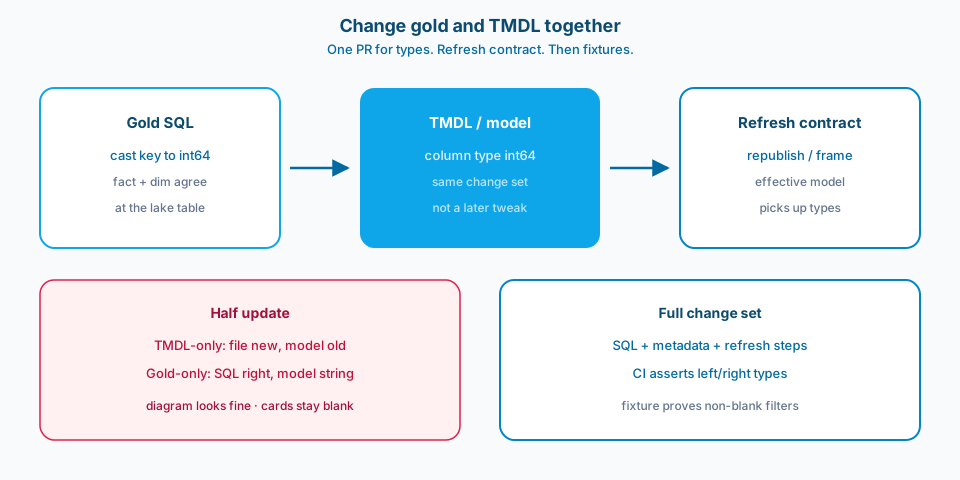
Figure 5. Change gold and TMDL together, then follow the refresh contract. TMDL-only or gold-only fixes leave the effective model mismatched.
4. Standardize date keys and degenerate dims
Pick a rule: int yyyymmdd versus date versus datetime, and stick to it for keys used in relationships. Degenerate dims on facts need the same honesty. Write the standard in the modeling guide so new facts do not invent a fourth approach.
5. Add CI for relationship endpoint types
Parse TMDL or model definition files and assert left/right column types match for each relationship. Fail the build on mismatch. Humans miss these in review when the diagram looks pretty. Machines do not care about pretty.
6. Keep a fixture that proves the relationship filters
Automated model tests or a small DAX query pack should show non-blank results for known keys after publish. Types can match and keys still disagree on content; fixtures catch both classes over time.
A practical repair sequence
Identify the blank visual's driving relationship. Dump endpoint types and five sample values from each side. Align types in gold. Align model metadata. Refresh or republish per your stage rules. Re-run the fixture. Only then consider DAX changes. Write down the sequence in the team runbook so the next blank visual does not restart at step zero with fresh panic.
Degenerate keys deserve the same discipline
Degenerate dims often start as strings "because source." If they participate in relationships or role-plays, pick a type and document it. Changing from string to int later rewrites history in painful ways. Prefer aligning to the source contract early, with explicit casts only at the typing boundary you already chose for bronze or gold keys.
Demo risk is a product risk
Blank visuals in a stakeholder demo destroy trust faster than a late feature. Type mismatches are especially cruel because the model view looks complete. A five-minute endpoint-type check before demos is not paranoia. It is release hygiene. Put it on the demo checklist next to row-count smoke tests.
Failure modes
DAX-first debugging. Days lost; types still wrong.
Diagram confidence. Lines drawn, types mismatched.
TMDL-only fix. File changed; effective model not refreshed.
Gold-only fix. SQL correct; model still typed as string.
Ad-hoc date key styles. Every fact invents a convention.
No CI. Regressions return with the next "quick" dim.
What to copy / what not to copy
Copy
- Relationship endpoint types must match; mismatches are release blockers.
- Gold and TMDL/model metadata for key types change together with a refresh contract.
- Date key and degenerate dim type standards are written and mandatory for new facts.
- CI validates relationship endpoint types in model definitions.
- Role-playing dims are inventoried with FK type rows in repo docs.
- Fixture queries prove non-blank filtering for critical relationships after publish.
Do not copy blindly
Strict type standards constrain flexibility. Flexibility here mostly produces blanks. CI parsing TMDL adds pipeline work; it removes production mystery. Coordinating gold and model PRs can feel slower than "just tweak the file." Slower is fine when the alternative is silent filter failure. Fixture maintenance costs time and prevents demos on empty visuals.
Primary references: Power BI relationship and data type guidance, plus TMDL documentation on Microsoft Learn. Pair docs with CI so the standard is enforced where people actually change models.
Closing
Match endpoint types. Align gold with the model. Standardize keys. Check it in CI. Role-plays stop being haunted, and debugging time returns to actual business logic.