
Key takeaways
- Uncertain and incomplete AI import rows stay deselected until a human opts in.
- Validity rules bind to the live section schema (visible columns), not a hard-coded spreadsheet layout.
- Footer status separates selected count from valid-to-import count.
- Unknown codes require explicit opt-in; never silent closest-master coercion.
- Prompt field schema and UI selection policy version and ship together.
- Import audit logs auto-eligibility, manual opt-in, and unknown acceptance.
Auto-selecting every AI-analyzed row feels helpful. It is how bad master data enters production with a smile. Users trust the model highlight. They click Import. Months later someone asks why an unknown code became a real record.
Treat AI import UX as governance. Default-deny uncertain rows. Bind validity to the live section. Separate selected from valid. Make unknown codes an explicit human act.
Named model: default-deny, section-aware
- Section schema: eligibility reads the columns the active section actually shows, including conditional fields, using the same metadata that renders the form.
- Default-deny: pre-check only rows that pass validity. Partials and unknowns start unchecked and need deliberate opt-in.
- Dual footer: show selected and valid-to-import as two numbers so the policy is legible without a training deck.
- Unknown opt-in: present unmatched codes as unknown; keep the row deselected until create or map is accepted under authority.
- One surface: change extraction prompt fields and UI selection rules in the same change whenever possible.
- Audit: log auto-eligible, manual opt-in, and unknown acceptance so stewards can reconstruct intent later.
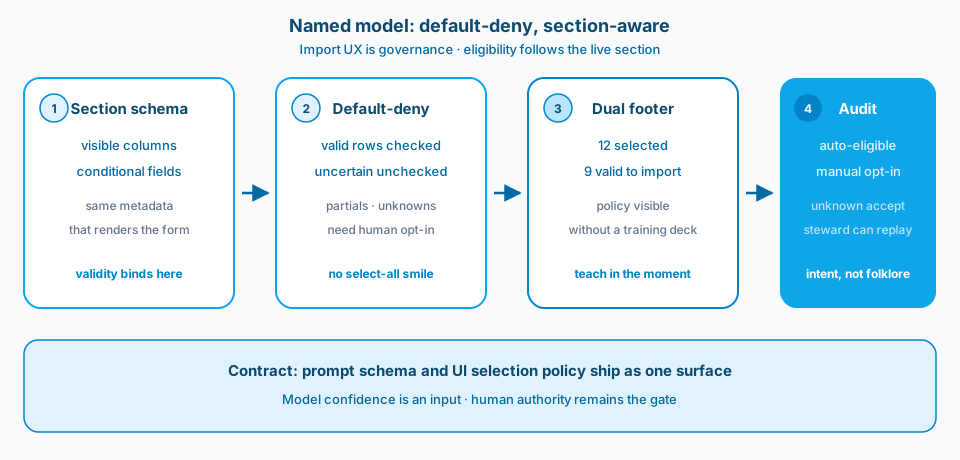
Figure 1. Named model: default-deny, section-aware. Eligibility follows the live section. Uncertain rows stay unchecked. Selected and valid are two numbers. Opt-ins leave an audit trail.
Context and constraint
The pattern shows up in AI import flows where the model is decent and the selection policy is reckless. Complete rows mixed with partial guesses, all pre-checked. Operators imported at speed. Data stewards cleaned for quarters.
Section-aware import means the validity rules read the columns the user actually sees for that section, including conditional fields. Hard-coded layouts rot the first time the form changes. Deliberate opt-in for unknown codes beats silent coercion into "closest" master values.
Figure 2 is the Learn surface where the extraction contract is chosen. That field list must match what the UI can validate and display.
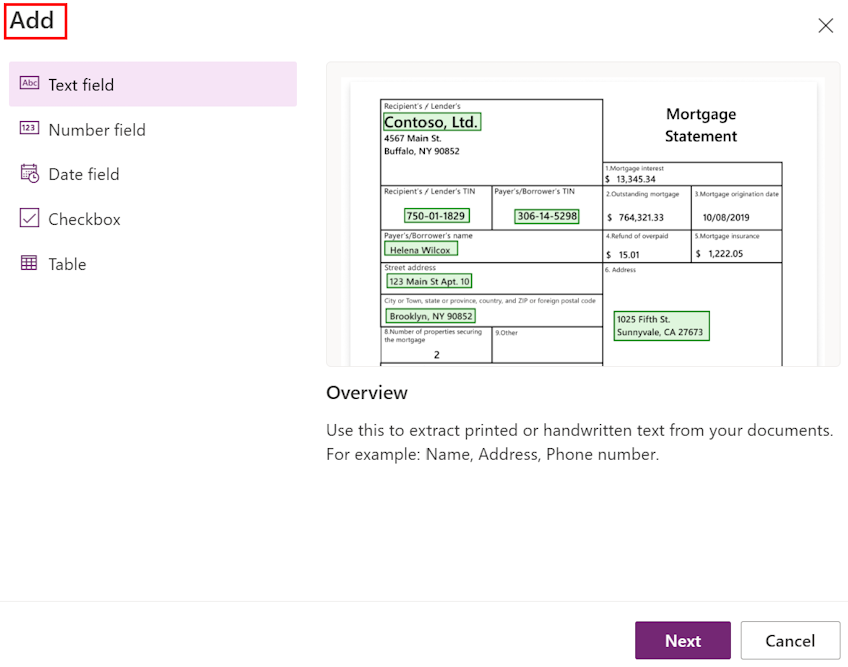
Figure 2. Import UX is governance. Selection policy and field validity belong with the live schema, not a default-select-all. Source: Microsoft Learn: create a document processing model.
Figure 3 is the document-type step. Who may import, and which rows count as valid, should be enforceable policy rather than a UI suggestion.
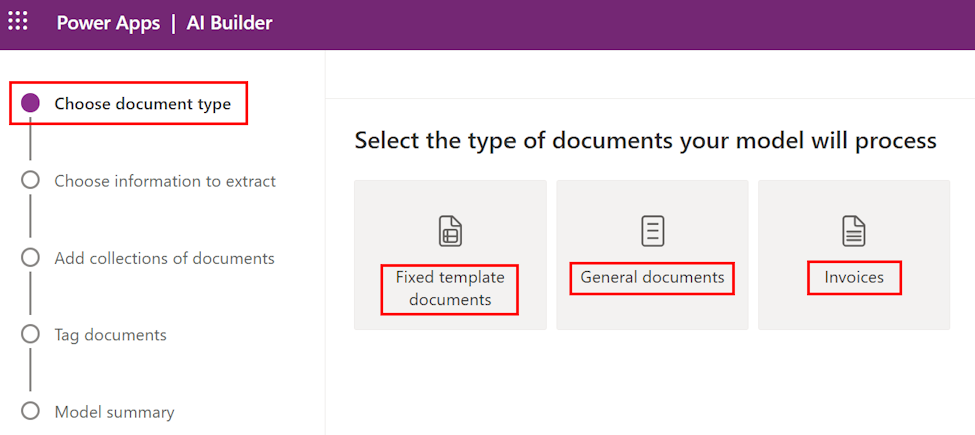
Figure 3. Who may import, and which rows count as valid, should be enforceable policy rather than a UI suggestion. Source: Microsoft Learn: create a document processing model.
Design
1. Default-deny uncertain and incomplete rows
Pre-select only rows that pass validity for the active section. Everything else starts unchecked. Make opt-in explicit for partials and unknown codes. Speed comes from confidence, not from selecting the whole page by default.
2. Validity follows the live section schema
If a section hides columns, do not require them. If it shows them, enforce them. Bind rules to the same metadata that renders the form. Spreadsheet-shaped assumptions belong in tests as fixtures, not as the only source of truth in code. Figure 4 is that binding drawn as two sections.
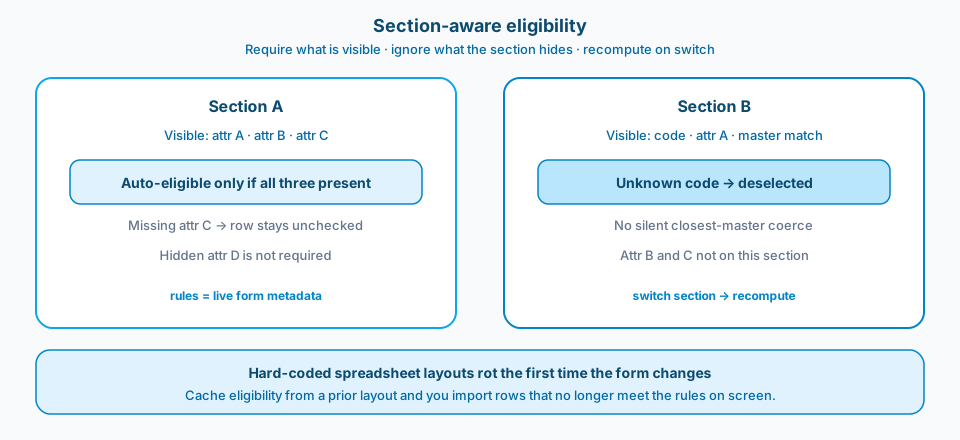
Figure 4. Section-aware eligibility. Require what is visible. Ignore what the section hides. Recompute when the user switches section. Cached rules from a prior layout are how you import rows that no longer meet the rules on screen.
3. Footer: selected versus valid to import
Show both numbers. "12 selected, 9 valid" teaches the policy without a training deck. Disable Import when selected includes invalids, or require a second confirmation that lists the exceptions. Pick one pattern and keep it stable. Figure 5 is the dual count made visible.
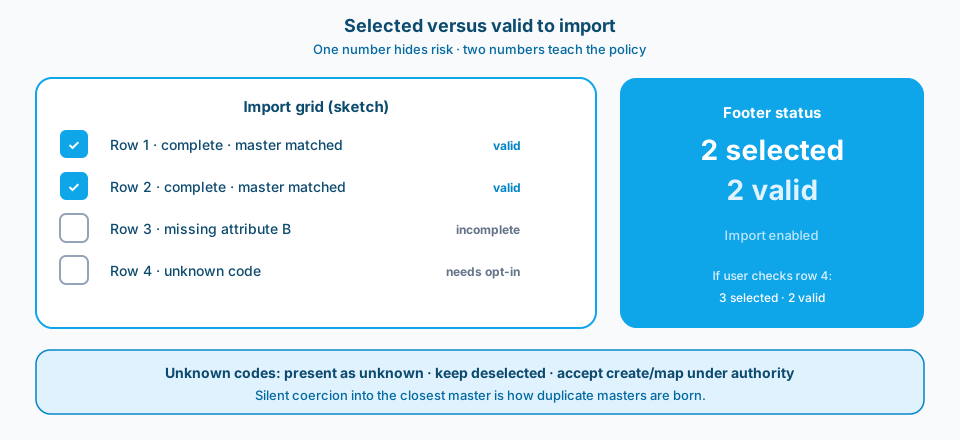
Figure 5. Selected versus valid to import. One number hides risk. Two numbers teach the policy. Unknown codes stay deselected until create or map is accepted under authority.
4. Unknown codes need deliberate opt-in
When AI proposes a code not in master data, do not coerce. Present it as unknown and keep the row deselected until the user accepts creating or mapping it under their authority. Silent coercion is how duplicate masters are born.
5. Prompt schema and UI policy ship together
The extraction prompt's fields must match what the UI can validate and display. If the prompt invents columns the section does not have, you get beautiful JSON and unusable rows. Change prompt and selection rules in one PR whenever possible.
6. Audit the import decision, not only the payload
Log which rows were auto-eligible, which were manually opted in, and which unknowns were accepted. Governance questions arrive later. Your log is the answer.
Section-aware rules in concrete terms
A section that shows attribute A and attribute B requires both before a row is auto-eligible. A section that hides attribute C must not block import for its absence. When the user switches section mid-session, recompute eligibility. Caching validity from a previous layout is how you import rows that no longer meet the rules on screen. Bind eligibility to what is visible now.
Pair AI confidence with human authority
Model confidence scores are inputs to eligibility, not replacements for policy. A high-confidence wrong code is still wrong. Combine confidence thresholds with schema validity and master-data membership. When those disagree, prefer deny and show why. Operators then spend attention on the ambiguous tail instead of rechecking rows the platform already trusts. That allocation is the governance win: human time on uncertainty, machine speed on the clear majority.
Why "helpful" defaults fail stewardship
Pre-checking every AI suggestion optimizes for the happy path in a demo script. Production imports are full of partial OCR, ambiguous codes, and sections with conditional required fields. Stewardship needs friction on uncertainty. The UI should make the safe path the fast path: confident rows import quickly; uncertain rows require a conscious click. That single inversion prevents months of master-data cleanup disguised as business as usual.
Train operators on why rows start unchecked. Without that one-minute explanation, people fight the defaults and reintroduce select-all habits through muscle memory. Governance UX only works when the policy is legible in the moment of import.
Failure modes
Select all by default. Fast import, slow regret.
Hard-coded column lists. Form changes; validation lies.
One status number. Users cannot see why Import is risky.
Closest-match coercion. Wrong master, confident UI.
Prompt drift without UI update. Extracted fields nobody validates.
No audit of opt-ins. Stewards cannot reconstruct intent.
What to copy / what not to copy
Copy
- Uncertain and incomplete AI import rows default deselected.
- Validity rules bind to live section schema and visible columns.
- Footer separates selected count from valid-to-import count.
- Unknown codes require explicit opt-in; no silent coercion.
- Prompt field schema and UI selection policy version together.
- Import audit includes eligibility, opt-in, and unknown acceptance.
Do not copy blindly
Default-deny feels slower in demos. It is faster than master-data cleanup. Section-aware rules need metadata plumbing. The alternative is brittle layouts. Dual footer counts add a bit of UI complexity and remove ambiguity. Strict unknown handling requires a path to create or map codes; without that path users invent workarounds. Logging opt-ins has privacy and retention implications; define them.
Primary references: Microsoft Learn on AI Builder and document processing models, plus Power Apps forms and controls guidance. Pair with your master-data ownership rules so UX policy matches stewardship.
Default-deny uncertain rows. Bind validity to the live section. Separate selected from valid. Make unknown codes an explicit human act. That is how import UX protects the platform instead of flattering the demo.