

Key takeaways
- Fabric executes the work; Airflow owns schedule, graph, retries, and alerts.
- Success means Fabric terminal state, not trigger acceptance.
- Prefer many thin tasks named for the pipeline step.
- Put quality gates in the DAG where they are visible.
- Do not rebuild Fabric transforms inside Airflow operators.
- Reach for Airflow when cross-job dependencies need an honest graph.
Yes, when you treat them as two planes. Fabric should do the work. Airflow should own the schedule, the dependency graph, retries, and the on-call story of the run.
Airflow earns its place when a Fabric environment looks fine in the portal and still falls apart because three jobs have to finish before a fourth can start. Native schedules handled single jobs. They did not explain a graph. Collapsing coordination into notebooks made every change feel riskier than the transform itself.
Named model: two planes
- Execution plane (Fabric): notebooks, pipelines, work, warehouse ops, semantic refresh.
- Orchestration plane (Airflow): schedule, dependencies, retries, alerts, run history humans can read.
- Contract: each Airflow task waits for Fabric terminal state, not trigger acceptance.
- Shape: many thin tasks named for the pipeline step; quality gates are visible DAG steps.
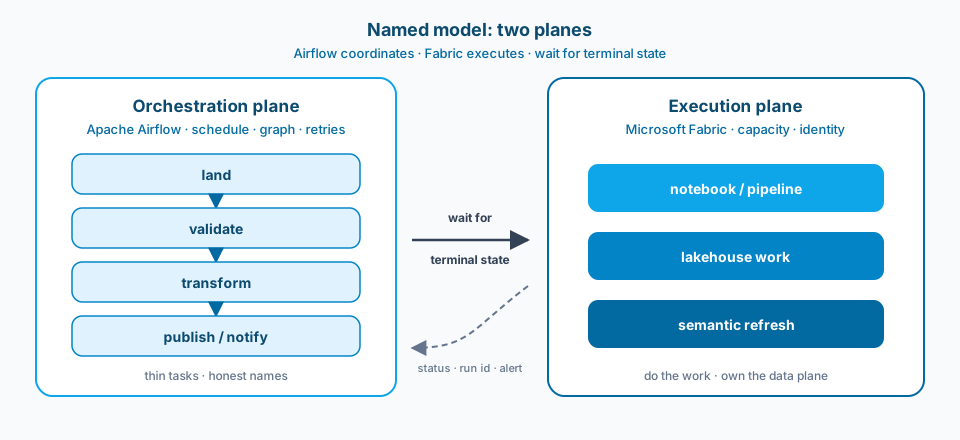
Figure 1. Airflow coordinates, Fabric executes. The solid arrow is wait for terminal state. The dashed return is status, run id, and alert text. Not fire and forget.
Context and constraint
Fabric notebooks and pipelines are strong at doing work. They are weaker as the calendar and dependency graph for everything around them. The moment the path is land, validate, transform, publish, you need an orchestration plane that is not pretending to be another transform engine.
Airflow fits when you want an honest DAG. Keep tasks thin. Call Fabric. Do not rebuild Fabric inside operators because it was convenient on a Friday. If you start reimplementing transforms in Airflow Python, you have created a second source of truth. Convenience is how orchestration layers go thick and then opaque.
Fabric Airflow jobs make that split concrete in the product surface. Figure 2 is the Learn tile that starts a DAG whose job is to run a Fabric item, not to host the Spark logic. The orchestrator stays thin on purpose.
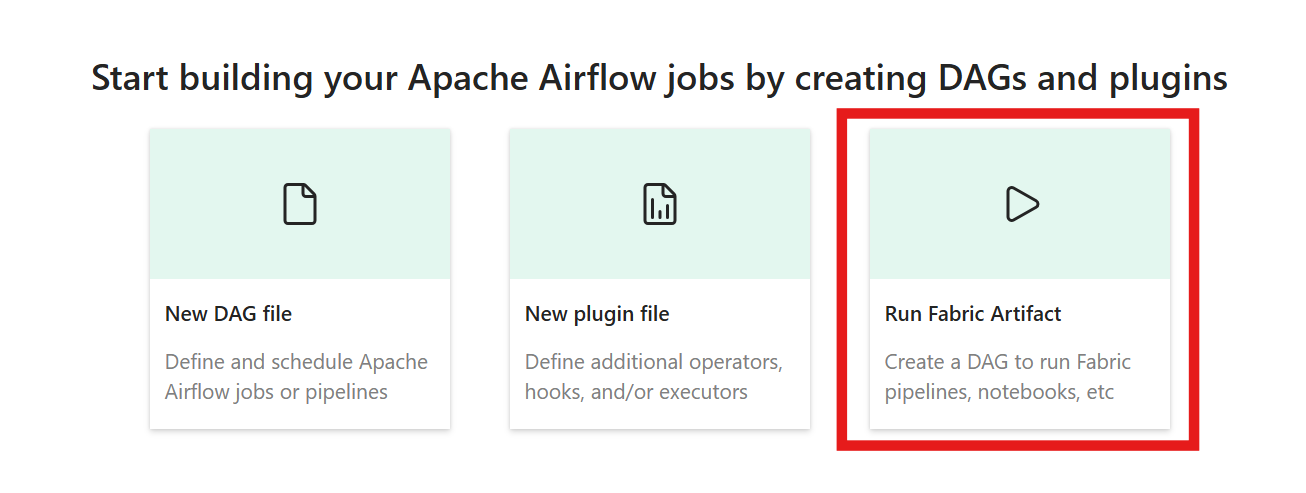
Figure 2. Start from Run Fabric Artifact when the DAG should trigger notebooks or pipelines without stuffing transform logic into the orchestrator. Source: Microsoft Learn: run a Fabric item using Apache Airflow.
Design
1. One DAG, thin tasks, honest names
Map the flow so a new hire can read it without a walkthrough: land, validate, transform, publish, notify. Each task should do one clear thing. If a task grows into everything after bronze, you lose clean retries and you lose the ability to say which step actually failed. Prefer many small operators that call Fabric over one giant operator that hides a private workflow. Figure 3 shows the shape difference.
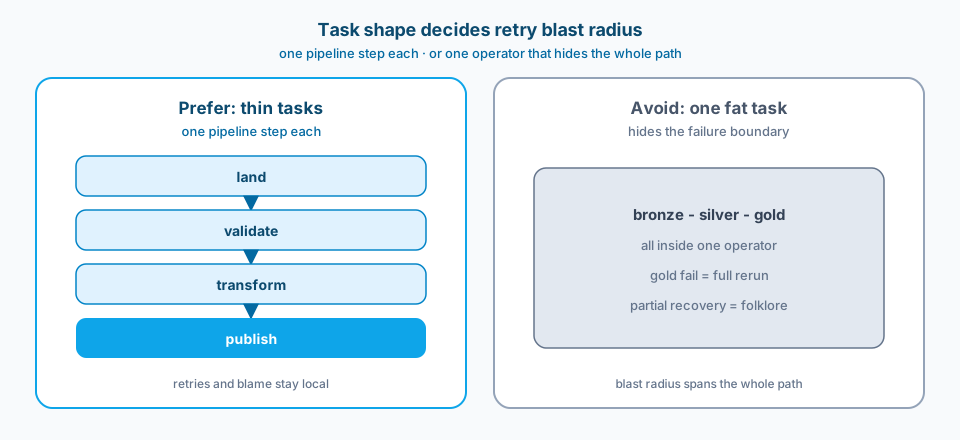
Figure 3. Thin tasks keep retries and blame local. One fat bronze-to-gold operator turns a gold failure into a full rerun.
2. Fabric executes; Airflow coordinates
Trigger Fabric jobs, pipelines, or notebooks from Airflow. Do not copy the Spark logic into Airflow Python for speed. The execution plane stays in Fabric where capacity, identities, and lakehouse bindings already live. Airflow should pass parameters, wait for completion, and react to status. When status is ambiguous, fix the Fabric job contract. Do not paper over it with longer sleeps. Figure 1 is the ownership split; Figure 2 is the product entry point that keeps transforms out of the DAG.
3. Explicit success and failure contracts
Every task needs a definition of done that is checkable: row counts, file presence, quality gate pass, pipeline status, semantic refresh state. "It ran" is not a contract. Partial success without a named gate is how gold tables get refreshed from incomplete silver. Put the gate in the DAG where it is visible, not only in a notebook comment. Figure 4 is the contract that matters most between the planes.
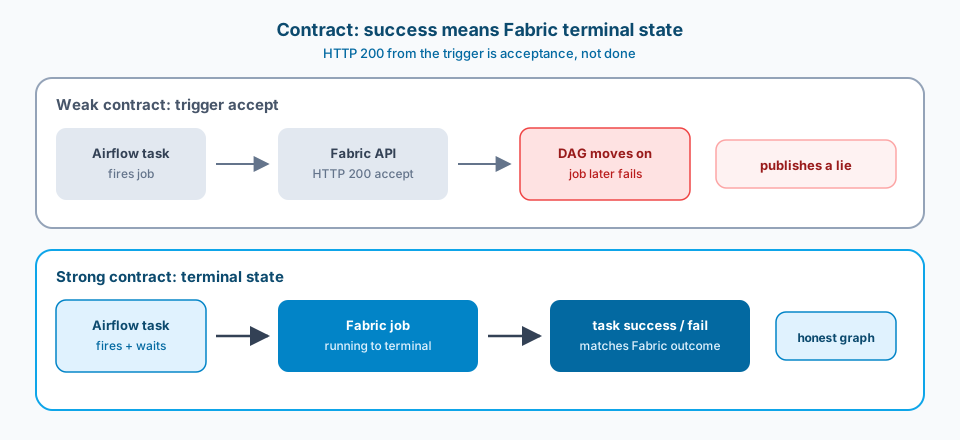
Figure 4. HTTP 200 from the trigger is not done. Wait for Fabric terminal state, then mark the Airflow task success or fail.
4. Retries that match the failure type
Transient platform blips deserve automatic retry with backoff. Bad data and broken schemas do not. Treat validation failures as terminal for that run unless you have a deliberate quarantine path. Blind retries on quality failures burn capacity and hide the real incident under a green looking retry storm.
5. Observability that names the step
Operators, run ids, and alert text should point at the failing Fabric artifact and the DAG task in the same message. A ping that says "pipeline failed" without the task id and the Fabric run url forces people to reconstruct context under pressure. Design the alert as part of the DAG, not as an afterthought in a shared mailbox rule.
Figure 5 is the monitoring surface that makes that contract readable: task id, operator, status, and duration for a Fabric item run. When the DAG waits for terminal state, this view and the Fabric run history should agree.
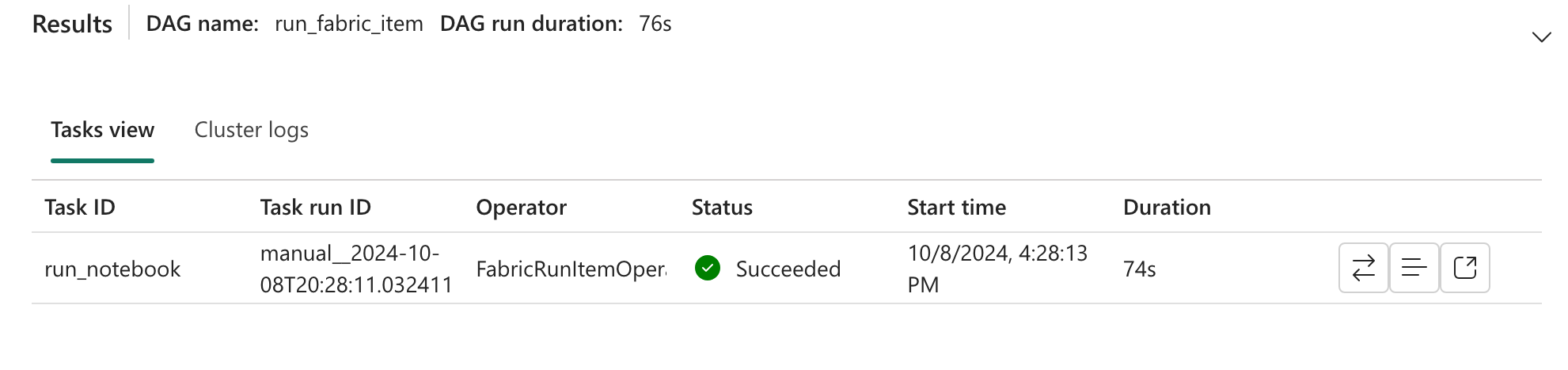
Figure 5. Tasks view for a Fabric item run: task id, operator, status, and duration in one place. Source: Microsoft Learn: run a Fabric item using Apache Airflow (Monitor your DAG).
6. Environments as parameters, not forks
Dev, Test, and Prod should be the same DAG shape with different Fabric targets, identities, and schedules. Copy pasted DAGs per environment drift on the first hotfix. Parameterize workspace, lakehouse, and connection ids the same way you would parameterize a Fabric deploy. Pretty names change. Ids should be the contract.
Failure modes
Orchestrator does the transform. Airflow notebooks or Python operators slowly recreate what Fabric already owns. Now you have two places to patch logic and no single owner. Figure 2 exists so you do not take that path by default.
One fat task for the whole path. Failure at gold forces a full rerun from bronze. Time and cost explode. Partial recovery becomes folklore. Figure 3 is the blast radius made visible.
Hidden dependencies outside the DAG. A refresh that someone runs after lunch is still a dependency. If it is not in the graph, on-call will learn about it from a broken report, not from Airflow.
Success means HTTP 200 from a trigger. The trigger accepted the job. The job later failed. Your DAG already moved on. Wait for terminal state, or you will publish lies. Figure 4 is the weak contract versus the strong one.
Secrets and identities living in two places. Airflow connections and Fabric workspace identities disagree. Runs work on one laptop schedule and fail in the shared environment. Centralize how service principals and key vault references are bound.
Alerts without a step name. A mailbox ping that cannot name the DAG task and the Fabric run leaves people reconstructing context under pressure. Figure 5 is the minimum surface the alert should point back to.
What to copy / what not to copy
Copy
- Fabric owns data plane work; Airflow owns schedule, dependency, retry, and alert contracts.
- Tasks are single-purpose and named for the pipeline step, not for the tool call.
- Terminal state of the Fabric job is the task success condition, not trigger acceptance.
- Quality gates are explicit DAG tasks with defined fail behavior.
- Environment targets are parameterized; no forked DAGs per stage.
- Alerts include DAG task id, Fabric run url, and the artifact that failed.
- No transform logic duplicated into Airflow operators without a written exception.
Do not copy blindly
Airflow adds another runtime to operate: workers, schedulers, package versions, and network paths into Fabric APIs. That cost is real. For a single nightly notebook with no dependents, Fabric native scheduling may be enough. Reach for Airflow when cross-job dependencies, shared SLAs, or multi-system coordination show up.
You will also negotiate ownership. Platform teams often want Fabric-native orchestration. Data engineers often want DAG readability and ecosystem operators. Pick based on the dependency graph you must explain, not on which demo looked smoother in a workshop.
API throttling matters when many DAGs poke the same Fabric environment. Set concurrency limits before you scale hourly jobs.
Related
Next in the Microsoft Fabric series: lakehouse topology choices after the orchestration contract is honest. Start with One lakehouse with schemas vs many lakehouses when workspace and schema boundaries are the next decision.
Primary references: Microsoft Learn on Fabric Data Factory and pipelines, notebooks in Fabric, run a Fabric item using Apache Airflow, and Apache Airflow docs on DAGs and tasks.
Workload. Schedule. Contract. Three concerns. Two tools. One readable DAG.