20 posts tagged with "Toolkits"

Reusable starter kits, checklists, and templates for faster engineering execution.

View All Tags

Env files are not environments: isolate with Azure CLI discipline

· 6 min read
Sai Prudhvi Neelakantam
Senior Consultant, Data Engineering & AI at Evidi

Six nearly identical .env.example files feel thorough. They guarantee drift. Someone updates three. Prod still reads the fourth. Agents and humans resolve different paths. The repo looks configured. The cloud is the actual environment, and nobody agrees which subscription is live.

Treat Azure CLI context (subscription, resource group, identity) as the isolation boundary. Keep a small set of live env files plus stage templates that document names, not secrets. POC and MVP can share product code while keeping separate deploy stages.
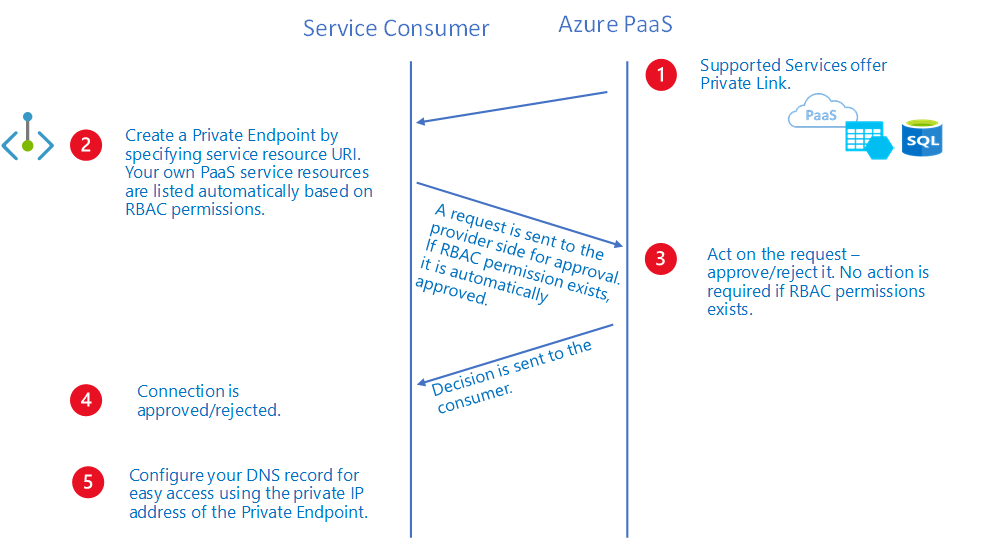
Private Link PaaS workflow diagram

Figure 1. Cloud isolation is subscription, resource group, identity, and network posture. Env files only describe names. Source: Microsoft Learn: private endpoint overview.
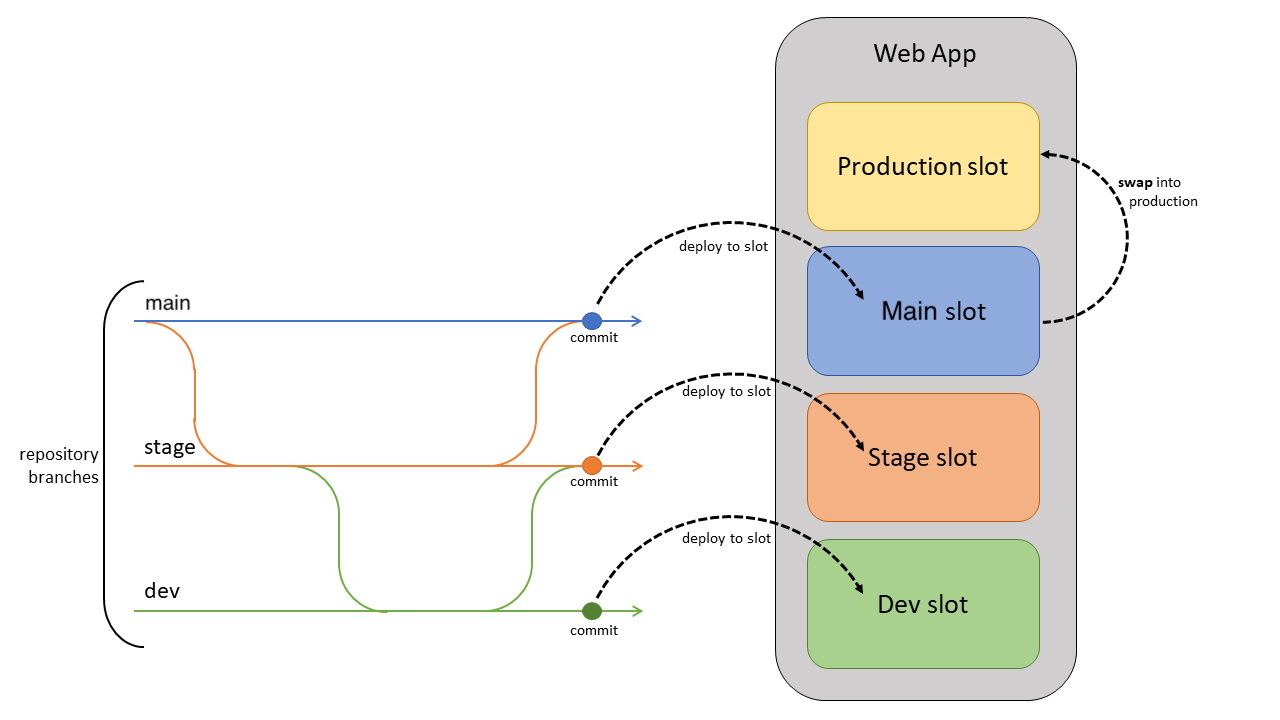
App Service deployment slot flow diagram

Figure 2. POC and MVP can share product code while keeping separate deploy stages and Azure CLI contexts. Source: Microsoft Learn: App Service deploy best practices.
Rename the estate once: workspace naming is architecture

· 5 min read
Sai Prudhvi Neelakantam
Senior Consultant, Data Engineering & AI at Evidi

Inconsistent workspace display-name prefixes look cosmetic until CI bindings, support scripts, and onboarding docs all grow translation layers. Every new engineer learns a dialect map. Every pipeline encodes yesterday's politics in a string.

Rename the estate once. Display names are for humans; catalog and lakehouse names may stay stable on purpose. Prefix chaos multiplies CI, docs, and scripts. Do the rename as a program with an old-to-new map. Strip legacy vendor codes when they no longer mean ownership. Naming standards belong in platform docs next to Variable Library maps. Perpetual translation is more expensive than a planned rename.

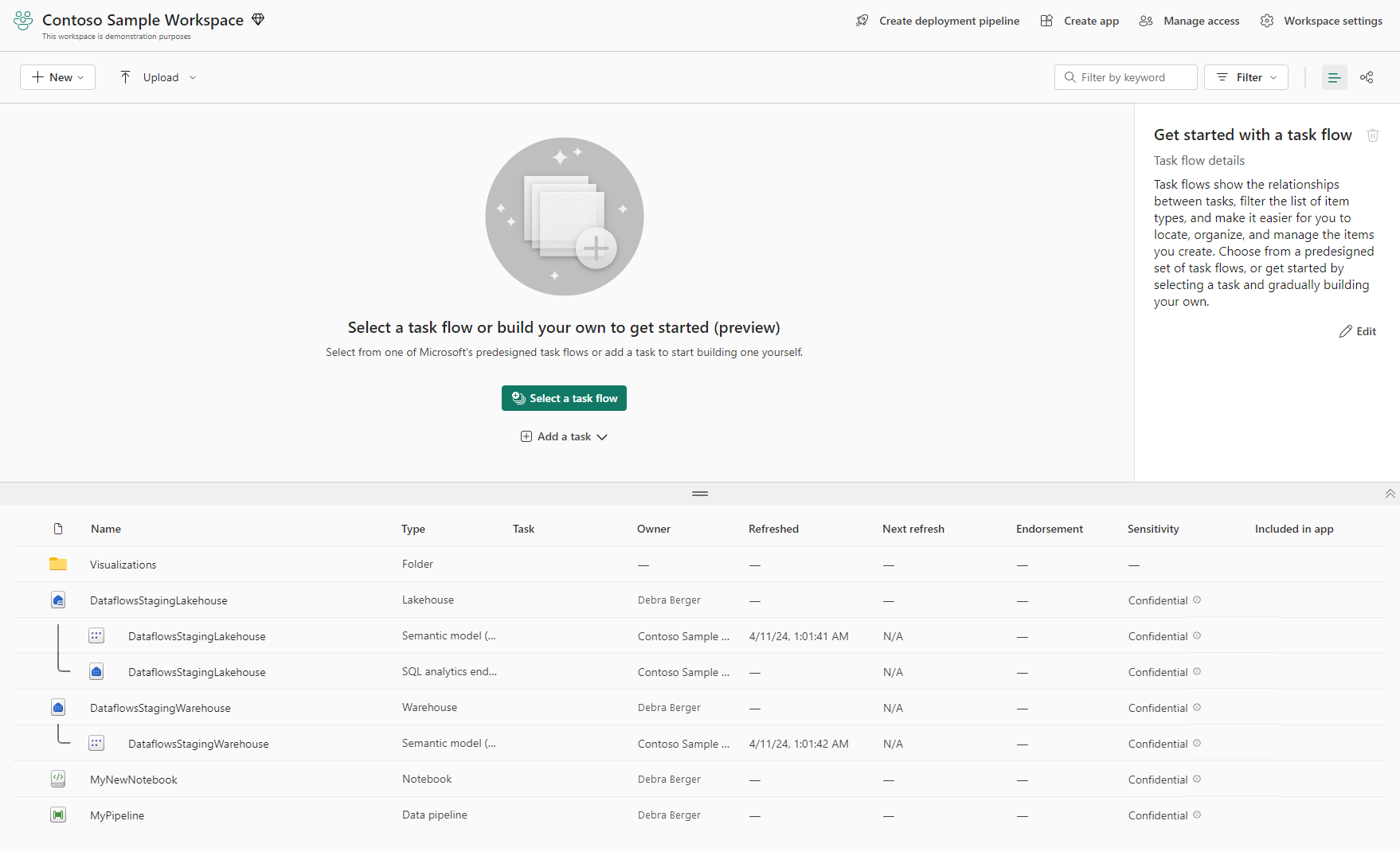
Microsoft Fabric workspace page

Figure 1. Workspace and lakehouse naming is estate architecture. Display names should guide humans without freezing bad prefixes forever. Source: Microsoft Learn: workspaces.

Feature toggles beat hard-coded agent IDs

· 6 min read
Sai Prudhvi Neelakantam
Senior Consultant, Data Engineering & AI at Evidi

Multi-agent shells rot when every new assistant becomes an if-else on agent ids. Microcopy forks. Export prefixes fork. Access checks fork. Soon the SPA is a customer-specific catalog pretending to be a product.

Default-open with overlays. Product feature flags gate shared UX. Per-agent overlay rows carry scope, starters, export prefixes, and access arrays. The SPA never parses JWTs to invent policy. White-label cores stay clean because domain agents are data, not code forks. Test matrices expand by flag, not by customer branch.

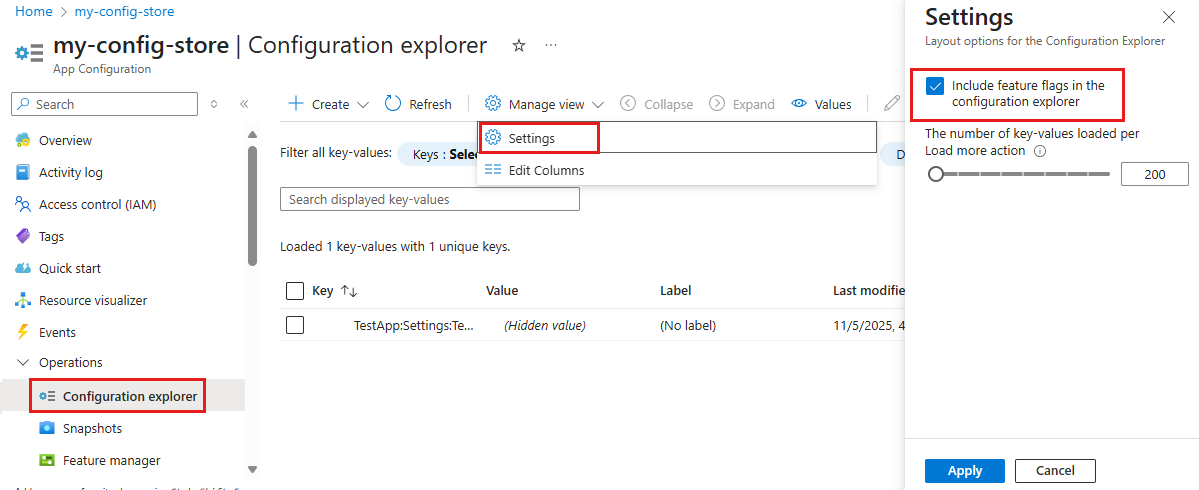
Feature flag configuration explorer in Azure App Configuration

Figure 1. Shared shell UX is a product feature. Agent differences belong in overlay flags the API already authorizes. Source: Microsoft Learn: manage feature flags.

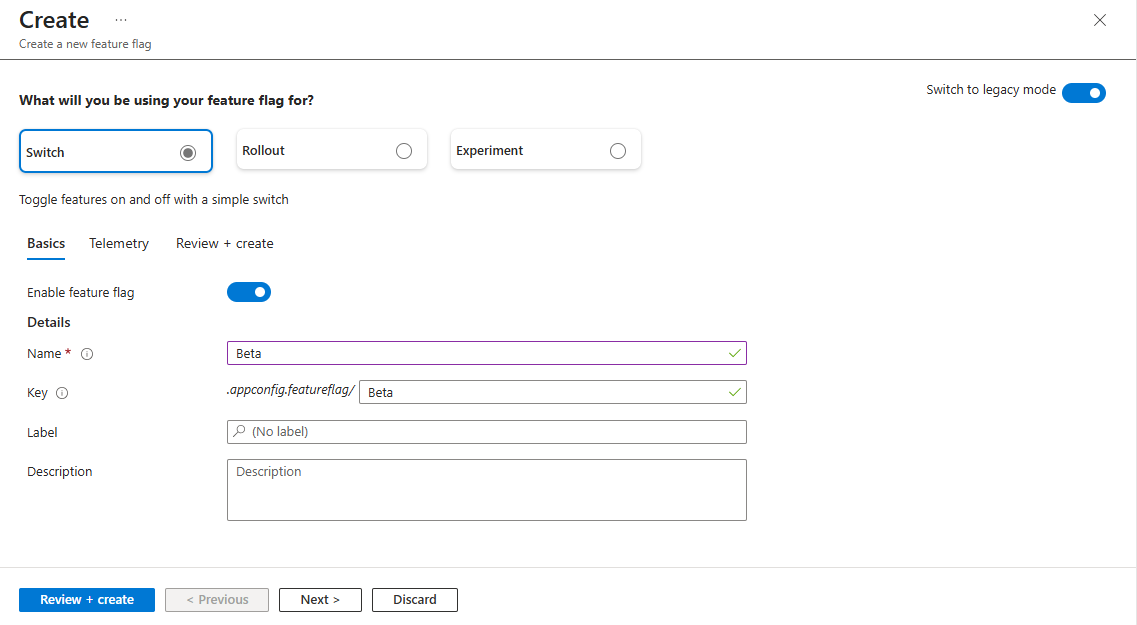
Create a feature flag switch in Azure App Configuration

Figure 2. Feature flags gate surfaces. App roles still decide what the catalog may show. The SPA should not invent policy from JWTs. Source: Microsoft Learn: manage feature flags.

Language gates belong in CI, not in code review folklore

· 6 min read
Sai Prudhvi Neelakantam
Senior Consultant, Data Engineering & AI at Evidi

Locale bugs and copy regressions show up in demos, not in polite Slack reminders. White-label shells make it worse: a forbidden customer string in core, a hard-coded English-only prompt overlay, a missing translation key that only fails in one market.

Put language gates in CI. Native linters in the pipeline beat optional pre-commit hooks for shared agent repos. Gates should cover prompt overlays and UI strings. Fail fast on forbidden customer hardcoding in core packages. Keep the gate list short enough that people do not bypass it. Locale and copy regressions are product bugs, not translation tickets filed after the fact.

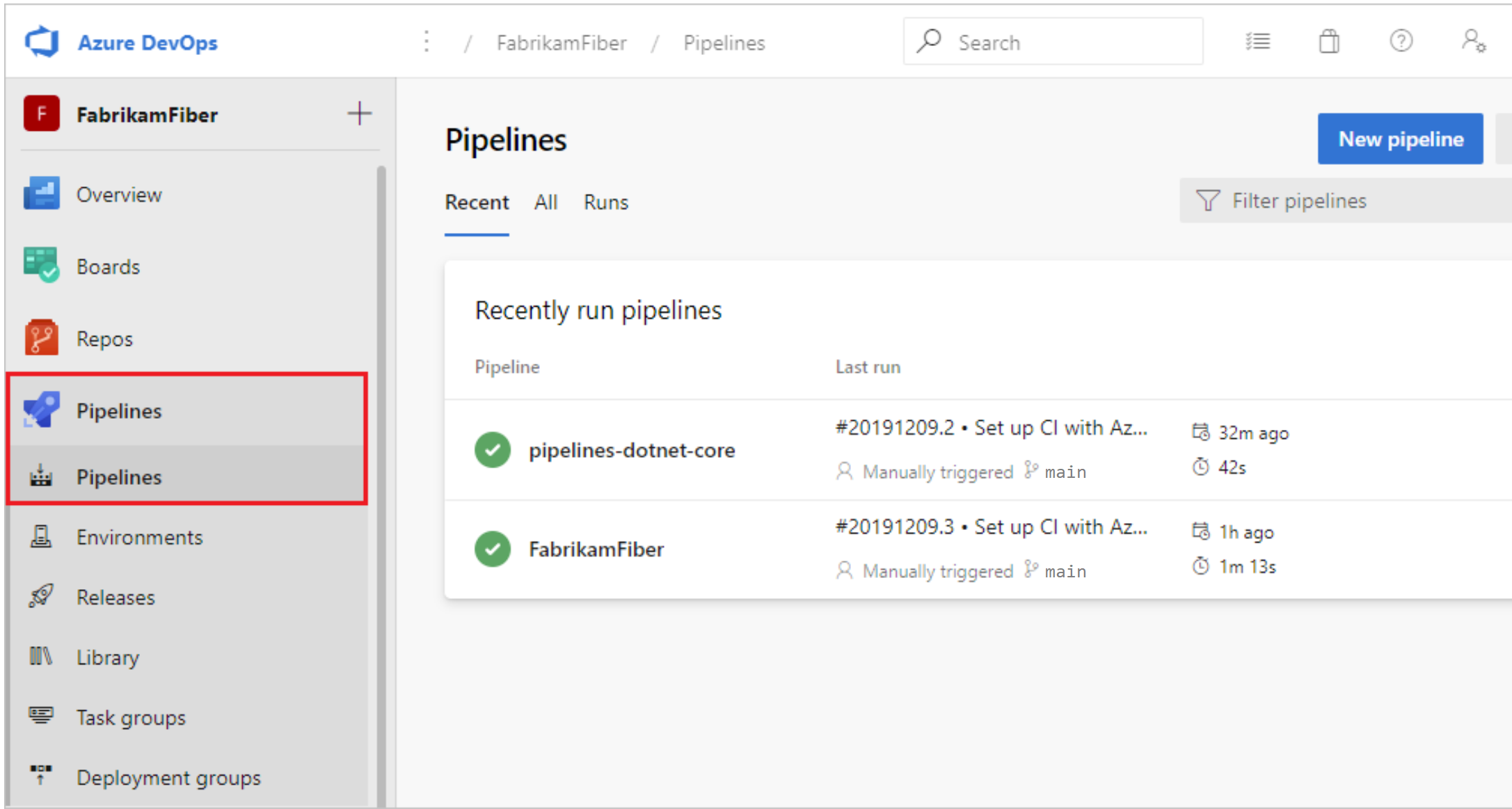
Azure Pipelines overview

Figure 1. Locale and copy regressions are product bugs. Put the gates in CI where unwilling enforcement actually runs. Source: Microsoft Learn: what is Azure Pipelines.

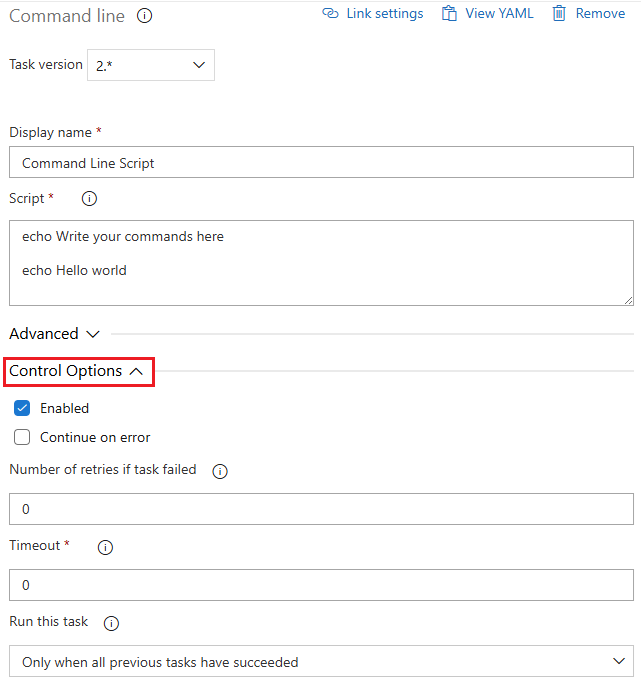
Azure Pipelines task control options

Figure 2. Native linters and short language tests beat optional hooks that disappear under release pressure. Source: Microsoft Learn: pipeline tasks.

Genie readiness is a modeling problem, not a prompt problem

· 6 min read
Sai Prudhvi Neelakantam
Senior Consultant, Data Engineering & AI at Evidi

Teams ask how good the data needs to be before conversational analytics helps. The honest answer: good enough that a careful analyst would trust the same tables without a chat UI.

Prompts cannot rescue ambiguous grain, cryptic column names, or missing relationships.

Lakehouse analytical surface

Figure 1. Conversational tools sit on top of curated analytical structures. Source: Microsoft Learn: lakehouse overview.

Type each column once, as early as you dare

· 6 min read
Sai Prudhvi Neelakantam
Senior Consultant, Data Engineering & AI at Evidi

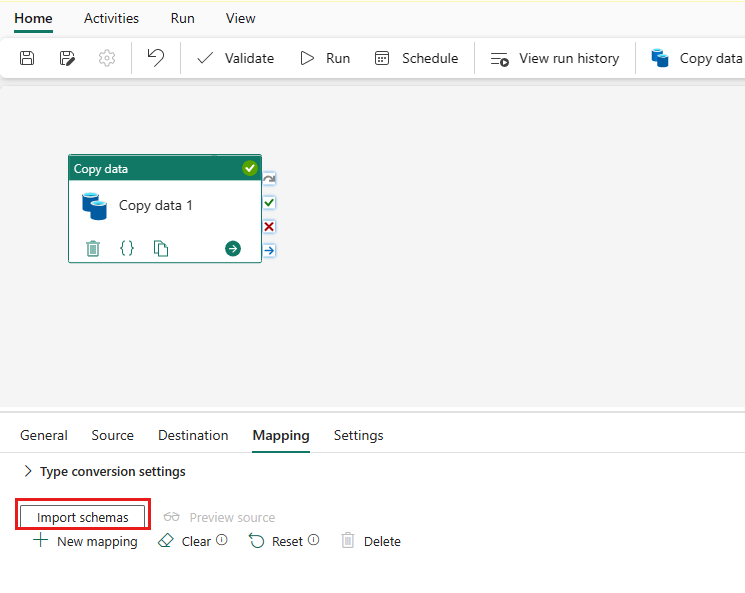
Re-CASTing the same physical column in every medallion layer feels careful. It is usually how drift multiplies. Bronze casts to decimal. Silver casts again "to be safe." Gold casts a third time and invents an unknown literal with yet another type. Consumers inherit a guessing game.

Type each published column once, as early as you dare (usually bronze, sometimes the first stable clean view). Silver and gold keep aliases, business calculations, and typed unknown-row literals only. UNION alignment casts are the exception, not the lifestyle. Lint the rest.

Configure column mapping in a Fabric pipeline

Figure 1. Type each column once, as early as you dare. Downstream layers should inherit the contract, not reinvent CASTs. Source: Microsoft Learn: copy data activity.

AI import UX is governance: default-deny uncertain rows

· 6 min read
Sai Prudhvi Neelakantam
Senior Consultant, Data Engineering & AI at Evidi

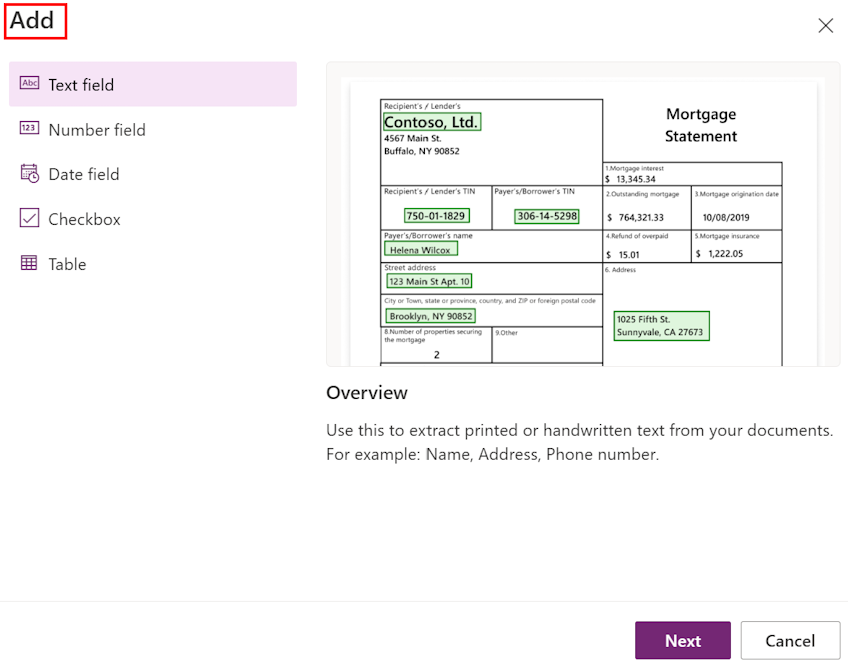
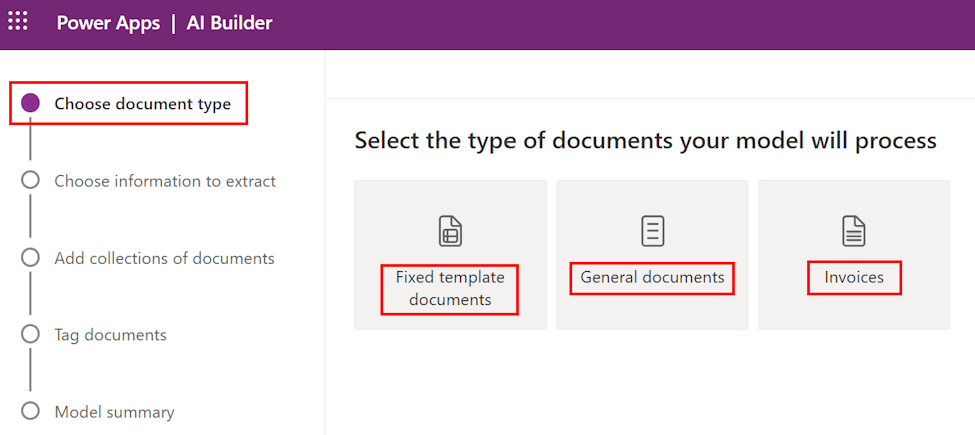
Auto-selecting every AI-analyzed row feels helpful. It is how bad master data enters production with a smile. Users trust the model highlight. They click Import. Months later someone asks why an unknown code became a real record.

Treat AI import UX as governance. Default-deny uncertain rows. Validity rules follow the live section schema (visible columns), not a hard-coded spreadsheet layout. Footer status separates "selected" from "valid to import." Prompt schema and UI selection policy are one product surface.

AI Builder choose information to extract

Figure 1. Import UX is governance. Selection policy and field validity belong with the live schema, not a default-select-all. Source: Microsoft Learn: create a document processing model.

AI Builder select documents type

Figure 2. Who may import, and which rows count as valid, should be enforceable policy rather than a UI suggestion. Source: Microsoft Learn: create a document processing model.

Row counts lie: validate MLVs column by column

· 6 min read
Sai Prudhvi Neelakantam
Senior Consultant, Data Engineering & AI at Evidi

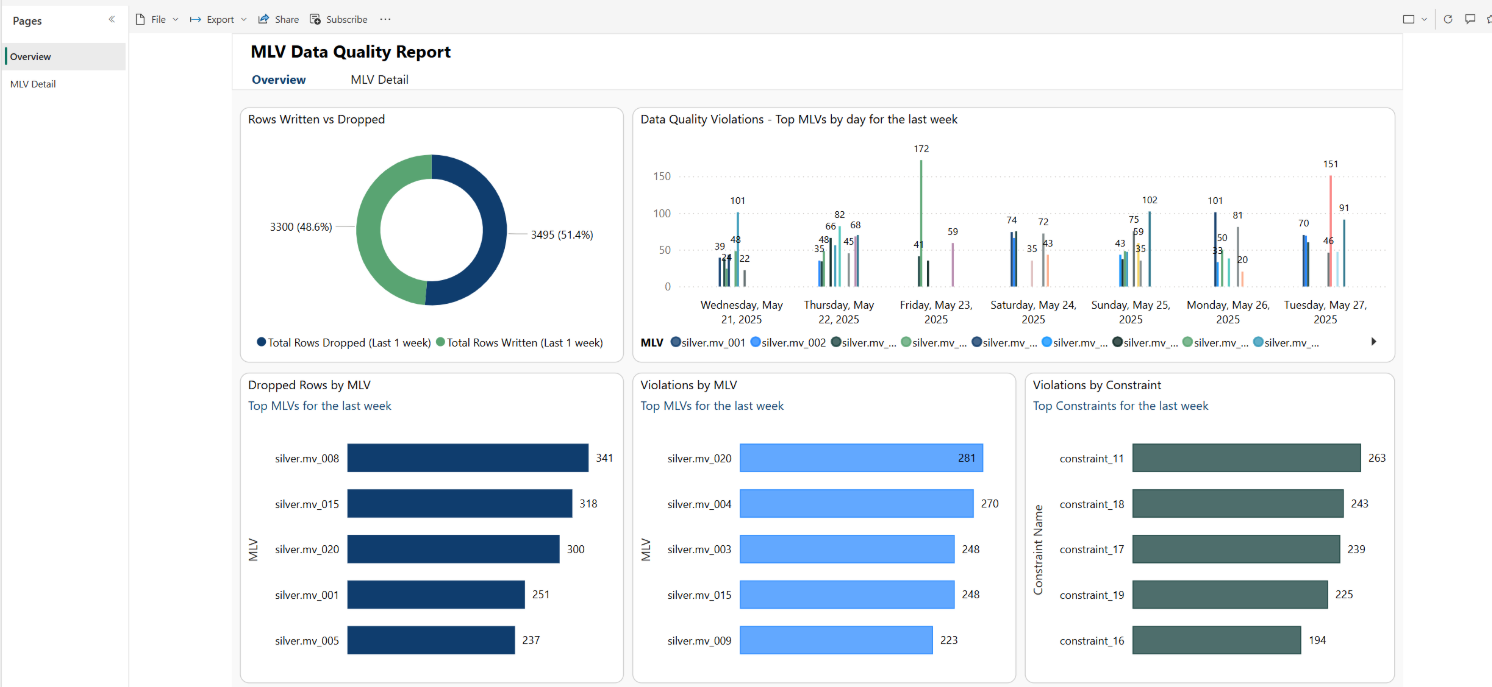
A migration checklist that only compares row counts will greenlight wrong money, wrong dates, and wrong statuses. Row counts catch catastrophic drops. They miss the quiet CAST that turns decimals into floats, the null that became empty string, and the column that silently defaulted.

Push MLV cutovers to per-column tables and type-aware aggregates. Borrow the tiered reconciliation classical data migrations already trust: rows, then keys, then column aggregates. Automate it. Treat the artifacts as release evidence, not as a screenshot buried in chat.

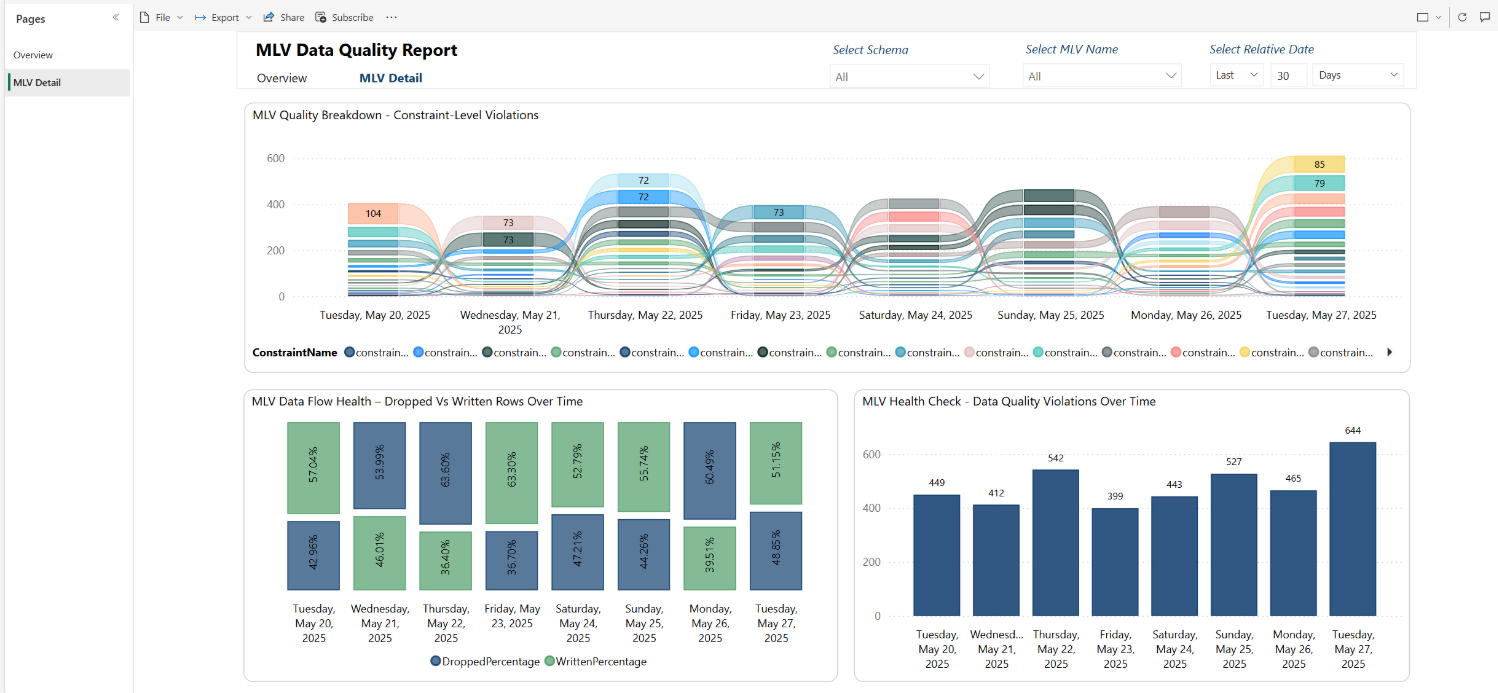
Materialized lake view data quality overview

Figure 1. Row counts catch catastrophes. Column aggregates and quality reports catch the quiet CAST that breaks money. Source: Microsoft Learn: MLV data quality reports.

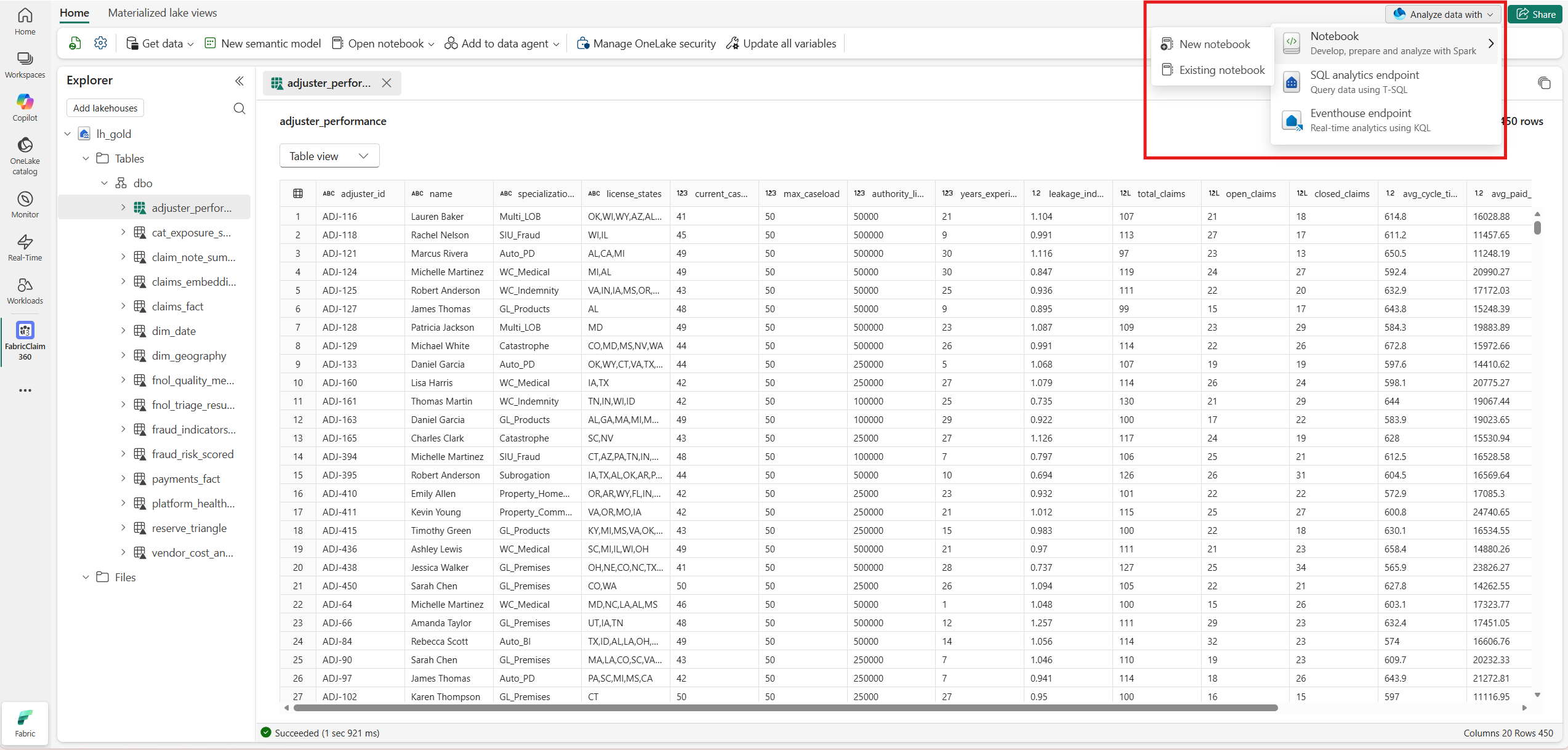
Materialized lake view detail page

Figure 2. Treat per-column reconciliation artifacts as release evidence for MLV cutovers, not optional notebook scratch. Source: Microsoft Learn: MLV data quality reports.

Fabric CI/CD blast radius: when no changes still deploys

· 6 min read
Sai Prudhvi Neelakantam
Senior Consultant, Data Engineering & AI at Evidi

Your pipeline runs. You did not touch half the notebooks. They still publish.

That is not always a bug in your YAML. Fabric deployment models and item pairing often optimize for workspace consistency, not git-style minimal diffs. If you design as if only changed files move, production will teach you otherwise.

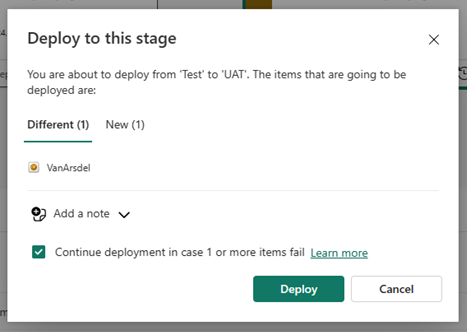
Confirm a Fabric deployment

Figure 1. Deployment is a workspace operation. Source: Microsoft Learn: deployment pipelines.

Semantic refresh architecture: notebooks, pipelines, and Direct Lake

· 6 min read
Sai Prudhvi Neelakantam
Senior Consultant, Data Engineering & AI at Evidi

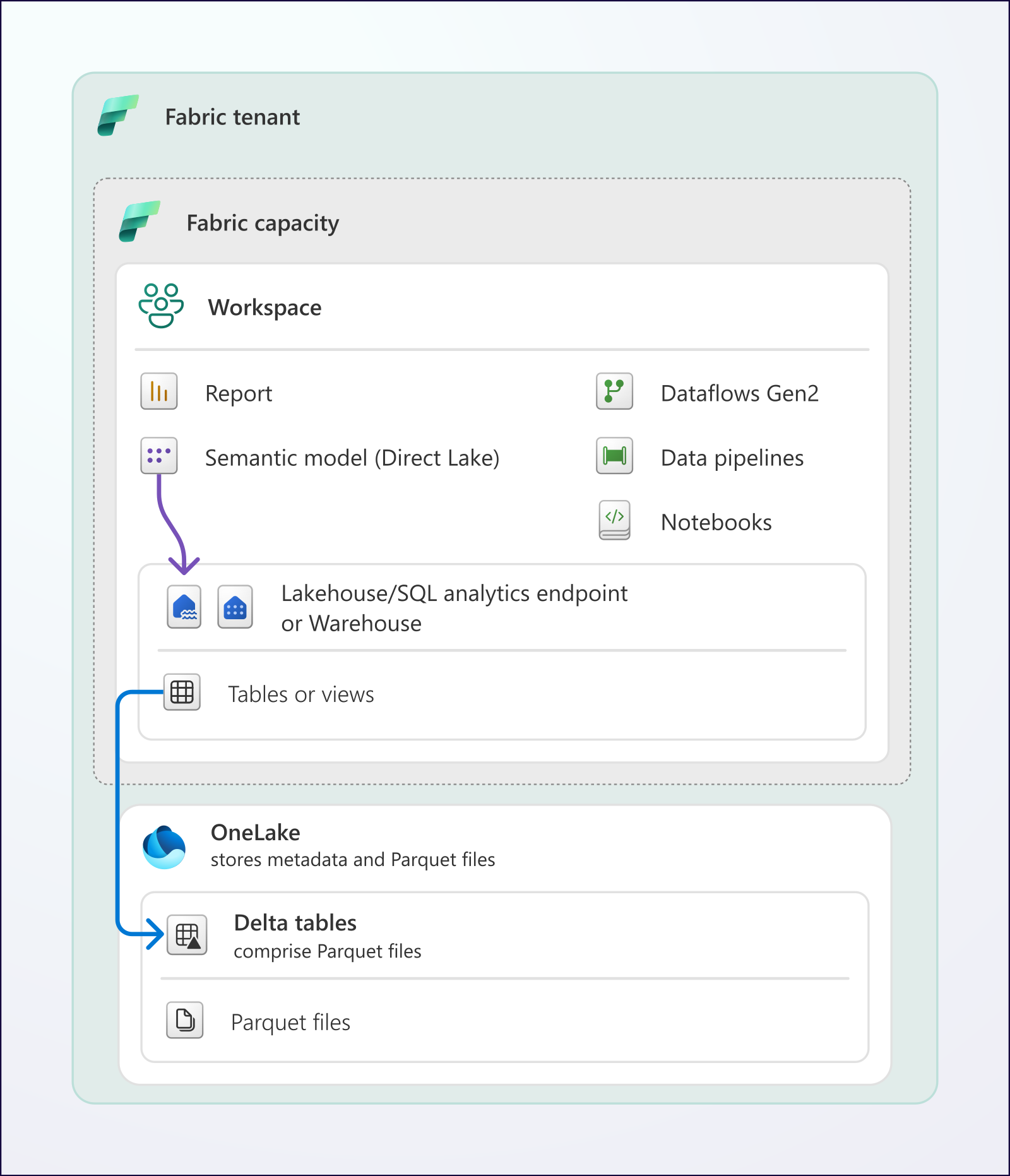
Fresh gold tables are useless if the semantic model still points at yesterday, or if refresh burns an hour on a fact you could have incrementalized. Refresh is an architecture problem: orchestration, identity, and storage mode. Treat it as a portal checkbox and you invent a second process nobody can explain.

Direct Lake overview

Figure 1. Direct Lake connects the semantic model to Delta in OneLake. Source: Microsoft Learn: Direct Lake overview.

Knowledge RBAC for enterprise agents: same gates for chat, browse, and citations

· 5 min read
Sai Prudhvi Neelakantam
Senior Consultant, Data Engineering & AI at Evidi

An agent that answers from documents is only as trustworthy as the document permissions behind it.

Teams often lock the chat endpoint carefully, then leave library browse and citation PDF downloads open to anyone who can sign in. That is not a knowledge boundary. That is a second door with a nicer UI.

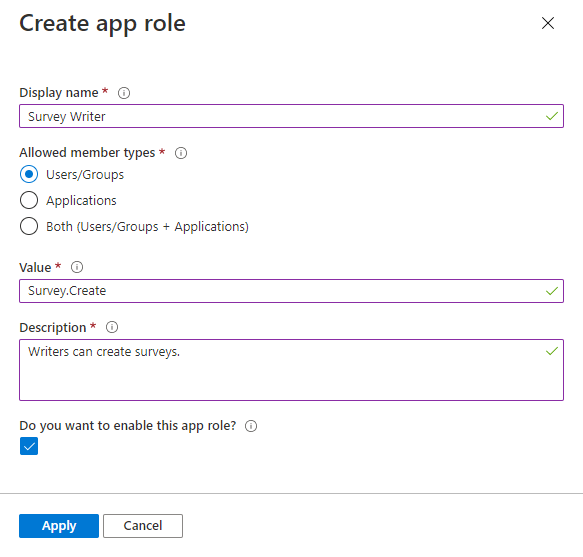
Create an app role in Microsoft Entra

*Figure 1. Product capabilities belong as app roles on the API. Source: Microsoft Learn: add app roles.

Consolidate Fabric monitoring into one operable skill

· 5 min read
Sai Prudhvi Neelakantam
Senior Consultant, Data Engineering & AI at Evidi

Fabric estates accumulate half-scripts: a notebook that checks capacities, a shell history that lists failed jobs, a wiki page with screenshots from last quarter. Each produces a different health story. On-call picks a favorite. Coding agents inherit the contradiction.

Consolidate into one operable skill. Clear verbs beat tribal shell history. Agents consuming monitor tools need stable output contracts. Separate diagnosis from remediation. Version runbooks like product code. Many half-scripts create contradictory signals; one interface creates a shared truth you can improve.

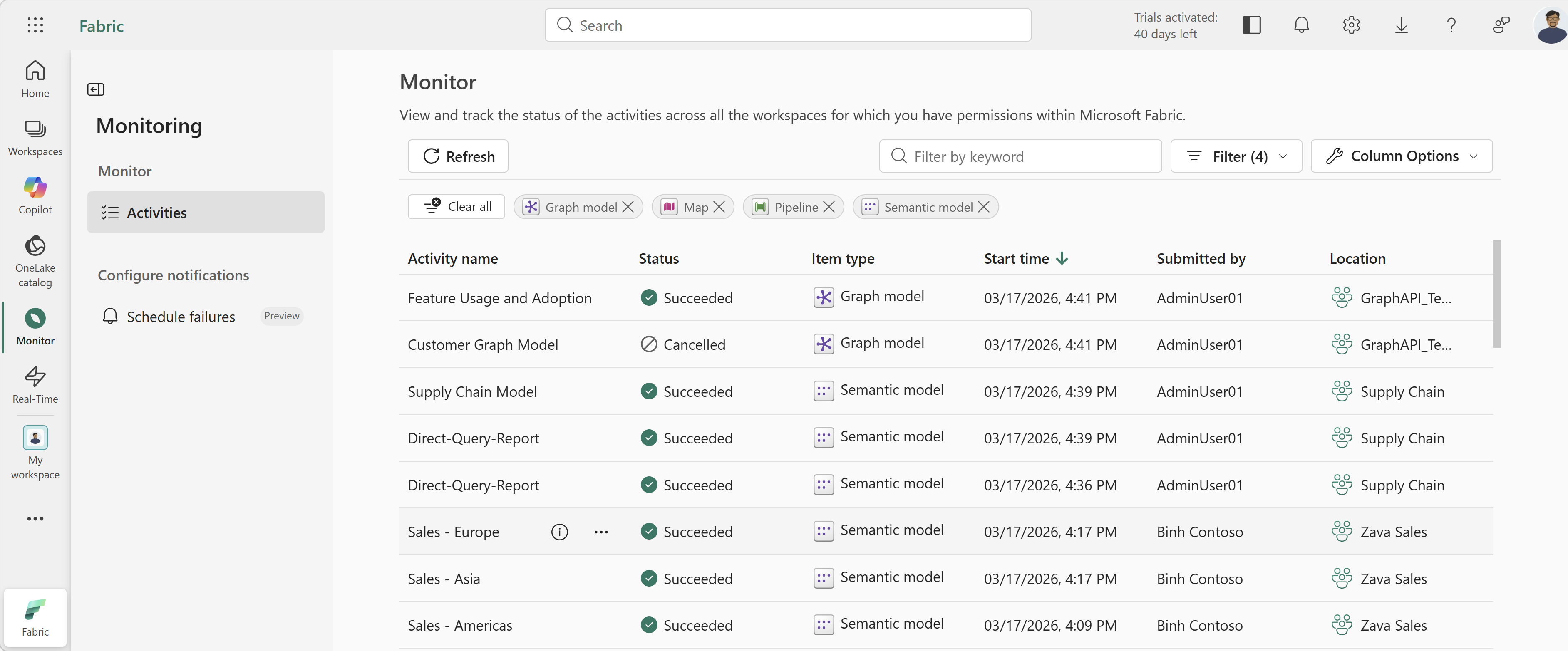
Fabric monitoring hub table

Figure 1. Monitoring should be an operable interface with stable outputs, not a pile of one-off scripts. Source: Microsoft Learn: monitoring hub.

Bulk reload is an orchestration problem, not a bigger VM wish

· 6 min read
Sai Prudhvi Neelakantam
Senior Consultant, Data Engineering & AI at Evidi

InsertAll of multi-million ledger rows on one driver is a known failure mode. The notebook looks simple. The driver dies. Someone asks for a bigger cluster. The next reload dies later, with a larger bill.

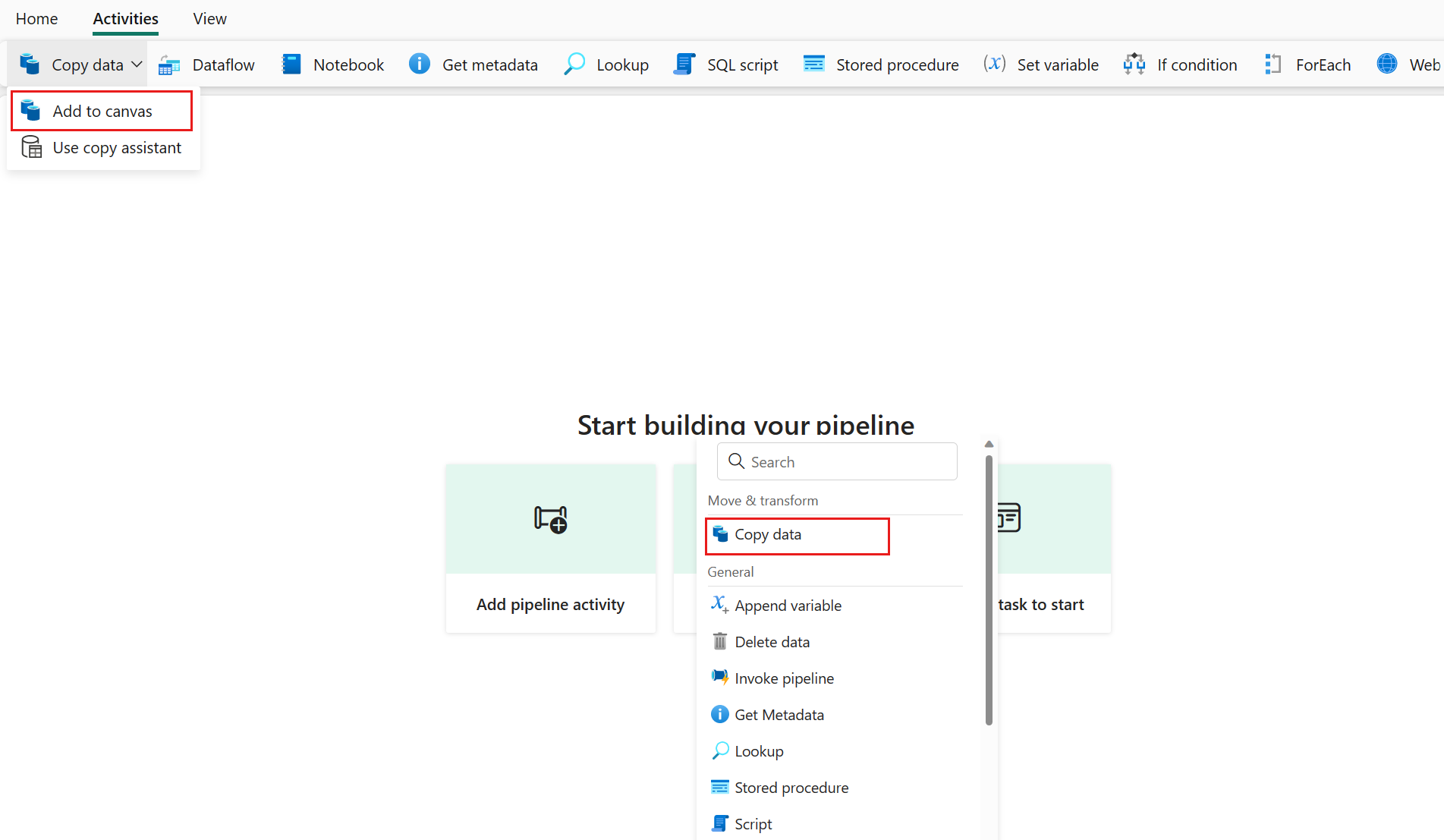
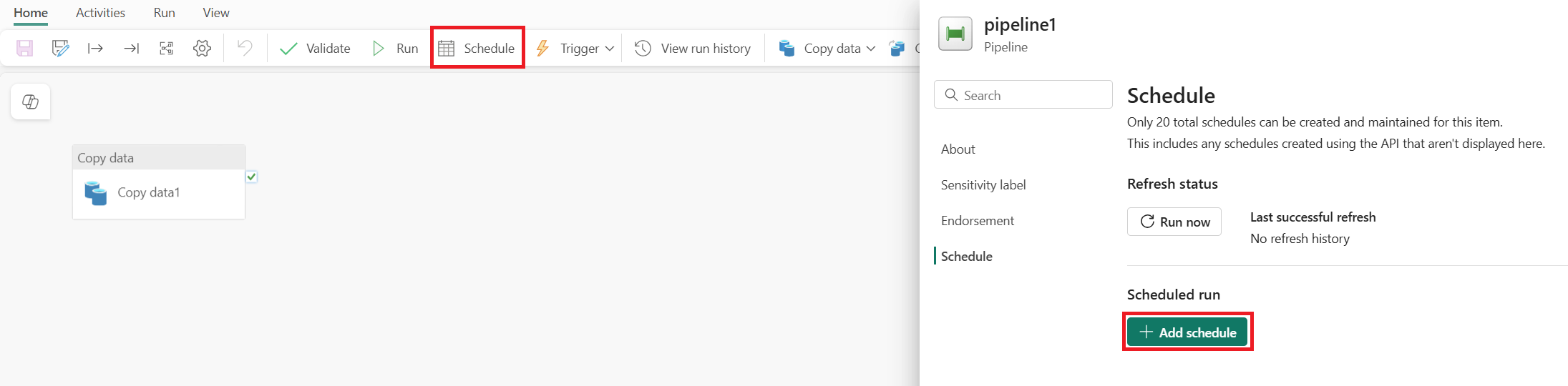
Treat bulk reload as orchestration: batched parallel page ingest, progress monitoring, and entity filters for operable reruns. Separate one-time rebuild paths from incremental watermarks. Publish the pattern to prod only after batch-level observability exists. OOM here is a design smell in notebook API usage, not proof that "Fabric is flaky."

Add copy activity to a Fabric pipeline canvas

Figure 1. Multi-million InsertAll on one driver is an orchestration smell. Batch ingest belongs in an operable pipeline. Source: Microsoft Learn: copy data activity.

Schedule a Fabric pipeline run

Figure 2. Batch with progress and entity filters, then promote the pattern like any other scheduled pipeline. Source: Microsoft Learn: pipeline overview.

If you cannot explain the tool calls, you do not have an agent product

· 6 min read
Sai Prudhvi Neelakantam
Senior Consultant, Data Engineering & AI at Evidi

Support opens a session. The UI says two searches and six tools. Foundry traces show something else. App Insights has a third story. Nobody can tell whether the agent searched knowledge, hallucinated a citation path, or the counter lied. That is not a cosmetic bug. That is a missing product surface.

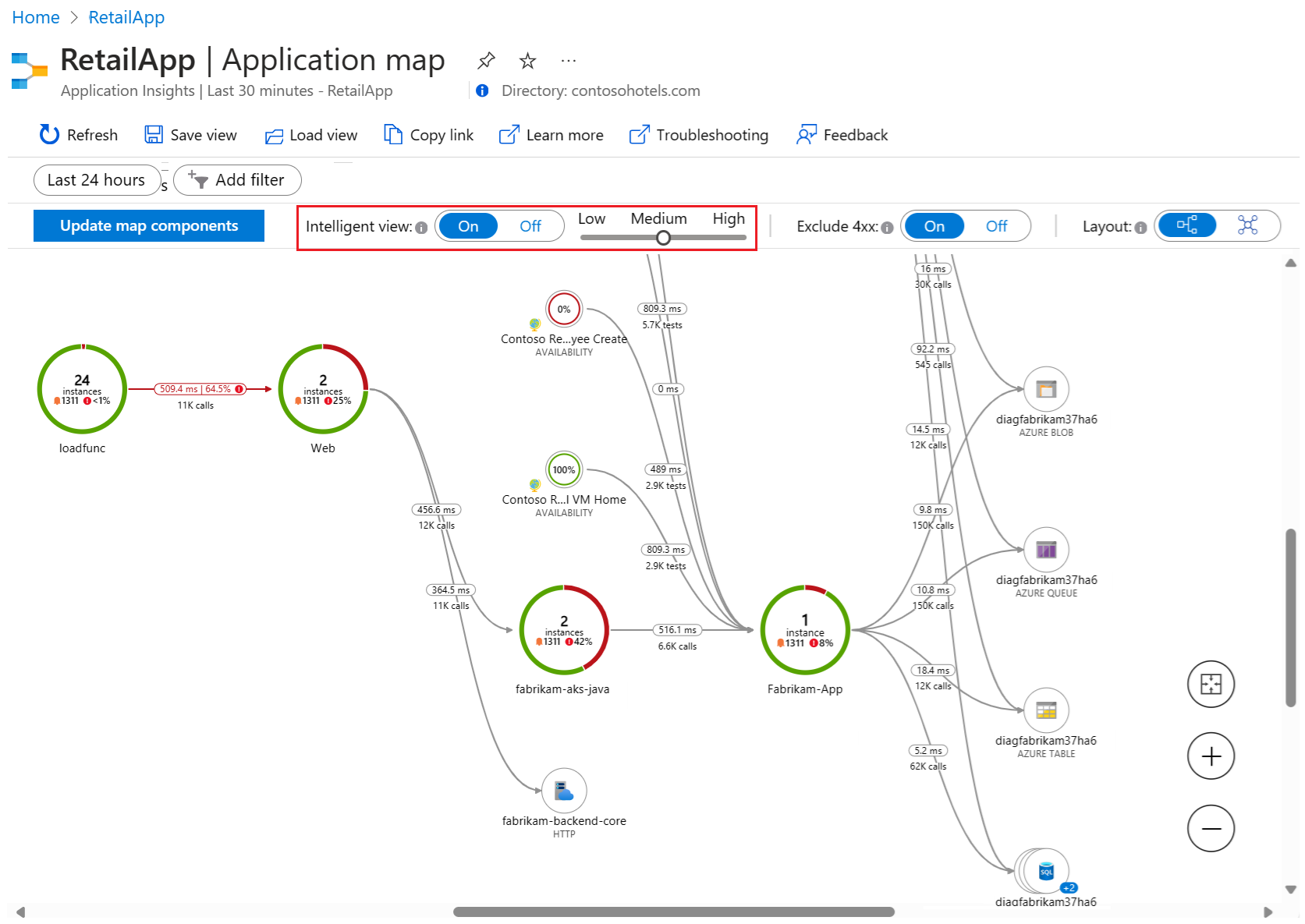
Activity timelines must reconcile platform traces, MCP knowledge searches, and UI counts. Persist normalized events, not only chat bubbles. Count knowledge searches separately from generic tool invocations. Traceability is part of the customer contract for regulated knowledge agents.

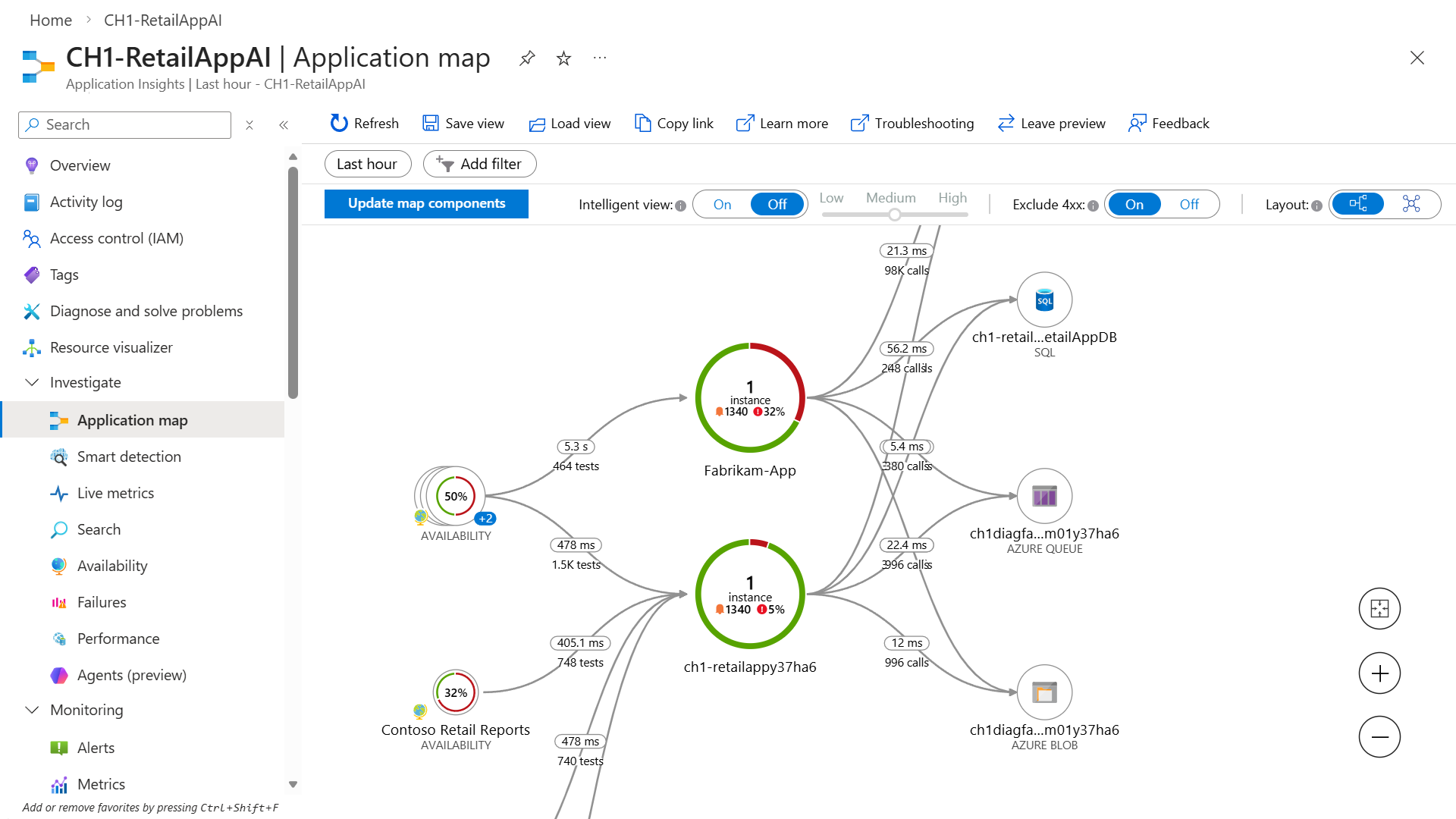
Application Insights application map intelligent view

Figure 1. The shell shows activity chips. Correlated traces must tell the same story, or support has three truths. Source: Microsoft Learn: Application Insights correlation.

Azure Monitor Application Insights overview

Figure 2. Persist normalized activity events and reconcile them with platform traces. UI counts alone are not an audit trail. Source: Microsoft Learn: Application Insights overview.

The AI shell proxy is a security boundary

· 5 min read
Sai Prudhvi Neelakantam
Senior Consultant, Data Engineering & AI at Evidi

Browser shells tempt teams to over-trust the SPA. The chat UI looks like the product. The proxy in front of the agent backend is where authentication becomes authorization, where egress is constrained, and where dangerous payloads are allowlisted or dropped.

Treat the proxy as a security boundary. Choose Front Door, Application Gateway, or an equivalent pattern deliberately. Do not bolt TLS and authZ on later. Runtime mismatches between local and live proxies create false confidence. Reasoning and passthrough payloads need explicit allowlists. Security reviews should start at the proxy, not at the system prompt.

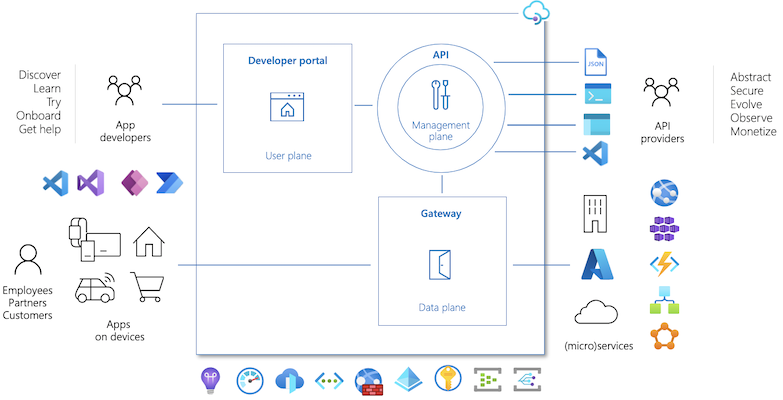
Azure API Management components diagram

Figure 1. Harden the path from browser to agent APIs. Gateway controls are part of the product, not optional polish. Source: Microsoft Learn: API Management key concepts.

PII redaction belongs in the notebook config, not in tribal knowledge

· 6 min read
Sai Prudhvi Neelakantam
Senior Consultant, Data Engineering & AI at Evidi

Free-text export columns are where names, phones, and emails hide. The same columns often hold codes and addresses that policy still allows. Blanking everything is lazy. Sprinkling regexp_replace through a notebook is how two engineers redact differently on the same Friday.

Put the redaction contract in one config cell the rest of the notebook reuses. Flags, tokens, patterns, and known-name helpers become reviewable. Residual risk decisions leave chat history and enter the artifact you promote.

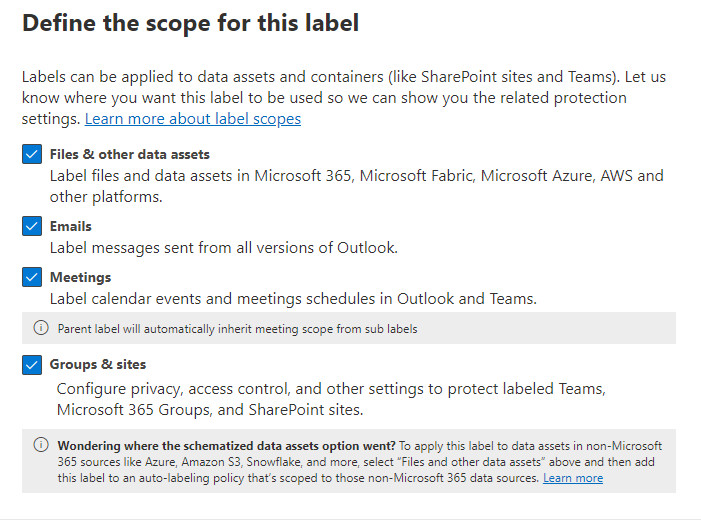
Sensitivity label scopes in Microsoft Purview

Figure 1. PII handling is a governance contract. Label scopes and redaction rules belong in reviewable config, not tribal notebook lore. Source: Microsoft Learn: sensitivity labels.

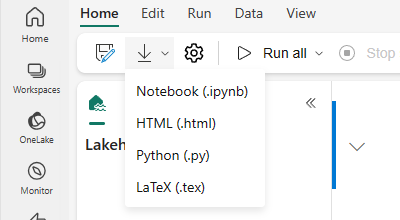
Export notebook from Microsoft Fabric

Figure 2. Keep redaction config next to the notebook that owns the export path so reviewers can see what ships with the artifact. Source: Microsoft Learn: how to use notebooks.

Matching relationship types is cheaper than debugging blank visuals

· 6 min read
Sai Prudhvi Neelakantam
Senior Consultant, Data Engineering & AI at Evidi

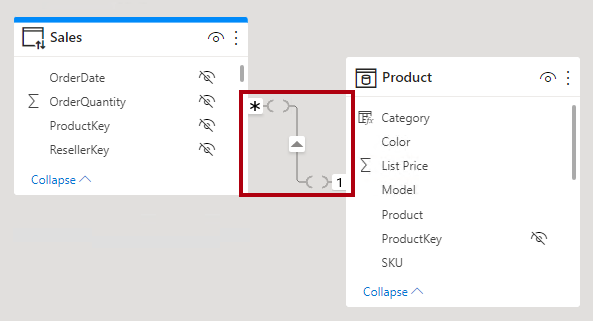
Blank visuals are often type mismatches, not proof that "DAX is hard." An int64 fact key next to a string dimension key fails quietly. Role-playing dims multiply the blast radius: one bad FK type breaks several relationships that all looked fine in the diagram.

Align gold SQL and TMDL together. Date keys and degenerate dims deserve explicit type standards. Add a CI check for relationship endpoint types. Matching types is cheaper than another afternoon of staring at empty cards.

Limited relationship in a Power BI model diagram

Figure 1. Blank visuals are often int64-versus-string relationship endpoints, not proof that DAX is hard. Source: Microsoft Learn: understand relationships.

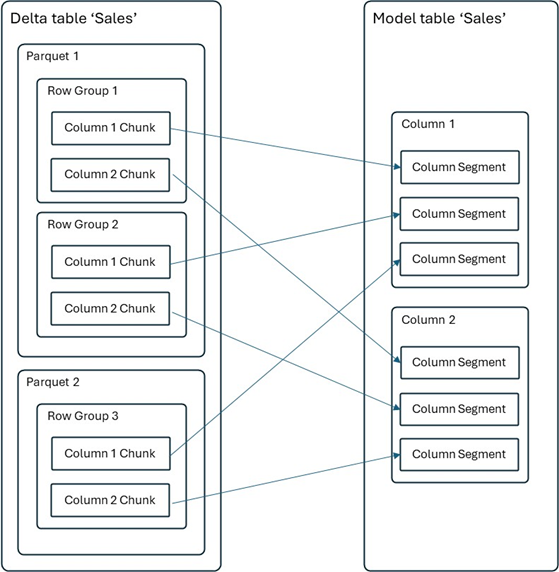
Delta table mapped to a semantic model table

Figure 2. Align gold SQL types and TMDL together, then gate relationship endpoint types in CI. Source: Microsoft Learn: Direct Lake storage.

When warehouse views time out, materialize the trunk not the leaves

· 6 min read
Sai Prudhvi Neelakantam
Senior Consultant, Data Engineering & AI at Evidi

Nine warehouse views timing out usually means two trunks and seven dependents. Teams that rewrite every leaf, or jump straight to a new platform, often miss the cheap win: materialize the consolidations everything else hangs from.

Use a layered playbook. Drop orphans. Apply cheap predicate and join rewrites. Then materialize the two or three heavy consolidations. Measure with the same harness before and after. Document what is a view versus a managed table so CI/CD stays honest.

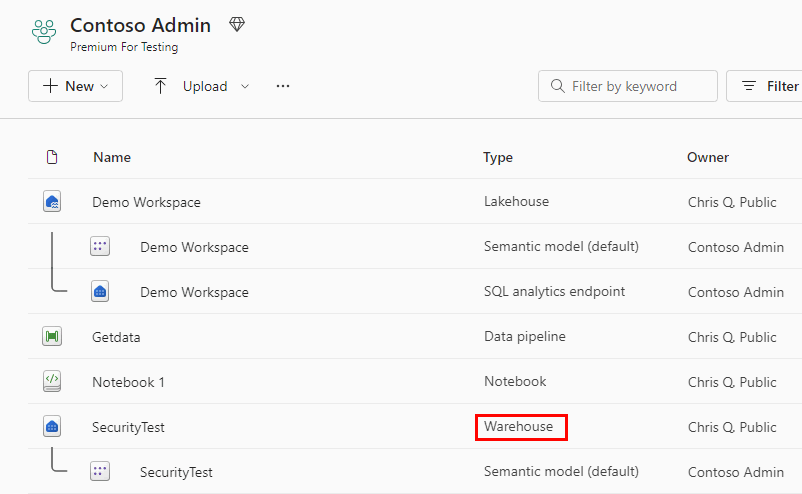
Warehouse item type in Microsoft Fabric

Figure 1. When dependents time out, materialize the trunk consolidations first instead of rewriting every leaf view. Source: Microsoft Learn: data warehousing in Fabric.

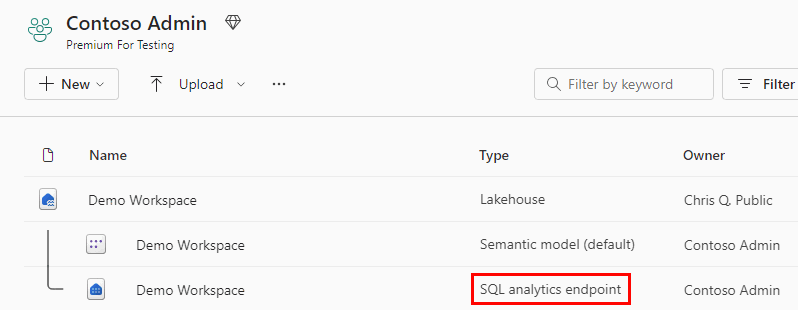
SQL analytics endpoint item type in Microsoft Fabric

Figure 2. Measure with the same harness before and after. Document view versus managed table so CI/CD stays honest. Source: Microsoft Learn: data warehousing in Fabric.

Variable Library is your environment map, not a sticky note

· 6 min read
Sai Prudhvi Neelakantam
Senior Consultant, Data Engineering & AI at Evidi

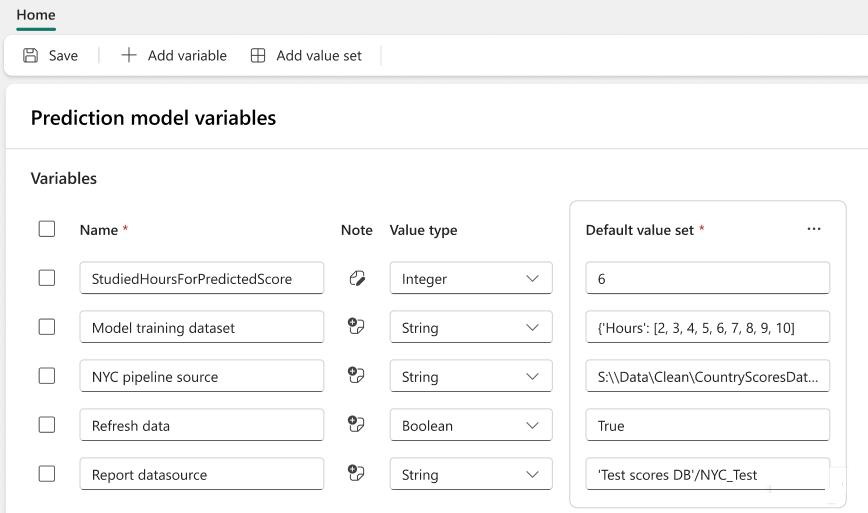
Hard-coded workspace IDs in notebooks are how Test accidentally rebinds Prod. Spreadsheet "environment maps" in chat are how two teams maintain different truths. Fabric already ships a better home: a Git-tracked Variable Library with per-stage value sets.

Put Test, Preprod, and Prod values in the item. Teach rebind notebooks to read via supported APIs. Split platform versus domain workspaces explicitly. Respect Git schema so restores work. Pair the library with a promotion story when portal parameters regress.

Define values in a Fabric Variable Library

Figure 1. Promotion is safer when workspace targets come from a Variable Library map, not pasted GUIDs. Source: Microsoft Learn: Variable Library overview.

Lineage explorers beat tribal notebooks

· 6 min read
Sai Prudhvi Neelakantam
Senior Consultant, Data Engineering & AI at Evidi

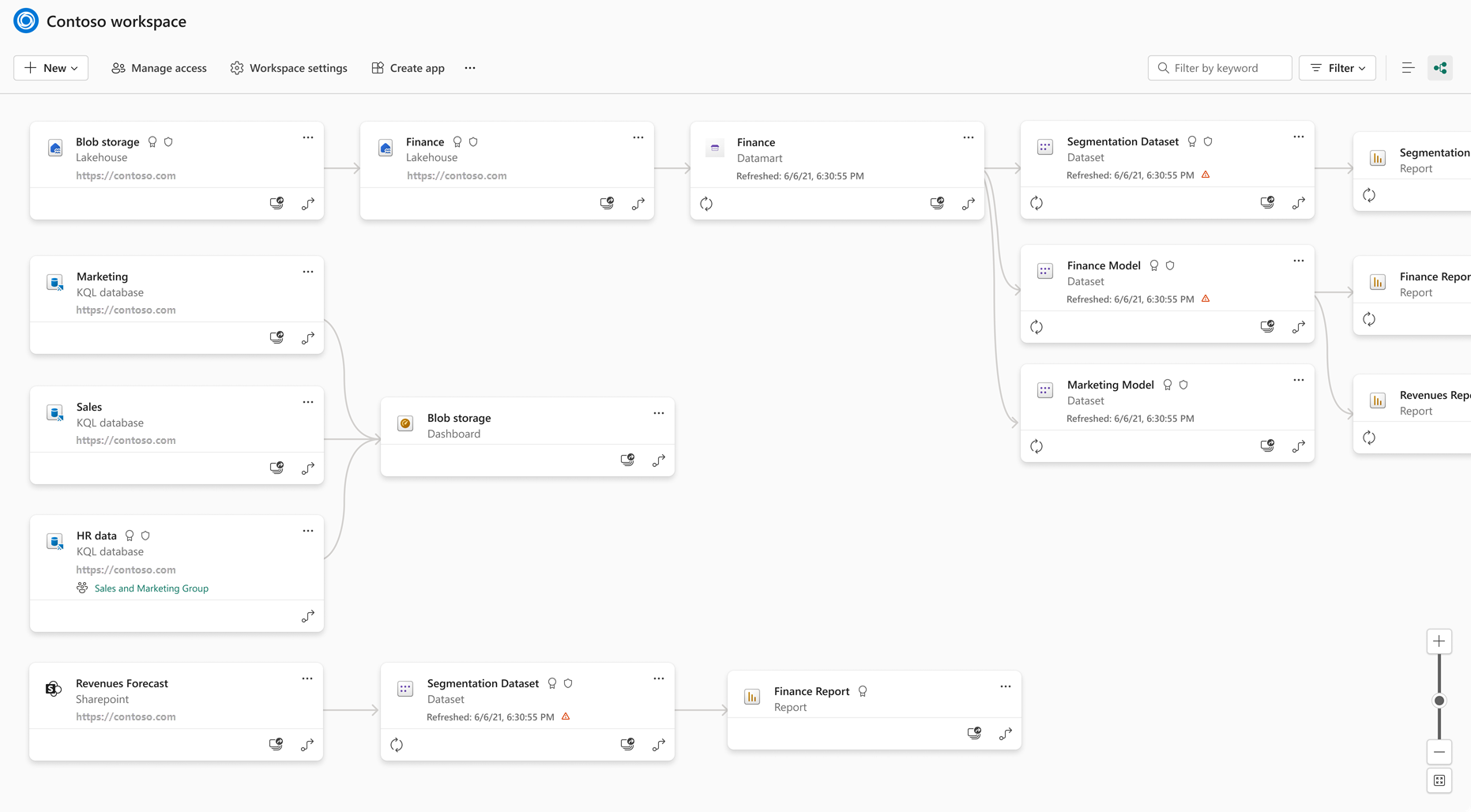
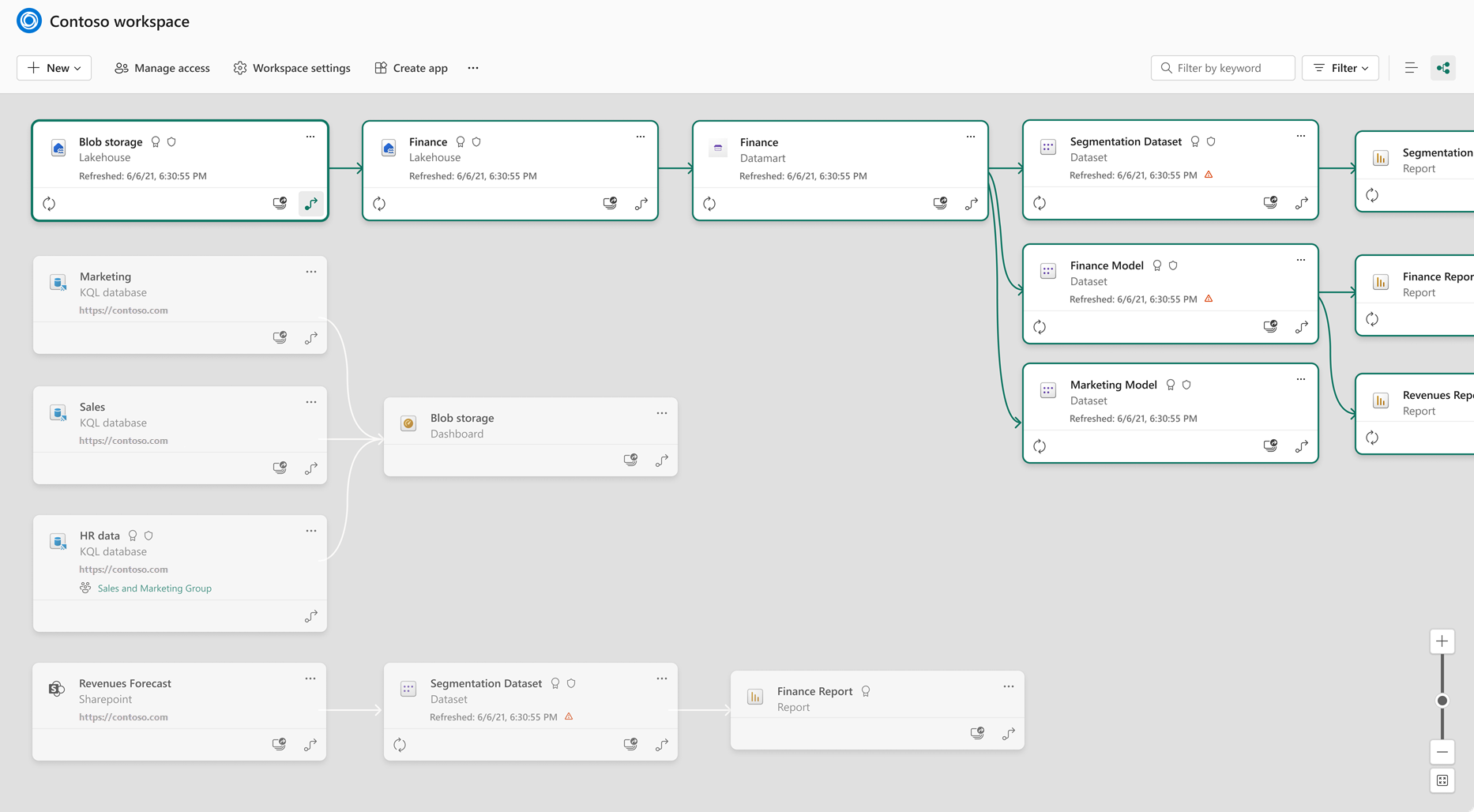
Pipeline graphs that live in people's heads do not survive vacation handoffs. Ad-hoc docs rot. A "harmless" bronze rename still nukes gold because nobody saw the edge.

Build a small lineage explorer over metadata you already emit: notebooks, MLVs, shortcuts, pipelines. Read-only exploration is enough for v1. Treat lineage UX as platform product, not a slide in an architecture deck.

Fabric workspace lineage view

Figure 1. Lineage that lives in people's heads does not survive a rename. Explore metadata before you change identities. Source: Microsoft Learn: lineage in Fabric.

Highlight a specific lineage path in Fabric

Figure 2. A thin read-only explorer over notebooks, MLVs, shortcuts, and pipelines is platform product, not a slide. Source: Microsoft Learn: lineage in Fabric.