


Key takeaways
- Put chat, browse, download, upload, reindex, and citation on one authorization module.
- Use the same role family for the agent catalog and knowledge categories.
- Filter the library and clamp retrieval on the server before the SPA renders.
- Citation and content routes must call the same path checks as library browse.
- Write implication rules (manage implies use, or not) and unit-test them.
- Test general-only, specialized-only, admin, and named break-glass matrices.
An agent that answers from documents is only as trustworthy as the document permissions behind it.
Teams often lock the chat endpoint carefully, then leave library browse and citation file downloads open to anyone who can sign in. That is not a knowledge boundary. That is a second door with a nicer UI.
Named model: one entitlement module
- Doors: chat, browse, download, upload, reindex, and citation fetch.
- Gate: one API authorization module with app roles and path checks.
- Catalog + corpus: same role family for agents and knowledge categories.
- UI contract: frontend renders a capability payload; it does not decode JWTs.
- Fail closed: missing path entitlement is 403, not a helpful empty list that still serves bytes elsewhere.
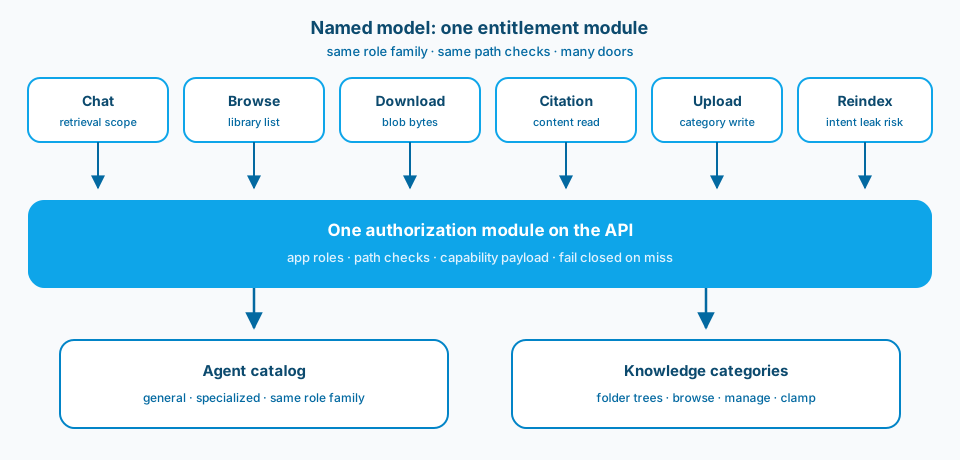
Figure 1. Chat, browse, download, citation, upload, and reindex are doors. The entitlement module is the gate. Agents and knowledge folders share one role family so a general-only principal cannot walk in through a quieter door.
Context and constraint
This pattern is easy to build by accident in an agent app. The chat experience looks strict. The library looks helpful. Citations look harmless. Together they recreate full corpus access for anyone who is merely authenticated.
I treat knowledge paths as categories with the same roles that gate agents. A general-only principal never sees specialized folders in the library, never downloads those files, and never gets them injected into retrieval scope for a turn.
When a user opens a citation, that is still a content read. Gate it like chat. If the answer referenced a file the user cannot open, you have either over-retrieved or under-gated the citation UI. Both are design bugs.
Figure 2 is the Learn surface where product capabilities become API app roles. Keep the strings stable. Prefer roles that travel with the app registration over a new nested Entra group for every folder.
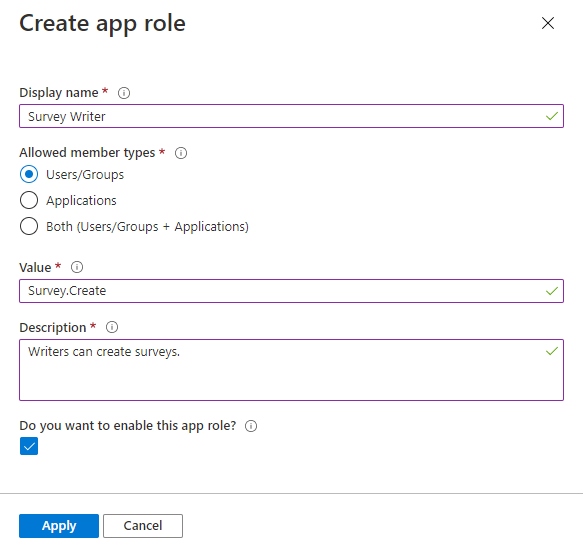
Figure 2. Product capabilities belong as app roles on the API. Groups are fine for assignment. Roles survive group reshuffles better for capabilities the product must enforce. Source: Microsoft Learn: add app roles.
The problem shape
Enterprise agent apps usually grow a shared library: general guidance plus specialized packs. Think of them as separate document sets with narrower audiences, such as pack A and pack B. Product wants a few honest outcomes:
- some users only on the general agent and general docs
- some users on one specialized agent and its folder tree
- admins who can upload and reindex without becoming god mode by accident
- auditors who can explain why a person saw a file
If browse lists every folder, and /api/content/... serves any blob path to any authenticated user, specialized knowledge leaks through the UI even when the agent picker looks restricted. The model did not "hallucinate access." Your API granted it.
Design
1. App roles on the Backend API
Declare roles for agent use and for category manage or browse. Keep the strings stable. Prefer roles that travel with the app registration over nested Entra groups for every folder. Groups are fine for assignment. Roles are better for product capabilities that must survive group reshuffles.
2. Server filters before the UI gets a vote
Filter the library list on the server. Clamp retrieval paths before the model runs. Return 403 on content routes that fail the path check. The SPA should never be the only place a folder disappears. Figure 3 is that ownership split.
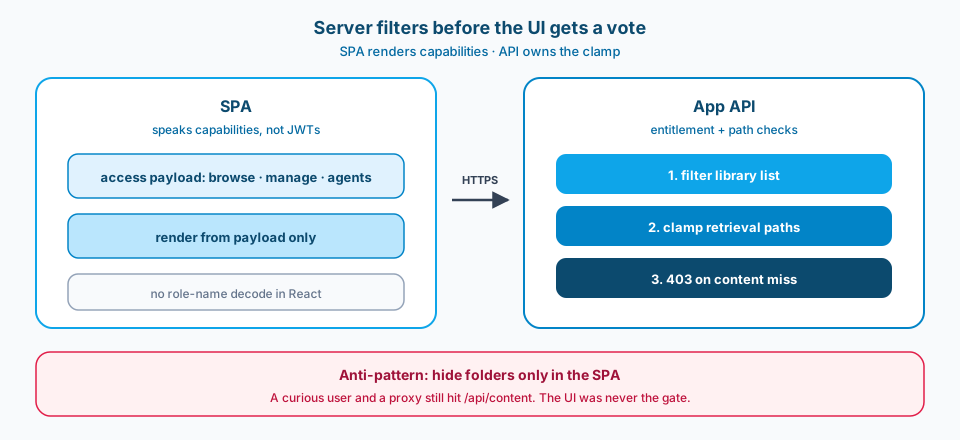
Figure 3. The SPA speaks capabilities. The API owns the clamp. Hiding a folder only in React is not a permission model.
3. Frontend speaks capabilities, not JWTs
Expose an access payload: what the user can browse, manage, and which agents are allowed. Render from that. Decoding role names in React duplicates policy and drifts the moment someone renames a role in Entra.
Figure 4 is the Learn framing for SPA-to-API auth: sign-in is only the shell. Knowledge entitlements still need API-side checks on every content path.
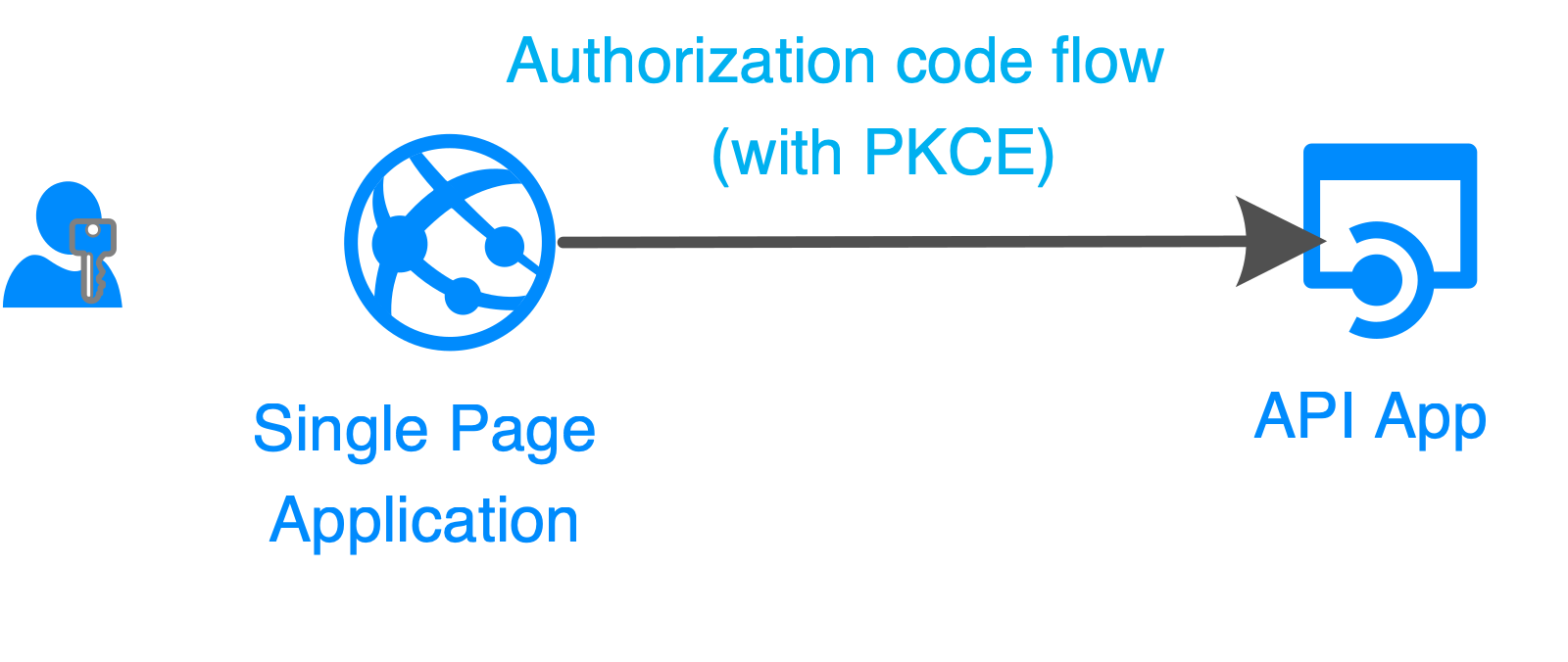
Figure 4. Sign-in is only the shell. Knowledge entitlements still need API-side checks. Source: Microsoft Learn: authentication flows and app scenarios.
4. Explicit implications
Managing a category can imply using the matching agent. Or it might not. Pick one. Write it down. Unit-test it. Tribal knowledge ("admins always get the agent") becomes a production incident when one user gets manage without chat, or chat without manage, and nobody agrees which is correct.
5. Storage ACLs reinforce the app, they do not replace it
Blob ACLs and app roles should point the same direction. Users hit the app layer first. If the app is loose, storage never gets a chance to save you for browser downloads through your own API.
6. Test the principal matrix
Ship tests for general-only, specialized-only, multi-pack, admin, and named break-glass. Figure 5 is the matrix shape I want in the suite before the next pack is added.
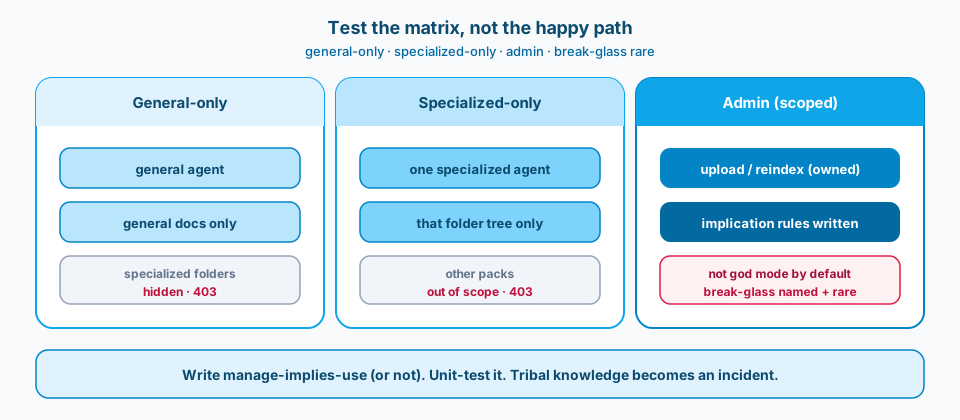
Figure 5. General-only never sees specialized folders. Specialized-only stays inside one tree. Admin upload and reindex are scoped, not god mode. Break-glass is named, rare, and reviewed.
Failure modes
Helpful library, open browse. Signed-in users can browse everything because the library is helpful. Helpful is not a permission model.
Agent filtered, blob open. Agent picker is scoped. Blob download is not. Same bytes, different door.
Browser-supplied retrieval scope. Retrieval scope is a folder list from the browser with no server clamp. Assume a proxy and a curious user.
ACL and role disagreement. Storage ACLs and app roles disagree. Citations 403 for people who already saw the answer, or open for people who should not.
Break-glass as default. Break-glass admin is the default library group. Break-glass should be named, rare, and reviewed.
Reindex wider than manage. A reindex-all button for someone who can only manage one category leaks intent even when the files stay put.
What to copy / what not to copy
Copy
- Same role family for agent catalog and knowledge categories.
- Browse is not open to all signed-in users if chat is scoped.
- Citation and content routes call the same path checks as library.
- Tests for general-only, specialized-only, and admin matrices.
- Written implication rules (manage implies use, or not).
- Generic folder names (folder A, folder B) in public docs and screenshots.
Do not copy blindly
Stricter knowledge RBAC means more Entra work and a larger test matrix: general-only, specialized-only, multi-pack, admin, break-glass. You will spend time with identity owners on who creates roles versus who assigns groups.
You may also frustrate power users who want "just show me everything." That is a product conversation. Do not solve it by quietly opening browse.
Indexing and reindex permissions need the same care as upload. Scope the button to the categories the principal can manage.
Primary references: Add app roles, Verify scopes and app roles, SPA calling a web API. Prefer current naming when the agent host has moved under that umbrella.
Chat without corpus control is a demo. Corpus control without citation control is a leak with footnotes. Put them on the same gate.