


Key takeaways
- A sign-in group (for example an app users group) gates the shell only; it is not every product permission.
- Backend API app roles own and knowledge category access; enforce on every sensitive call.
- One authorization module serves agent list, chat, browse, and content reads.
- The SPA consumes capability endpoints; it does not parse roles from the JWT.
- Citations and downloads use the same path rules as chat. A UI hide is not a boundary.
- Document and test implication rules (manage may imply use), including for users with only baseline roles.
Most AI app demos collapse three different questions into one login button:
- Can this person open the shell?
- Which agents are they allowed to talk to?
- Which knowledge are they allowed to see, download, or ground answers on?
In a real enterprise agent webapp, those are three different control planes. Treat them as one and you get either a security hole or a support nightmare.
answers authentication and presence. Agent access answers authorization and scope.
Named model: front door · catalog · corpus
- Front door (app access): Microsoft Entra decides whether you can sign into the SPA (group assignment, Conditional Access, network rules). That only proves you are allowed in the building.
- Catalog (agent access): The API decides which agents appear and which chat streams are allowed. That belongs in app roles (or equivalent claims) on the resource API.
- Corpus (knowledge access): Browse, download, upload, reindex, and citation fetch use the same entitlement story as chat.
- Contract: one authorization module; the SPA renders capabilities the API already filtered. Signing in is necessary. It is not sufficient.
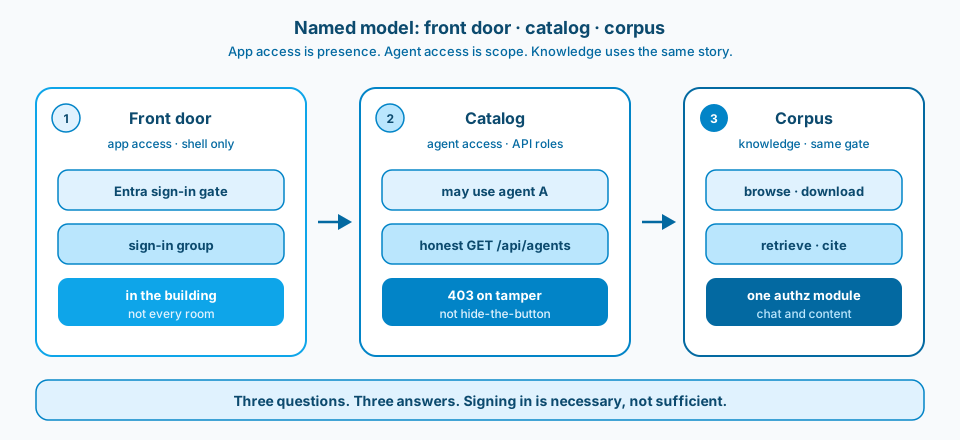
Figure 1. Front door, catalog, corpus. App access is presence. Agent access is scope. Knowledge is not a separate soft suggestion in the UI.
Context and constraint
The pattern applies to any . The chat surface feels consumer-simple. The entitlement model still has to behave like an enterprise system.
If chat is locked but content download is open to any signed-in user, you do not have a knowledge boundary. You have a UI suggestion. Figure 1 is the split I would defend in an architecture review. Figure 2 is the Learn reminder that a token from the SPA is not the end of authorization.
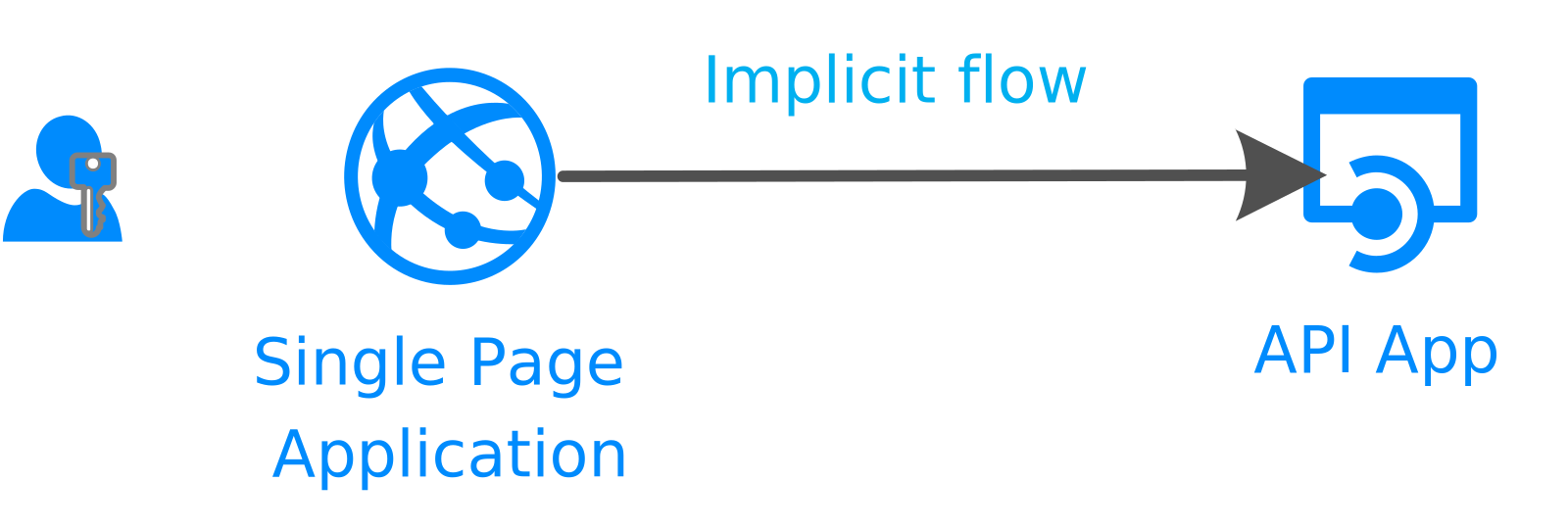
Figure 2. SPA calling a web API. Authentication gets you a token; authorization still has to happen on the API. Source: Microsoft Learn: authentication flows and app scenarios.
Design
1. One sign-in gate for the shell
Keep a clear "who may use the app at all" assignment (often a single sign-in group on the SPA). Dynamic groups are fine when the rule is org-wide. Do not overload this group with every restricted permission. Its job is the front door.
2. App roles on the Backend API for what you can do
Map roles to capabilities, not to screens:
- roles that mean "may use agent A"
- roles that mean "may manage knowledge category A"
- a break-glass admin that implies both where that is intentional
Enforce on the API. Filter GET /api/agents so the catalog the UI renders is already honest. Return 403 on chat if someone tampers with agent ids. Do not "hide the button" and call it security. Figure 3 is the product surface where those roles are declared. Figure 4 is the ownership split that keeps enforcement on the API.
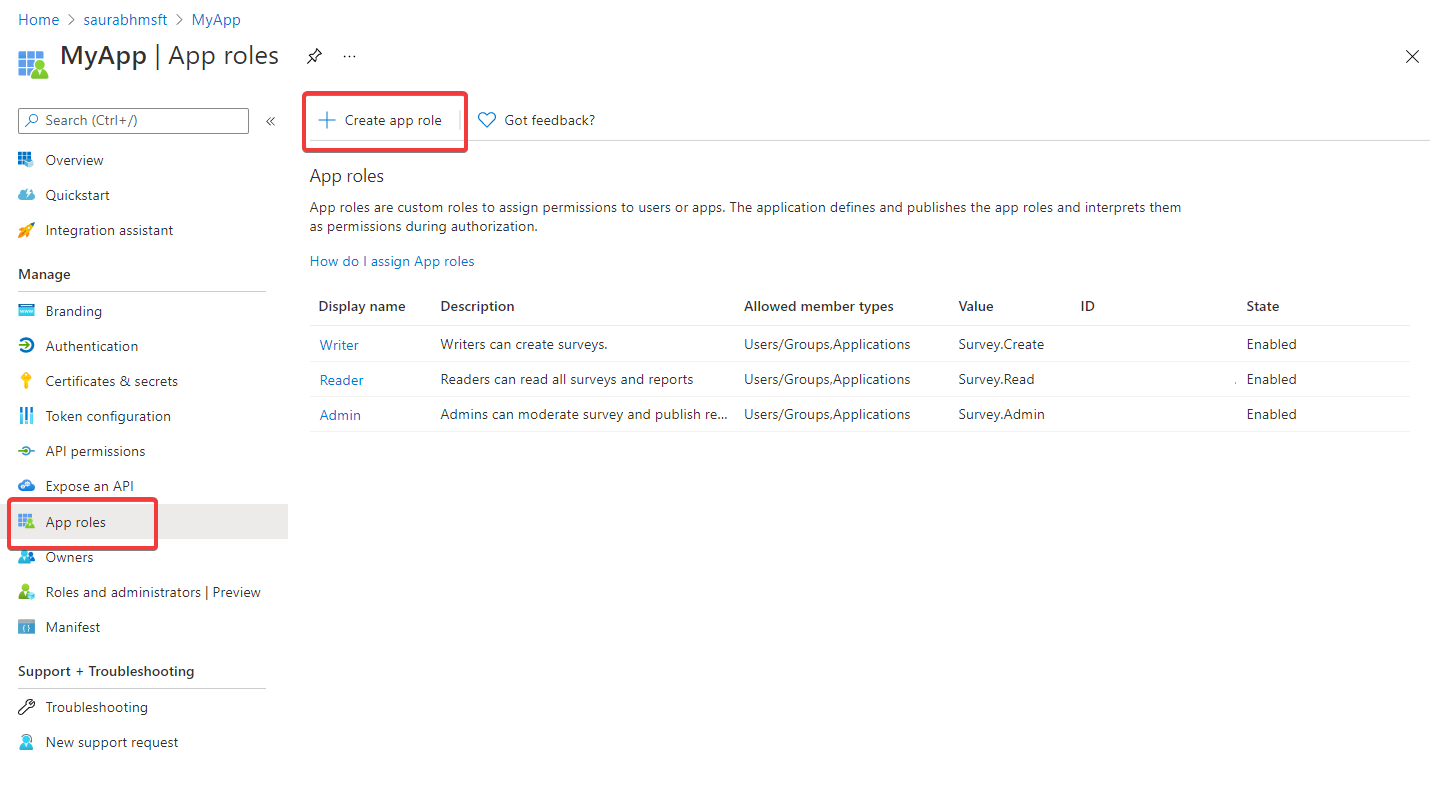
Figure 3. Declare app roles on the API app registration, then assign them to users or groups. Source: Microsoft Learn: add app roles.
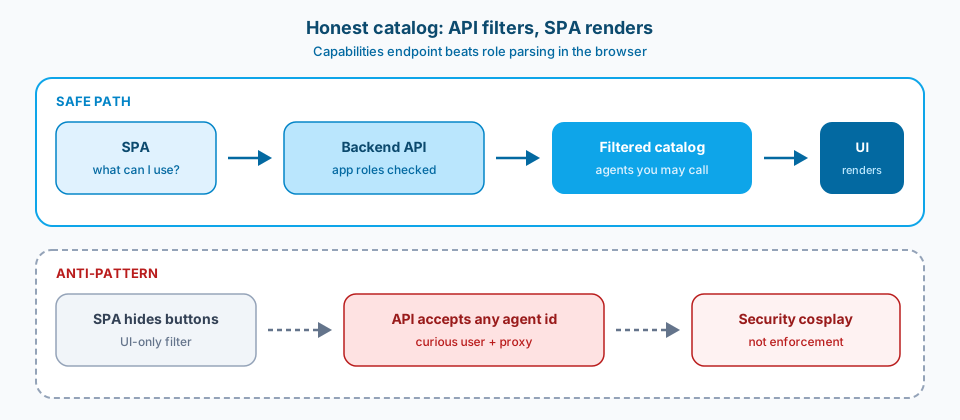
Figure 4. Honest catalog. The API filters. The SPA renders. UI-only hiding with an open API is security cosplay.
3. Frontend speaks capabilities, not JWTs
The SPA should ask the API "what can I manage / browse?" and render that. Decoding roles in the browser duplicates policy and drifts. One access payload beats three copies of role string constants in React.
4. Manage can imply use, deliberately
If someone can manage a restricted knowledge category, they usually need the matching agent. Encode that as an explicit implication in one authorization service, not as tribal knowledge. Users holding only baseline roles should never see restricted categories in browse, download, or retrieval scope clamps.
5. Citations are an access path
Users will open the document the model cited. If that blob endpoint ignores the same path rules as browse, your "restricted knowledge" story is cosplay. Gate content reads like you gate chat. Figure 5 is the shared gate.
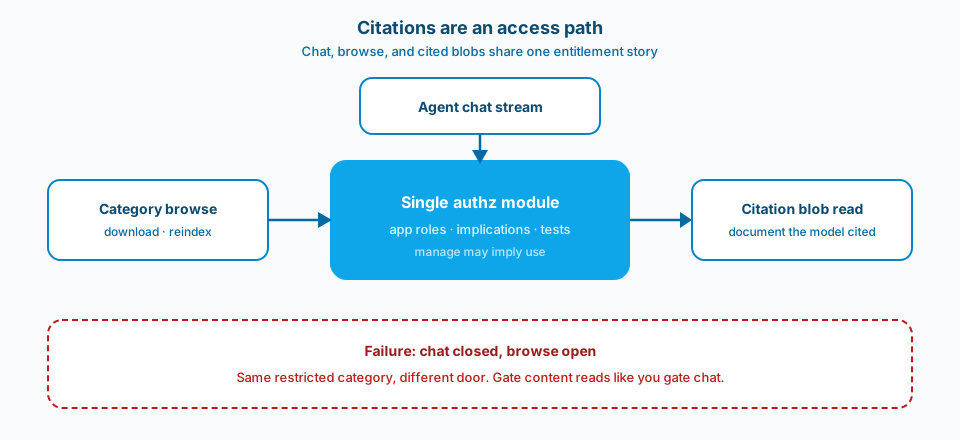
Figure 5. Chat, browse, and cited blobs share one entitlement story. Browse open while chat is closed is the same data through a different door.
Failure modes
Signed-in = trusted. Everyone who can sign in can open the app, therefore everyone sees every agent and every folder. That is a demo posture, not a production posture.
Groups everywhere, roles nowhere. Nested Entra groups for every category feel flexible until Graph checks, token size, and "why doesn't my access update" dominate the backlog. Prefer app roles on the API for product capabilities; use groups to assign those roles.
UI-only filtering. Agent picker hides options; API still accepts any agent id. Assume a curious user and a proxy. Figure 4 is that failure made visible.
Browse open, chat closed. You blocked a restricted agent but left list and download open to all authenticated users. Same data, different door. Figure 5 is the warning.
Manage without retrieve (or the reverse) without saying so. Decide whether "can manage this category" implies "can use the agent that reads it." Then write it down and test it.
What to copy / what not to copy
Copy
- Sign-in group = shell only.
- Backend API app roles = agents + knowledge categories.
- Single authorization module used by agent list, chat, browse, and content.
- SPA consumes capability endpoints; no role parsing in the browser.
- Automated tests for "baseline-only cannot browse or retrieve restricted paths."
- Explicit implication rules (manage may imply use) documented and unit-tested.
Do not copy blindly
Stricter roles mean more Entra work and more test matrices (baseline-only, category-A-only, admin, break-glass). You will negotiate with identity owners about who creates app roles versus who assigns groups.
On-behalf-of / multi-resource tokens add moving parts. Incomplete consent shows up as "random" platform failures that look like model bugs.
Network controls (private endpoints, IP allowlists) protect the plane; they do not replace per-agent authorization. Both layers matter; they solve different threats.
Primary references: Microsoft Learn on Entra app roles, SPA calling a web API, and verifying scopes and app roles. Prefer current naming when your agent front door sits under that umbrella.
Front door. Catalog. Corpus. Three questions. Three answers.