
Key takeaways
- Context is the product: native lakehouse and deploy awareness beats thin MCP babysitting.
- Optimize for artifacts people present and run (editable decks, hosted apps), not chat answers alone.
- Encode company PPTX templates as versioned skills; brand fidelity is not a first-prompt miracle.
- Capture compute shape in the deploy runbook (CLI availability, identity, serverless vs classic).
- Treat vendor task-success percentages as a signal; reproduce on your tables, template, and host.
- Human review stays on the critical path before executive or external audiences.
Can Databricks Genie make a PowerPoint from my data and respect a company template? Can it develop and deploy a web app that lands on a Genie space?
Those are the questions I keep getting after demos. I have been stress-testing Genie Code on two jobs: turn governed data into an editable deck, and ship a small web app on the platform. That raises the bar for what an enterprise data platform assistant can own end to end.
Named model: context → artifact → review
- Context: Genie Code already sees what the principal can see: tables, governance, and platform constraints. You inherit entitlements instead of pasting extracts into a consumer chatbot.
- Artifact: The assistant continues past chat into decks, apps, and deploys. A correct SQL answer is not a board pack. A code sketch is not a hosted app.
- Review: Editable decks still need metric-definition checks. Deployed apps still need auth, secrets, cost controls, and CI. Draft speed is the win. Unreviewed publish is the failure mode.
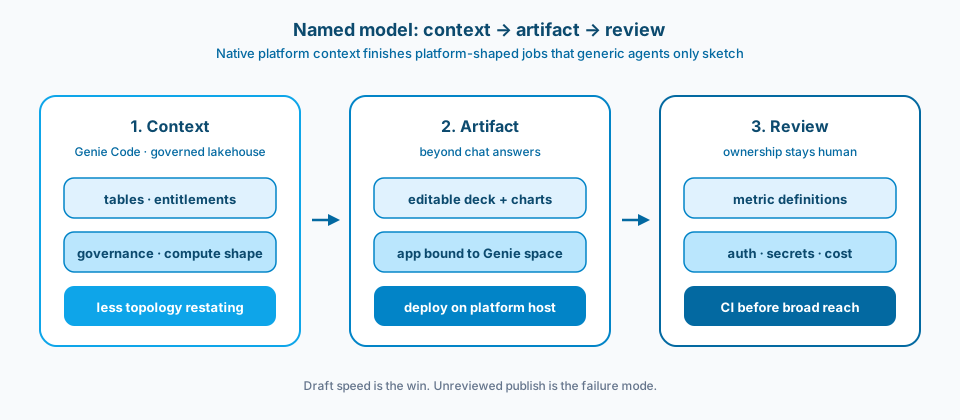
Figure 1. Named model for Genie Code work. Native context feeds artifact generation. Review gates what reaches an audience or a shared host.
Context and constraint
Most buzz around Genie Code focuses on data questions or ETL scaffolding. I wanted the day-to-day path: can it produce artifacts people actually present and run? After those tests, it feels closer to Claude Code or Cursor than to shallow autocomplete, with enterprise data security already in the room. Native Databricks context on tables, governance, and platform constraints means less token waste restating warehouse topology.
Genie Code matters when it continues past chat into artifacts. If it reasons about deploy constraints, you spend less time as the human MCP adapter. Figure 2 is the ownership split I use when someone asks whether a generic coding agent with thin MCP is "the same thing."
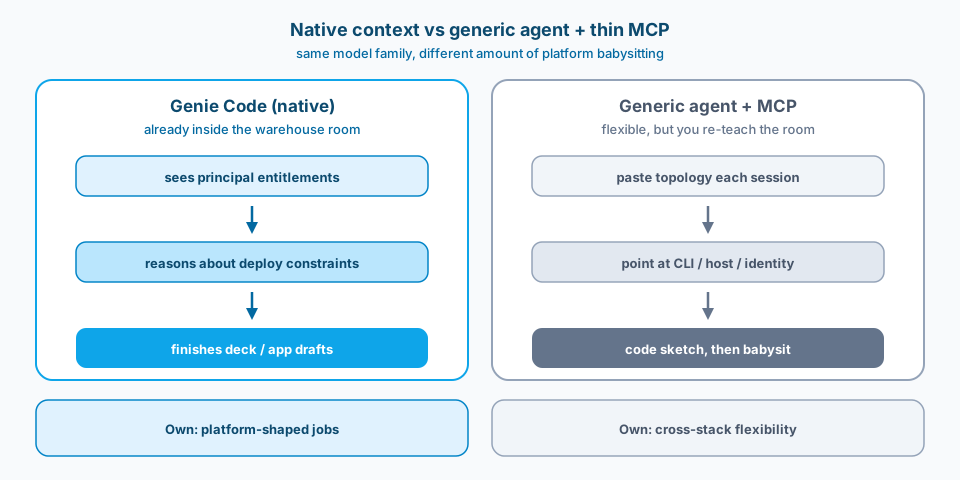
Figure 2. Same class of coding help, different babysitting load. Native context finishes platform-shaped jobs. Generic agents stay flexible across stacks but re-teach the warehouse and deploy reality every session.
Design
1. Deck generation as a skill-backed workflow
I connected Genie Code with an open-source PPTX skill (the same family used with Claude Code) to build a PowerPoint from Databricks data. Instead of chat-only insights, it generated a full editable multi-slide deck with charts. That is the difference between a screenshot of an answer and a boardroom-ready artifact for monthly or quarterly reviews. Figure 3 is the path: governed metrics into a skill, then an editable deck, then an editorial pass.
2. Templates as deliberate customization, not magic
If you customize the skill, it can work from a company template: unpack the structure, then pick and replace slides for the related data. Exact brand fidelity is a skill and asset problem, not a vibe. Budget time to encode the template rules. Do not expect a first prompt to invent your corporate master.
3. App build and deploy with platform-native constraints
App development and deploy inside Databricks is possible from IDEs like Cursor or Claude Code with Databricks MCP, but I still have to point those agents at the right path. Genie Code already has platform context. In my run it wrote the app, noticed the Databricks CLI was missing on serverless compute, pivoted, and deployed the live dashboard to a Databricks Apps host. Capture that compute-shape pivot in the runbook so the next person does not rediscover it under demo pressure.
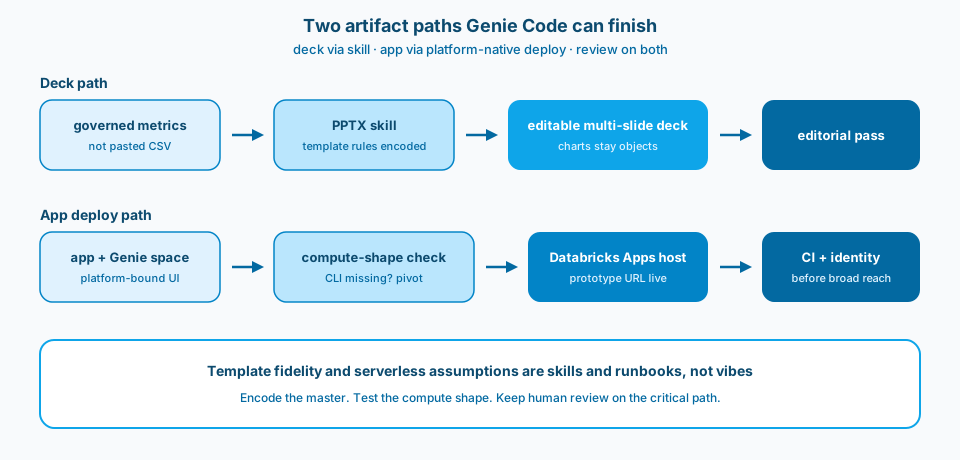
Figure 3. Two artifact paths. Top: governed metrics through a PPTX skill into an editable deck, then editorial review. Bottom: app bound to a Genie space, compute-shape check, host deploy, then CI and identity before broad reach.
4. Benchmarks as a signal, not a religion
Databricks has reported Genie Code at about 77.1% success on real-world tasks versus about 32.1% for leading coding agents using MCP. Treat that as evidence that native context changes outcomes, not as a guarantee for your Monday ticket. Reproduce the tasks that matter: deck from governed metrics, app bound to a Genie space, deploy on the compute you actually use.
5. Human review stays on the critical path
Editable decks still need a human to check claims against metric definitions. Deployed apps still need auth, secrets, and cost controls. Genie Code shortens the path to a draft. It does not retire ownership.
Common mistakes
Chat answers mistaken for board artifacts. A correct SQL answer is not a deck. Design the skill path and template rules explicitly. Figure 3 is the minimum shape.
Template hope without template work. One brand prompt yields a generic theme. Exact masters need encoding and test renders.
Generic agent plus thin MCP mistaken for native context. You get code, then babysit deploy topology and CLI availability. Figure 2 is that babysitting made visible.
Serverless assumed identical to classic compute. Missing CLI, different identity wiring, different egress. Capture compute shape in the deploy runbook.
Benchmark theater. You cite 77.1% and skip smoke tests on your tables, template, and app host.
Unreviewed publish. An agent can deploy. Gate promotion and app identity before broad reach. Figure 1 puts review on the critical path on purpose.
Use as-is or adapt
Use as-is
- Genie Code allowed for draft decks and prototype apps; production publish follows existing review and CI gates.
- Company PPTX templates encoded as versioned skills or assets with a smoke render checklist.
- Auto-generated charts must resolve to governed tables or semantic metrics, not pasted CSV extracts.
- Deploy runbooks document compute shape, CLI availability, and app identity; serverless assumptions are tested.
- Human review mandatory before external or executive audiences see generated decks.
- Compare native assistant vs MCP-from-IDE on a fixed internal task set periodically; do not rely only on vendor percentages.
Adapt before you use
Native assistants reduce context assembly on platform-shaped work. You accept vendor coupling. External coding agents stay flexible across stacks but re-teach warehouse and deploy reality every session.
Skill-based decks are powerful and still fragile around complex masters and semantic charts. Plan an editorial pass. Removing the last human check is how wrong KPIs reach the all-hands pack.
Assistant deploy speeds prototypes. Production still wants CI, reviews, and environment separation. Clear the first fog; do not bypass the release train.
Related
This also leaves a question for Copilot in Microsoft Fabric: agent mode with context of Fabric items and data soon? Track that peer question when you compare platform assistants, not only Databricks Genie.
Primary references: Genie Code, Anthropic agent skills docs, Databricks docs for Genie and Databricks Apps, and Databricks materials on Genie Code task success with vs without native platform context.
Context. Artifact. Review. Three steps. Native beats naive when the job is platform-shaped.