

Key takeaways
- Name the proxy as a product component with an owner (Front Door, App Gateway, or App API).
- Match local and live refusal rules for auth, routes, body size, and payloads.
- Choose the edge pattern for the threat model, not as a late TLS bolt-on.
- Allowlist reasoning and passthrough fields; drop unknown shapes.
- Enforce authZ on the forward path before Foundry or the agent API sees the call.
- Start security reviews at the proxy, then prompts and corpus controls.
Browser shells tempt teams to over-trust the SPA. The chat UI looks like the product. The proxy in front of the agent backend is where authentication becomes authorization, where egress is constrained, and where dangerous payloads are allowlisted or dropped.
Treat the proxy as a security boundary. Choose Front Door, Application Gateway, or an equivalent pattern deliberately. Do not bolt TLS and authZ on later. Runtime mismatches between local and live proxies create false confidence. Reasoning and passthrough payloads need explicit allowlists. Security reviews should start at the proxy, not at the system prompt.
Named model: proxy as the control plane
- SPA front end: browser shell holds tokens and UI state. It is not the security boundary.
- Named proxy: terminates TLS, validates identity, enforces scopes, clamps egress, allowlists payload shape.
- Foundry / agent API: receives only what the proxy already authorized and shaped.
- Parity: local and live share the same refusal rules, even when vendors differ.
- Contract: the SPA asks; the named proxy decides what reaches the agent plane.
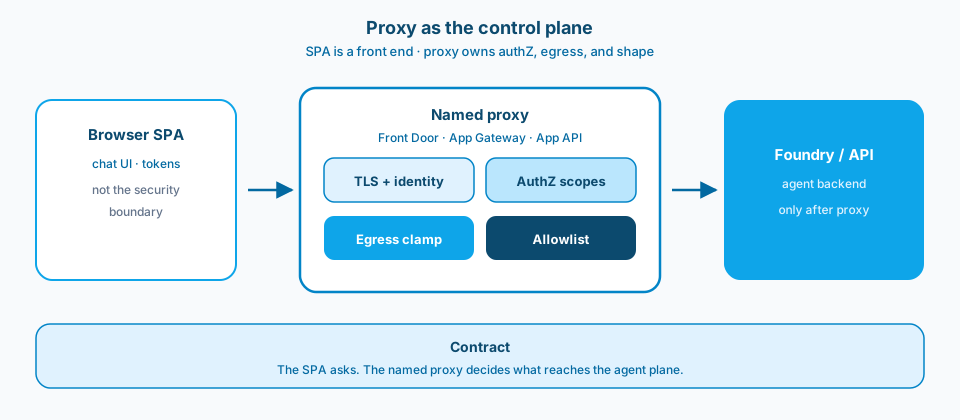
Figure 1. Proxy as the control plane. The SPA is a front end. The named proxy owns identity, scopes, egress, and payload shape before Foundry or your agent API sees the request.
Context and constraint
A common failure is a local proxy that makes demos feel safe while the live edge allows broader passthrough than anyone reviewed. The model prompts can be fine while the boundary is not. Treat the proxy as the control plane for authZ and egress and reviews get shorter.
Tokens in the browser are not a complete story. The proxy must validate identity, enforce scopes, constrain egress to approved backends, and refuse surprise payload shapes. If your threat model starts with prompt injection and skips the edge, you are optimizing the wrong layer first.
Figure 2 is the Learn framing for gateway components in front of APIs. Treat those controls as product surface, not optional polish.
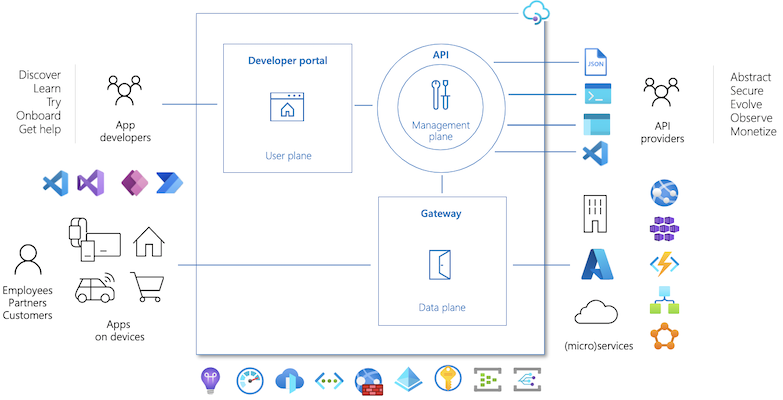
Figure 2. Harden the path from browser to agent APIs. Gateway controls are part of the product, not optional polish. Source: Microsoft Learn: API Management key concepts.
Design
1. Name the proxy as a product component
Document which service terminates TLS, validates tokens, and forwards to or your API. "The Node server in App Service" or "Front Door plus API" should be an explicit box. Unnamed edges become unowned edges. Figure 1 is that named box drawn as the middle lane.
2. Align local and live proxy behavior
Local mocks that skip authZ or widen CORS teach developers the wrong defaults. Parity does not mean identical vendors; it means the same refusal rules for unauthenticated calls, oversized bodies, and unknown routes. False confidence is a defect. Figure 3 is that parity drawn as shared refusals, with mismatch as the anti-pattern.
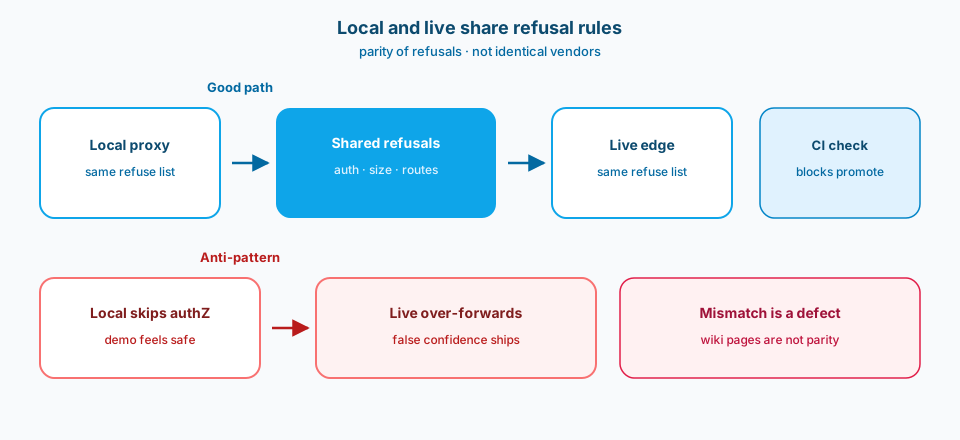
Figure 3. Local and live share refusal rules for auth, size, and routes. A wiki page nobody opens is not parity. A failing check that blocks promote is parity.
3. Choose Front Door or gateway patterns on purpose
Latency, WAF, private origin, and certificate management differ. Pick for the threat model and the network story you already run. Bolting a CDN-like edge onto an app that assumed a friendly intranet is how TLS becomes theatre.
4. Allowlist reasoning and passthrough payloads
Streaming chunks, tool call blobs, and "debug" fields travel through proxies. Explicit allowlists beat "forward everything the SPA sends." Surprise fields are how sensitive content leaves the path you reviewed. Figure 4 is the allowlist gate.
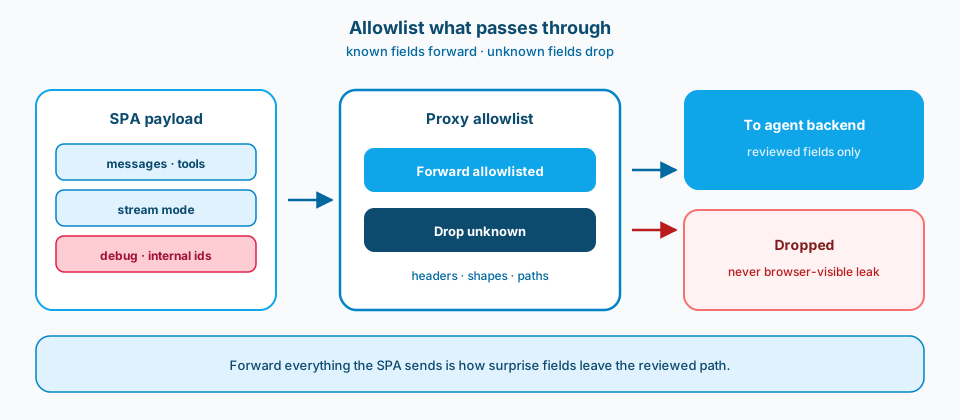
Figure 4. Allowlist what passes through. Known fields forward to the agent backend. Unknown and debug fields drop so they never become a browser-visible leak.
5. Enforce authZ on the forward path
Reject missing or wrong scopes before the agent backend sees the request. Hiding buttons in React is not a boundary. The proxy and the API share one authorization story.
6. Start security reviews at the edge
System prompts matter. Corpus RBAC matters. Still begin the review with who can hit the proxy, what they can invoke, and where responses can go. Prompt hardening on an open edge is decoration.
Front Door failure modes worth naming
Misconfigured origins, health probes that mark healthy shells while backends are wrong, and caching behaviors that surprise streaming chat are common. Document the failure mode you accept: fail closed on auth, fail visibly on origin health, never fail open on scope checks. Operators need a runbook that is not "restart the SPA."
Runtime mismatch checklist
Before you call a shell production-ready, compare: authentication required locally and live; max body size; allowed routes; header forwarding; websocket or SSE settings; and egress destinations. Put the comparison in CI or a release checklist. A wiki page nobody opens is not parity. A failing check that blocks promote is parity.
What belongs in the allowlist conversation
List request paths, methods, content types, and response streaming modes. List which headers may flow to the backend. List which tool-result shapes may return to the browser. If a field is only for internal tracing, it should not be browser-visible by default. Allowlists feel pedantic until the first accidental leak of an internal identifier.
Failure modes
SPA trust. "Users are signed in" replaces request validation.
Local/live mismatch. Dev works; Prod over-forwards. Figure 3 is that defect made visible.
TLS later. Certificates and HTTP settings become a scramble.
Passthrough maximalism. Unknown JSON fields ride along. Figure 4 is the allowlist that stops that.
Prompt-first reviews. Edge questions arrive after ship.
One engineer owns the edge. Absences become risk windows.
What to copy / what not to copy
Copy
- The browser-to-agent path includes an explicit proxy/security boundary with a named owner.
- Local and live proxies share refusal rules for auth, routes, and payloads.
- Front Door/gateway (or equivalent) choice is documented with threat-model rationale.
- Reasoning/passthrough fields are allowlisted; unknown fields are dropped.
- AuthZ is enforced on the forward path, not only in UI filtering.
- Security reviews begin at the proxy, then proceed to prompts and corpus controls.
Do not copy blindly
A serious proxy adds configuration and another owned component. Skipping it keeps demos fast and breaches simpler for attackers. Strict allowlists break casual experiments; casual passthrough breaks incident reviews. Matching local and live costs fixture work; mismatch costs production surprises. Edge-first security reviews take calendar time and save apology time.
Primary references: Azure Front Door and Application Gateway security guidance on Microsoft Learn, plus your API authorization ADR. Pair networking diagrams with payload allowlists so reviews have artifacts.
Closing
Name the boundary. Match local to live. Choose the edge on purpose. Allowlist what passes through. Enforce authZ on the way in. Start reviews at the proxy. The system prompt can wait its turn.