Pivot once in gold: measurable controls as a flat fact

Checklist reporting loves wide pivots. Teams often build them late: SQL OUTER APPLY, Import mode, captions invented in the report. Refresh time climbs. Direct Lake never gets a fair chance. The semantic model pays for a shape that should have been decided in gold.
Pivot once in gold. Broadcast joins plus a single groupBy/pivot in PySpark produce a self-contained fact: one row per reading with stable keys. Captions match the language users already see in PDFs. Materialize for Direct Lake. Stop paying Import tax for wide pivots that only exist because the warehouse view stayed nested.
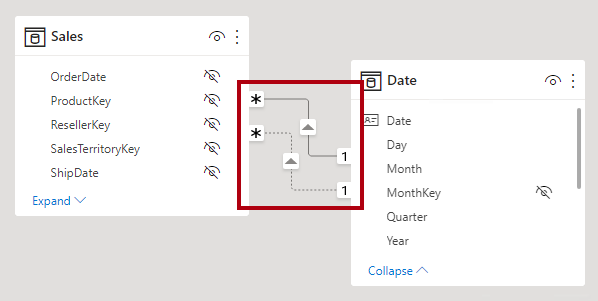
Figure 1. Direct Lake wants report-ready flat facts, not nested checklist trees that only Import mode can fake. Source: Microsoft Learn: understand relationships.
I learned this when measurable-control checklists still arrived as nested answer structures. Report authors pivoted in SQL for Import. Every new control meant another OUTER APPLY branch and a longer refresh. Moving the pivot into a gold Spark job made the semantic model boring in the best way.
The core idea
Report-shaped pivots belong in gold materialization, not on the Import refresh path.
Nested answer bags are an operational convenience for capture systems. Analytics needs flat facts with stable keys and domain captions. Doing the reshape in Spark once beats reshaping in SQL on every Import. Direct Lake then reads a table that already looks like the report.
A model that stays explainable
1. Ban OUTER APPLY pivots on Import paths
If the only reason a model stays on Import is a wide checklist pivot in SQL, move the pivot upstream. Import should be a storage-mode choice, not a tax for late shaping. Treat nested-to-wide SQL as a smell in code review.
2. Broadcast small dimensions, pivot once
Keep control definitions and caption maps small enough to broadcast. Drive a single groupBy/pivot over readings. One job, one output grain. Chained pivots and ad-hoc self-joins recreate the nested mess in Spark clothing.
3. One row per reading with stable keys
Prefer a grain you can explain: device or site, control id, reading timestamp or period, value, and status. Stable keys beat anonymous wide columns that drift when PDFs change. Surrogate keys are fine; silent column renames are not.
4. Captions follow domain PDFs, not engineer slang
Users already have names for controls in forms and PDFs. Put those captions on the fact or a related dimension the semantic model can bind. Do not invent short codes in DAX that nobody uses in the field. Language continuity is part of trust.
5. Materialize for Direct Lake deliberately
Write Delta with types and nullability that Direct Lake and the semantic model can consume without Import crutches. Validate column counts and key uniqueness in the notebook. A pivot that only works after a desktop Import is not done.
6. Version the control map with the fact
When controls are added or retired, version the caption map and document how historical rows behave. Silent widening of the pivot without a contract is how yesterday's report breaks tomorrow's dashboard. Treat the control catalog as product data.
Failure modes I design against
Nested forever. Capture shape becomes analytics shape by inertia.
Import as apology. Wide SQL pivots force Import; nobody asks why.
Caption drift. Engineers rename columns; operators stop recognizing measures.
Multi-step Spark pivots. Intermediate wide tables nobody owns.
No grain ADR. Two authors disagree on "one row per what" mid-incident.
PDF language ignored. Report labels invent a second dialect.
What the gold contract should say
Publish the grain, the key columns, the value columns, and the caption source. State whether missing controls are null columns, absent rows, or a status flag. State how late corrections land. Semantic authors should not reverse-engineer the notebook to learn whether a blank means "not applicable" or "not yet loaded." Ambiguity in checklist facts becomes wrong compliance narratives in meetings.
Direct Lake is not a free lunch without shape
Direct Lake rewards tables that are already analytical. Nested structs, exploding arrays in the model, and measure-time pivots push you back toward Import or toward painful DAX. If your checklist story needs a pivot to be human-readable, do that pivot before the semantic model. Capacity metrics will look better, but the deeper win is a model reviewers can explain without a SQL archaeology session.
How to migrate without a big-bang cutover
Keep the old Import path readable while the gold fact proves parity. Compare row counts at the reading grain, spot-check a fixed set of controls against PDF expectations, and only then point the semantic model at the flat fact. Deprecate the OUTER APPLY view with a date. Dual-running without a kill date is how both paths rot.
Trade-offs
Pre-pivoting in gold adds a Spark job and a control-map dependency. Late SQL pivots feel flexible until refresh and Direct Lake are on the table. Wide facts can be column-heavy; that is still cheaper than Import theatre when the grain is honest. Caption discipline slows the first delivery and speeds every audit after. Versioning the control map is ceremony; unversioned maps are incidents.
What I would put on an ADR
- Measurable-control analytics use a flat gold fact; nested capture shapes stay out of Import pivots.
- PySpark performs a single documented pivot with broadcast control maps.
- Grain is one row per reading with stable keys; captions follow domain PDF language.
- Delta output is Direct Lake ready; Import is not required for checklist width.
- Control catalog changes are versioned with explicit historical behavior.
- Parity checks gate cutover from OUTER APPLY Import paths.
Primary references: Direct Lake overview and Fabric Spark/Delta guidance on Microsoft Learn. Pair them with your control catalog ownership doc so captions have a human owner.
Closing
Checklist pivots are modeling decisions. They are not a tax you must pay on every Import refresh.
Flatten in gold. Caption in the domain language. Materialize for Direct Lake. Leave OUTER APPLY pivots in the history folder where they belong.