

Key takeaways
- Keep the UI boring: upload, predict, show label and confidence.
- Validate type, size, and decodability on the server before inference.
- Prediction credentials stay on the backend; the browser talks only to the app API.
- Treat low confidence as a first-class UI outcome, not a silent top-label win.
- Log correlation id, iteration id, latency, and top-N labels on every call.
- Publish Custom Vision iterations like app releases: smoke set plus rollback.
Custom Vision can get you from labeled images to a prediction endpoint quickly. The product work starts after the happy path: bad uploads, low-confidence answers, iteration that breaks the published endpoint, and no breadcrumbs when the label is wrong.
Keep the UI boring: upload, predict, show label and confidence. Put the complexity in data quality, validation, request limits, logging, and a controlled publish path for new iterations.
Named model: upload → predict → explain → iterate
- Upload: server-side type, size, and decode checks before you spend an inference call.
- Predict: app API owns timeouts, retries, and credentials (keys or managed identity).
- Explain: UI always shows label plus confidence; low score is a first-class outcome.
- Iterate: train, smoke a fixed image set, publish the iteration, keep a rollback path.
- Contract: Custom Vision owns the score; the web app owns hygiene, keys, and breadcrumbs.
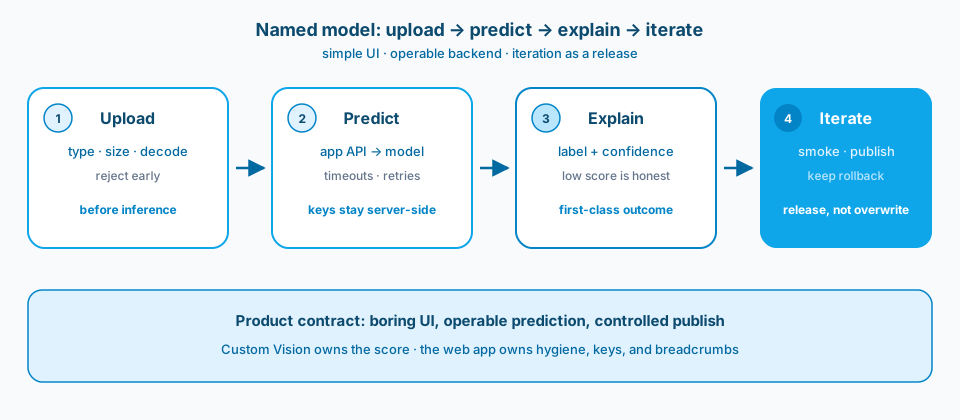
Figure 1. Upload, predict, explain, iterate. The UI stays simple on purpose. Operability lives in validation, the API boundary, honest confidence, and a publish path you can roll back.
Context and constraint
I have seen too many vision demos that look polished until the first bad upload, the first low-confidence answer, or the first model iteration that breaks the published endpoint. A good demo becomes a product when input validation, request limits, logging, and a path to retrain stay in place from day one.
Custom Vision (or the equivalent Azure image classification path you choose under Microsoft Foundry / Azure AI Services) should own prediction. The web app should own upload hygiene, auth if you need it, presentation of labels and confidence, and the operational breadcrumbs that let you debug wrong answers later. If the UI tries to be clever, people stop trusting the score. If the backend skips basics, you cannot operate the cleverness you shipped.
Figure 2 is the Learn surface that makes the user contract visible: labels and confidence, not a second story invented in the app shell.
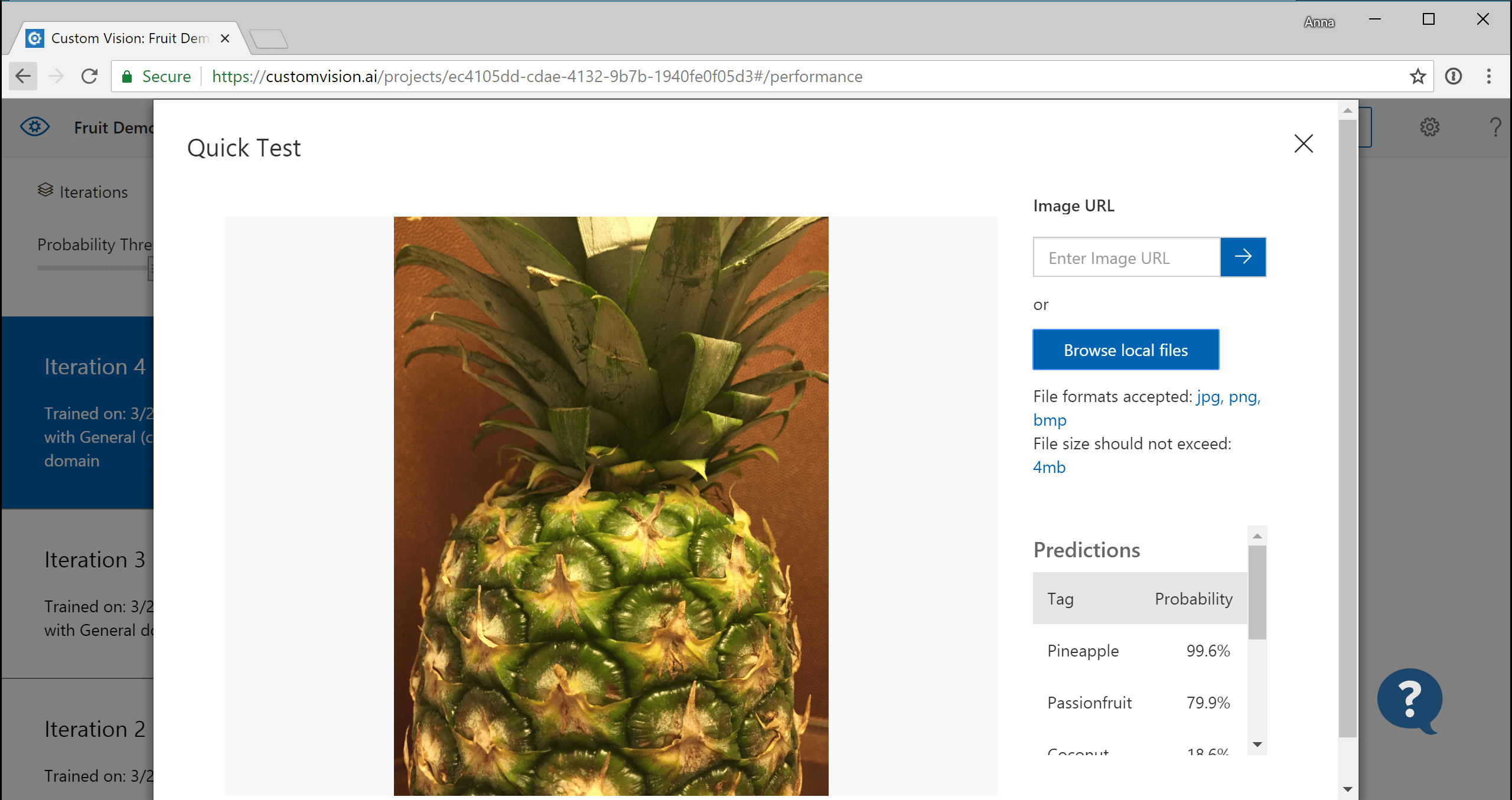
Figure 2. Labels and confidence are the user contract. The training UI is where iteration happens; the web app should not invent a second story. Source: Microsoft Learn: Custom Vision overview.
Figure 3 is the project home where iterations live. Treat a published endpoint as a release artifact, not as a casual overwrite after lunch.

Figure 3. Iteration lives in the project surface. Treat published endpoints as release artifacts, not as a casual overwrite. Source: Microsoft Learn: Custom Vision overview.
1. Start with the user flow, not the model card
The journey should be obvious: choose an image, submit, see a result. Minimal layout keeps focus on the core interaction. Extra toggles, advanced panels, and decorative charts can wait until the happy path is boringly reliable. If the flow is complicated, the AI feature feels harder than it is. Figure 1 is that boring path drawn as four jobs.
2. Validate before you spend an inference call
Check file type, size, and basic image decodability on the server. Reject clearly. Do not stream arbitrary blobs to the prediction endpoint and hope. Validation protects cost, protects the service from garbage, and gives users a faster failure than a timeout wrapped as something went wrong.
3. Wrap prediction in boring, predictable backend behavior
Timeouts, retries for transient faults, and mapped error responses belong in the API layer. Return plain-language failures when inference fails. Show label and confidence in plain language when it succeeds. Low confidence is a first-class outcome: say so in the UI instead of pretending the top label is gospel.
4. Keep secrets and keys out of the browser
Prediction keys and training keys belong on the server or in managed identity patterns, not in frontend bundles. A static page that calls Custom Vision directly is a short path to key leakage and uncontrolled quota burn. The browser uploads to your app; your app calls Azure. Figure 4 is the ownership split that keeps the key out of view-source.
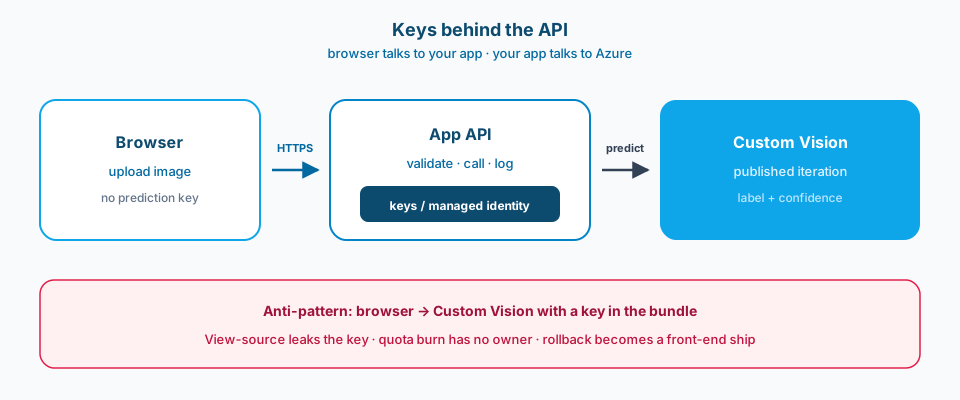
Figure 4. Browser talks to your app. Your app talks to Custom Vision. Keys and managed identity stay on the server. A browser-side key is how quota burn gets a silent owner.
5. Log enough to debug bad results
Store correlation ids, model name or iteration id, latency, top labels, and whether the user accepted or corrected the result if you collect that. You do not need the raw image forever in every environment, but you need a path to reproduce class of failures. Without iteration ids in logs, root cause becomes folklore after the next publish.
6. Treat Custom Vision iteration as a release
New tags, new training images, and a newly published iteration change product behavior. Promote iterations the way you promote app builds: note what changed, smoke-test a fixed image set, and keep a rollback to the previous published iteration. Narrow classifiers drift when the world changes. Plan for that drift instead of discovering it in a stakeholder meeting. Figure 5 is the release shape.
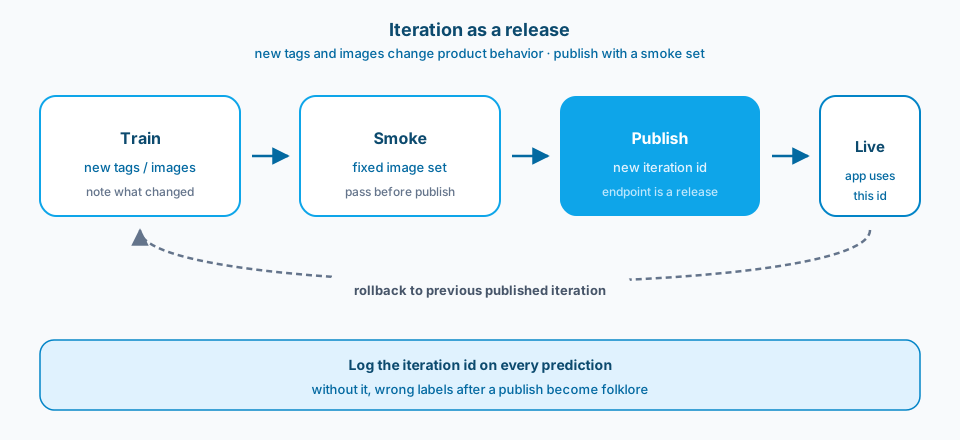
Figure 5. Train, smoke, publish, live. The dashed return is rollback to the previous published iteration. Log the iteration id on every prediction so a bad publish is diagnosable.
Common mistakes
Demo happy path only. PNG of a clear object on a white background. Real users upload HEIC phone photos, screenshots, and five-megabyte scans. The app chokes or the model shrugs.
Confidence ignored. Always show the top label in bold. Users trust 0.41 the same as 0.97. That is how wrong operational decisions get a nice UI.
Keys in the browser. Someone views source, copies the prediction key, and your bill explains itself next month. Figure 4 is the failure made visible.
No iteration discipline. Retrain in the portal, publish, and hope. Yesterday's smoke images now misclassify and nobody can say which publish did it. Figure 5 is the discipline that prevents that.
Logging without model identity. You know the request failed or looked weird. You do not know which iteration served it. Support becomes archaeology.
Unbounded uploads. No size limit, no rate limit, no auth on an internal tool that somehow became external. Inference cost and abuse arrive together.
Use as-is or adapt
Use as-is
- Server-side validation for type, size, and decodability before prediction.
- Prediction credentials only on the backend; browser talks to the app API.
- UI always shows label plus confidence; low-confidence threshold is product-defined.
- Logs include correlation id, iteration or model id, latency, and top-N labels.
- Published iterations are treated as releases with a smoke set and rollback.
- Rate limits and auth posture documented for internal versus public exposure.
- Retraining ownership and data retention rules written before the first production upload.
Adapt before you use
Custom Vision is fast to stand up for a narrow task. It is not a substitute for a carefully engineered vision stack when you need detection, segmentation, or strict latency at the edge. Choose it when labeled examples and a classification answer are enough for the product decision.
A thin web app is easy to explain and easy to replace. A thicker product shell (auth, history, human review queue) takes longer but is what internal tools often need after week two. Do not pretend the upload page is the whole system if reviewers must correct labels for retraining.
Hosting the model via Azure versus exporting for edge runtimes changes your update story and your offline story. Pick based on where images are allowed to travel, not based on which quickstart you pasted first.
Primary references: Microsoft Learn on Custom Vision, image classification, and Azure AI / AI Services authentication patterns for keeping keys off the browser. Prefer current Microsoft Foundry naming when your deploy target has moved under that umbrella.
Upload. Predict. Explain. Iterate. Four jobs. One score the user can actually trust.