
Key takeaways
- Persist a normalized activity event schema per session turn; chat bubbles are a render.
- Treat UI chips and counts as projections of that store only, never spinner increments.
- Count MCP knowledge searches separately from generic tools; corpus questions need their own label.
- Propagate correlation ids so shell, API, Foundry, and App Insights tell one story.
- Ship a role-gated debug drawer that shows events next to platform spans.
- Write retention, redaction, and audit access into a written policy before launch.
Support opens a session. The UI says two searches and six tools. Foundry traces show something else. App Insights has a third story. Nobody can tell whether the agent searched knowledge, hallucinated a citation path, or the counter lied. That is not a cosmetic bug. That is a missing product surface.
Activity timelines must reconcile platform traces, MCP knowledge searches, and UI counts. Persist normalized events, not only chat bubbles. Count knowledge searches separately from generic tool invocations. Traceability is part of the written policy for high-stakes knowledge agents.
Named model: persist → project → reconcile
- Persist: structured activity events per turn (tool name, knowledge versus generic, status, latency, correlation ids, redacted args as policy allows).
- Project: UI chips and aggregates computed only from that store. Simplify freely. Invent never.
- Reconcile: Foundry traces and App Insights transactions must match the same ids and counts; tests catch drift when a new tool path forgets to emit.
- Record: events are the system of record for support. Bubbles and summary chips are projections of that record.
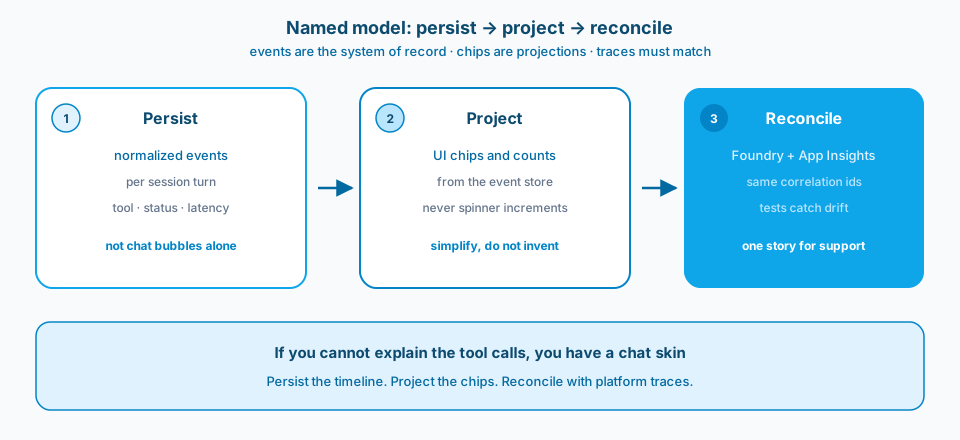
Figure 1. Persist, project, reconcile. If you cannot explain the tool calls, you have a chat skin over an opaque runtime.
Context and constraint
Picture an agent shell where the debug drawer and the polished activity chips disagree. Engineers trust traces. Users trust the chips. Support trusts neither. Incident time balloons because the product cannot explain itself.
Foundry (or equivalent) traces, MCP knowledge searches, and UI summaries must share a normalized event model. The UI is allowed to simplify. It is not allowed to invent. A debug drawer backed by Foundry plus App Insights shortens incidents only when the same identifiers stitch chat, tools, and platform spans.
Chips in the shell are useful only when the application map and the event store tell the same story. UI counts alone are not an audit trail. Persist events and reconcile them with platform traces. The Application Insights map and transaction views are usable for support only when operation ids stitch shell, API, and Foundry spans. See Microsoft Learn: Application Insights correlation and Application Insights overview.
Design
1. Treat UI counts as projections of stored events
"2 searches / 6 tools" must be computed from persisted activity events, not incremented in React because a spinner ran. If the platform rejects a tool call, the UI must not keep the optimistic count. Projection bugs are modeling bugs.
2. Persist normalized activity events
Store a structured timeline: tool name, knowledge search versus generic tool, status, latency, correlation ids, and redacted arguments as policy allows. Chat bubbles are a render. Events are the system of record for support. Without persistence, you cannot reconstruct a session after the websocket dies. Figure 1 is that contract drawn as three jobs.
3. Count MCP knowledge searches separately
Knowledge search is a different risk and a different support question than "ran calculator" or "exported CSV." Separate counters and filters. Careful users ask what corpus was hit. Bundling everything as "tools" hides the answer. Figure 2 makes the split visible.
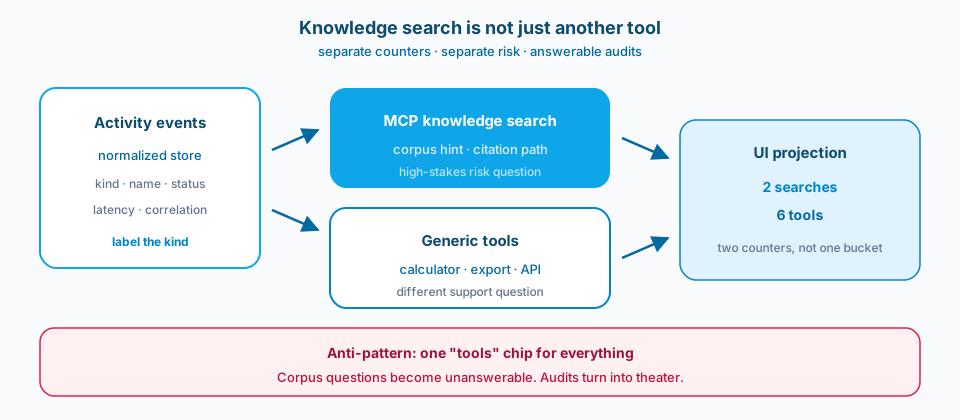
Figure 2. Knowledge search is not just another tool. Separate counters answer corpus questions. One tools bucket turns audits into theater.
4. Ship a debug drawer on Foundry + App Insights
Give internal users (and carefully gated support roles) a drawer that shows platform spans next to normalized events. End-to-end transaction views in App Insights become usable when you propagate operation ids through the shell and the API. This is not optional polish for enterprise agents. Figure 3 is the stitch.
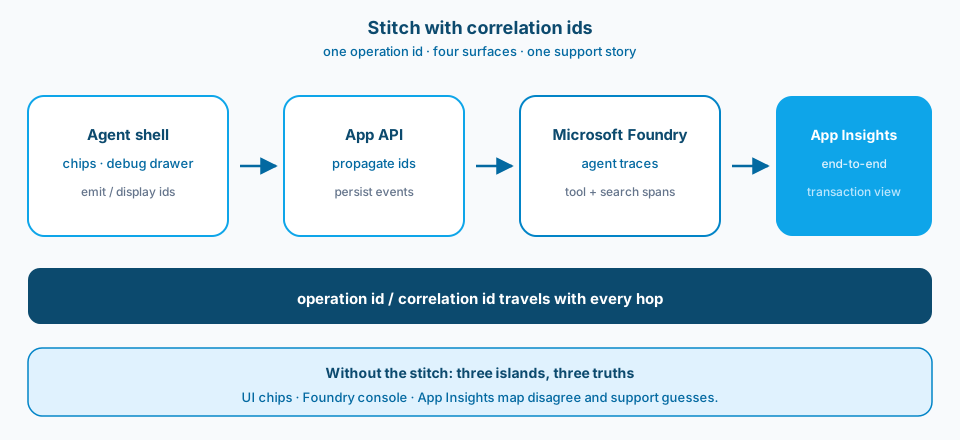
Figure 3. One operation id across shell, API, Foundry, and App Insights. Without the stitch you get three islands and three truths.
5. Make traceability a written policy item
Write what you retain, for how long, who can see raw traces, and how redaction works. If the product promise is "grounded with citations," the ops story must include "we can show which search ran." Otherwise audits become theater.
6. Reconcile on purpose in tests
Automated tests should assert that a scripted tool session produces matching UI aggregates and persisted event counts. Snapshot the timeline shape. Catch drift when someone adds a tool path that forgets to emit events.
Redaction versus usefulness
Persisted tool arguments help debugging and create leakage risk. Default to redacting free text and secrets, keep tool names, statuses, timings, and corpus identifiers that policy allows. Document the redaction profile next to the event schema. Support should know what they will not see before they open a ticket expecting full prompt replay.
What support should be able to answer in five minutes
Which knowledge searches ran, against which corpus hint, with what status? Which generic tools ran? Do UI chips match persisted events for that turn? Can we open the correlated App Insights transaction? If any answer requires reading three disconnected systems and guessing, the product is not operable yet. Build the drawer and the schema until those answers are boring.
When adding a new tool, the PR checklist includes event emission, UI projection, and a reconciliation test. Tools that skip the checklist recreate the original lie in a new costume.
Anyone on the team should be able to read the event schema without learning the Foundry console first.
Failure modes
Optimistic UI counters. Spinners increment; failures do not decrement.
Bubbles only. No event store; support reads screenshots.
One "tools" bucket. Knowledge access questions become unanswerable. Figure 2 is the failure made visible.
Traces without correlation ids. App Insights islands; Foundry islands; UI islands. Figure 3 is the stitch that prevents that.
Debug drawer as afterthought. Built during an outage, never maintained.
Promising auditability without retention design. Reviewers ask; engineering shrugs.
What to copy / what not to copy
Copy
- Normalized activity event schema persisted per session turn.
- UI aggregates are projections of that schema only.
- MCP knowledge searches counted and labeled separately from generic tools.
- Correlation ids stitch shell, API, Foundry, and App Insights.
- Support-facing debug drawer with role gates.
- Written policy for retention, redaction, and audit access.
Do not copy blindly
Normalized event persistence costs storage and redaction design. It buys incident speed and trust. Separate knowledge counters add UX complexity. They match how people think about risk. Debug drawers need access control so they do not become a data leak. Test reconciliation slows PR cycles slightly and prevents silent counter lies. You will argue about argument redaction verbosity versus debuggability. Write the policy once.
Primary references: Microsoft Learn on Application Insights correlation and tracing/observability docs for your stack version. Pair them with a written event schema in the repo.
Persist the timeline. Reconcile the counters. Separate knowledge searches. If you cannot explain the tool calls, pause the launch and build the observability product you already promised.