
Key takeaways
- Treat pose as a continuous capture → infer → render loop under one latency budget.
- Measure p50 and p95 end-to-end on the demo machine, not only model milliseconds.
- Separate inference work from overlays so drawing cannot stall the next frame.
- Name a frame-drop policy under load (prefer drop oldest for live UX).
- Pick MediaPipe-style vs YOLOPose-style for systems shape, not a bake-off slide.
- Write capture conditions (light, distance, people count) into the product spec.
Point a camera at a person, draw a skeleton, call it live. The clip demo survives. The live stream often does not: lighting swings, frames drop, backgrounds get busy, and people feel 80 ms of lag even when they cannot name the number.
Keypoint accuracy without a calm loop is a lab number. What users experience is time from frame grab to a stable overlay. Capture, inference, and render are three jobs. Each can fail while the other two look fine.
Named model: capture → infer → render
- Capture: camera or stream with a timestamp at frame grab.
- Preprocess / infer: resize once, run keypoints on their own worker.
- Render: overlays and confidence rules that never block the next grab.
- Contract: one shared latency budget (capture timestamp to overlay), plus an explicit backpressure and drop policy when the queue fills.
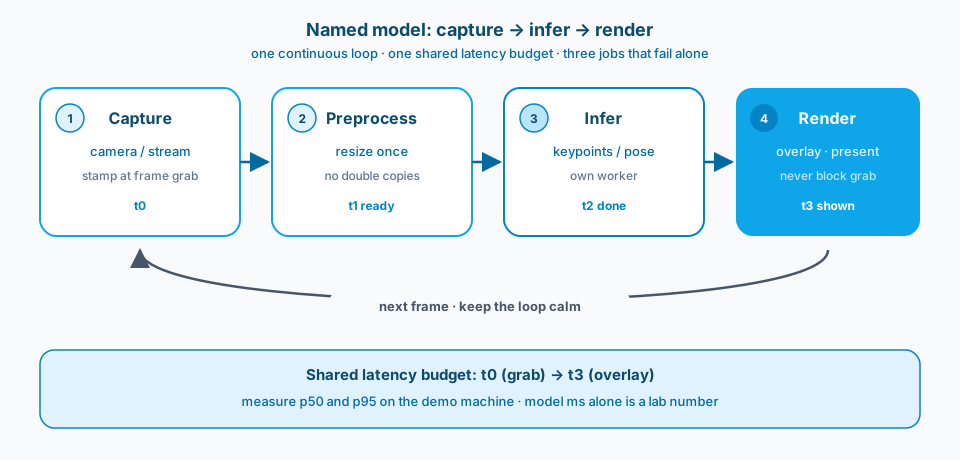
Figure 1. Capture, preprocess, infer, render. Solid arrows move the frame forward. The return path is the next frame. The band under the stages is the latency budget users actually feel.
Context and constraint
I treat pose demos as product exercises. Frames have to enter the pipeline. Inference has to finish on time. Results have to present without lying about confidence. If any of those jobs lags, the experience feels unreliable even when the offline keypoint table looks strong.
You are not only detecting joints. You are shipping a stream processor that must stay responsive when conditions change. Optimize the loop. Model milliseconds on a warm GPU stay a lab number until you measure them on the same camera and hardware the app will use.
MediaPipe-style landmark runtimes and YOLOPose-style detect-then-pose stacks answer different ownership questions. Figure 2 is the shape difference, not a leaderboard. Lean local landmarks keep fewer stages in the loop. Detect-then-pose buys multi-person association and costs more stages to budget and observe. Pick the shape that matches your latency and ownership budget before you argue mAP.
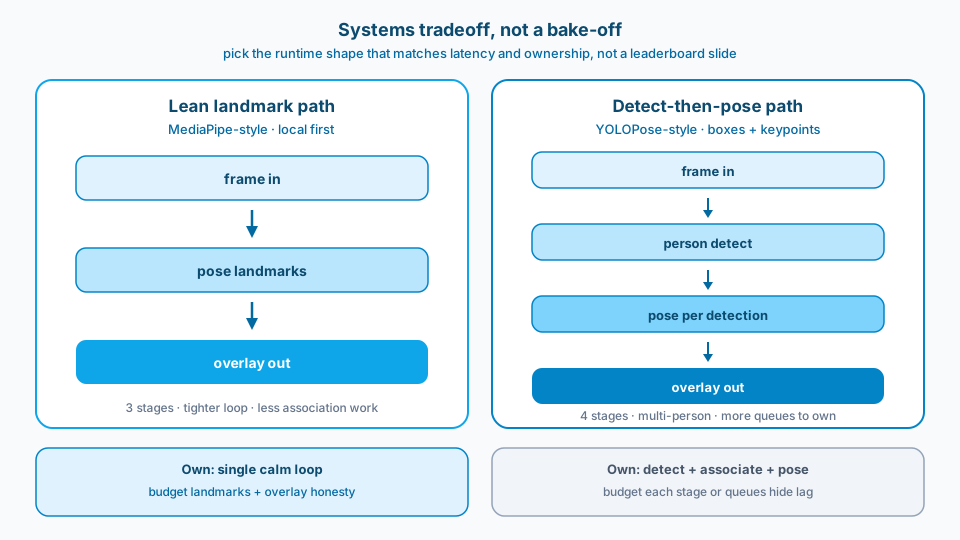
Figure 2. Systems tradeoff, not a bake-off. Left is a lean landmark path. Right adds person detect before pose. More stages means more places for queues and association errors to hide.
The same discipline shows up in other vision products. Figure 3 is an Azure AI Vision image-analysis surface from Microsoft Learn. Boxes and tags are a different output. The lesson still transfers: keep the frame path explicit. Pose work swaps boxes for landmarks and still fails when presentation flickers or the path is opaque.
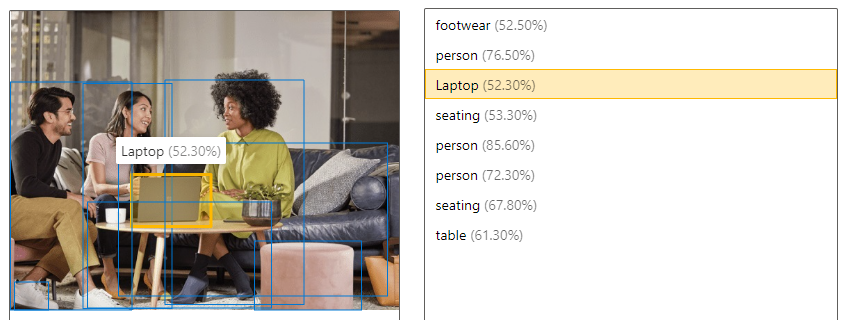
Figure 3. Vision pipelines succeed when the frame path stays explicit: capture, analyze, present. Pose work has the same loop, just with landmarks instead of boxes. Source: Microsoft Learn: image analysis overview.
Design
1. Budget the frame path first
Set target resolution, target FPS, and maximum end-to-end latency before you reach for a heavier backbone. Resize only as much as the model needs. Skip redundant color conversions and double copies between CPU and GPU. If capture already gives a usable size, do not upscale for aesthetics and then downscale for inference. Figure 1 is the budget surface: every stage eats from the same band from t0 grab to t3 overlay.
2. Separate inference from visualization
Keep the inference worker off the render path. Skeleton drawing, trail smoothing, and fancy overlays must not block the next frame grab. When visualization shares a thread with inference, a pretty effect becomes a latency bug. Clear overlays beat decorative ones when confidence flickers.
3. Measure end-to-end, in the real environment
Instrument capture timestamp, preprocessed frame ready, inference done, and frame presented. Track p50 and p95, not only averages. Measure on the laptop or edge hardware you will demo on, with the same camera and similar ambient load. A desktop GPU number does not forgive a thermal-throttled demo machine.
4. Name backpressure before the queue grows
Live systems need an explicit rule for what you discard under load. Figure 4 contrasts the live choice (drop oldest, keep presenting fresh frames) with the accidental failure (drop newest, let the queue go stale while capture still looks busy). Bound queue depth. Log drops. Do not invent the policy in a hallway demo.
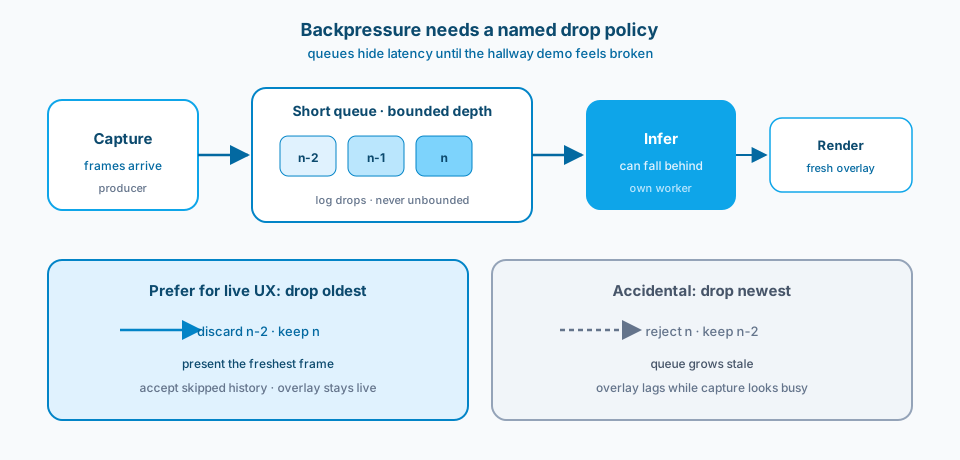
Figure 4. Backpressure needs a named drop policy. Prefer drop oldest for live UX. Dropping newest is how overlays lag while the camera path still looks busy.
5. Design for unstable confidence
Pose models wobble on occlusions, odd angles, and fast motion. Decide how the UI behaves when confidence drops: hold the last good pose briefly, fade the skeleton, or mark low-confidence joints. Silent jitter reads as broken AI. Explicit uncertainty reads as an honest system.
6. Keep the pipeline lean enough to reason about
Fewer stages mean fewer places for backlog to hide. Prefer a boring path: capture, light preprocess, infer, overlay, display. Add tracking, multi-person association, or recording only when you can name the product need. Each extra stage needs its own backpressure story, or you will drop frames in the wrong place and not know why. That is why Figure 2 matters before you add a second detector "for free."
7. Treat demo conditions as requirements
Lighting, distance to camera, clothing contrast, and number of people in frame belong in the spec. Write them down. A pipeline tuned on a clean studio take fails in a conference hallway. If the product must work in hallways, collect failure clips there and tune against those clips, not marketing stills.
Common mistakes
Model-only optimization. You shave 3 ms off inference and ignore 40 ms of preprocess and copy overhead. The user feels nothing. The slide looks better.
Ideal-case demos. Perfect light, one person, facing the camera, no occlusion. Stakeholders applaud. The first real user stands side-on under fluorescent lights and the skeleton falls apart.
Shared thread for infer and draw. Overlay code stalls capture. Apparent FPS collapses. You blame the model.
No backpressure policy. Queues grow, latency climbs, then you drop newest instead of oldest (or the reverse) without a deliberate choice. Figure 4 is that failure made visible.
UI that hides uncertainty. Low-confidence joints still draw at full opacity. People trust wrong elbows. Later that trust debt shows up as "computer vision does not work here."
Environment mismatch. Train and eval on clean datasets. Ship on webcams where auto-exposure fights the face. Domain shift is the default, not a surprise.
Bake-off without a product shape. You compare MediaPipe and YOLOPose on a static accuracy table and never decide lean single-person versus detect-then-pose multi-person. The slide winner loses on the hardware you actually demo.
Use as-is or adapt
Use as-is
- End-to-end latency budget (capture to overlay) with a p95 target on target hardware.
- Explicit pipeline stages and ownership: capture, preprocess, infer, render.
- Backpressure and frame-drop policy under load (name drop oldest vs drop newest).
- Confidence visualization rules for low-quality joints and lost tracks.
- Supported capture conditions (lighting, distance, people count) as product requirements.
- A demo checklist that matches those conditions, not a studio-only path.
- Separation of inference work from UI effects so overlays cannot stall the loop.
- Runtime choice framed as systems shape (lean landmarks vs detect-then-pose), not a leaderboard.
Adapt before you use
Lower resolution and simpler models buy latency and stability. You give up fine-grained joint precision. For coaching, ergonomics, or interactive demos, stability usually wins. For offline analysis where you can wait, accuracy can win. Name the product before you argue mAP.
Local inference reduces round trips and privacy surface. Cloud inference can give heavier models and easier updates. Real-time UX rarely forgives a flaky network hop. If you must go to the cloud, budget for jitter and design a degraded local mode, or accept that real-time becomes near-real-time with retries.
Multi-person tracking multiplies association errors and CPU cost. Ship single-person well before you promise a crowd. A crisp single skeleton beats three flickering ones in every stakeholder review I have run.
Primary references: docs for the pose runtime you actually ship (for example MediaPipe Pose or an equivalent keypoint stack), OpenCV capture and timing guidance, and the model card for keypoint definitions and known failure cases. Prefer vendor docs for your deploy target, not a blog benchmark from a different GPU. For the Learn surface in Figure 3, see Microsoft Learn: image analysis overview.
Capture. Infer. Render. Three stages. One latency budget. Honesty when confidence drops.